About micompras cupons fiscais
MICOMPRAS stores your tax coupons with information on all items in a database on your cell phone.
It performs this task by simply reading the QRCODE of the tax coupon. With purchases stored, you can search by product and store. You can also check the monthly purchase report and graph to control your budget. If you need proof of purchase, simply copy the key number from the coupon.
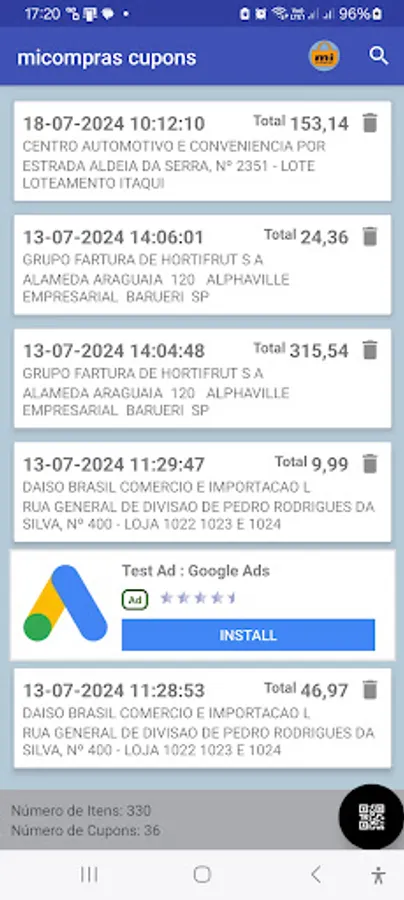
The home screen is a list of coupons already stored. In the bottom right corner, there is a button with a QRCODE symbol. It is through this that the coupon will be read. In the State of São Paulo, there are 2 types of tax coupons: the NFCE and the CFE. The NFCE has a smaller QRCODE and is much faster to read. For the CFE, the Treasury Department activates the anti-robot mechanism that presents those pages of challenges where it is necessary to choose photos of traffic lights, bicycles, motorcycles, pedestrian crossings, etc.
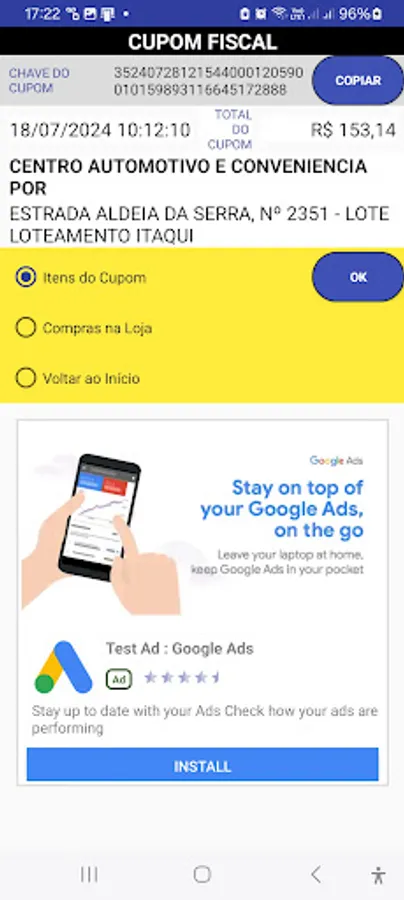
Once the coupons are inserted, they will appear in a list in order of issue date. When clicking on one of them, a page will be displayed with the coupon key, name and address of the issuer and 3 options:
list the coupon items,
list all purchases in the same store
or return to the home page.
There is a button to copy the coupon key and thus be able to use it on another service such as the Treasury Department page.
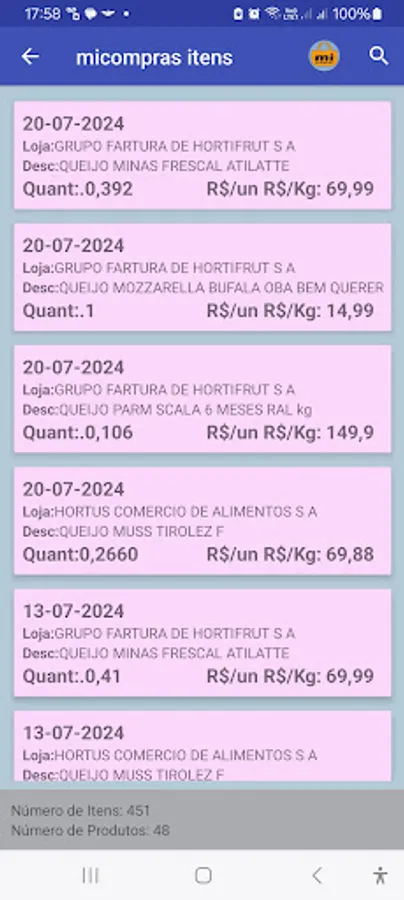
If you choose “coupon items” and click OK, a list of the items in this coupon will open with their date, issuer name, item description, quantity purchased and unit price.
If you choose “shopping in store”, a list of coupons issued by the same store will open.
In the list of items, when you click on one of them, all similar items in all coupons will be listed.
It performs this task by simply reading the QRCODE of the tax coupon. With purchases stored, you can search by product and store. You can also check the monthly purchase report and graph to control your budget. If you need proof of purchase, simply copy the key number from the coupon.
The home screen is a list of coupons already stored. In the bottom right corner, there is a button with a QRCODE symbol. It is through this that the coupon will be read. In the State of São Paulo, there are 2 types of tax coupons: the NFCE and the CFE. The NFCE has a smaller QRCODE and is much faster to read. For the CFE, the Treasury Department activates the anti-robot mechanism that presents those pages of challenges where it is necessary to choose photos of traffic lights, bicycles, motorcycles, pedestrian crossings, etc.
Once the coupons are inserted, they will appear in a list in order of issue date. When clicking on one of them, a page will be displayed with the coupon key, name and address of the issuer and 3 options:
list the coupon items,
list all purchases in the same store
or return to the home page.
There is a button to copy the coupon key and thus be able to use it on another service such as the Treasury Department page.
If you choose “coupon items” and click OK, a list of the items in this coupon will open with their date, issuer name, item description, quantity purchased and unit price.
If you choose “shopping in store”, a list of coupons issued by the same store will open.
In the list of items, when you click on one of them, all similar items in all coupons will be listed.