Typing Tutor (Keyboard)
Darshan University
3.5 ★
219 ratings
100,000+
downloads
Free
In this typing tutor app, you can practice letter and word exercises while viewing your typing statistics. Includes scoreboards, row-specific drills, and keyboard connectivity features.
AppRecs review analysis
AppRecs rating 3.6. Trustworthiness 77 out of 100. Review manipulation risk 33 out of 100. Based on a review sample analyzed.
★★★☆☆
3.6
AppRecs Rating
Ratings breakdown
5 star
64%
4 star
0%
3 star
0%
2 star
0%
1 star
36%
What to know
✓
Credible reviews
77% trustworthiness score from analyzed reviews
✓
Good user ratings
64% positive sampled reviews
⚠
High negative review ratio
36% of sampled ratings are 1–2 stars
About Typing Tutor (Keyboard)
Typing tutor is useful to improve your typing skills and increase your productivity! Whether you're a beginner or looking to refine your typing speed and accuracy, this app is designed to help you master the art of typing effortlessly and efficiently. Letters are highlighted to help you focus on typing.
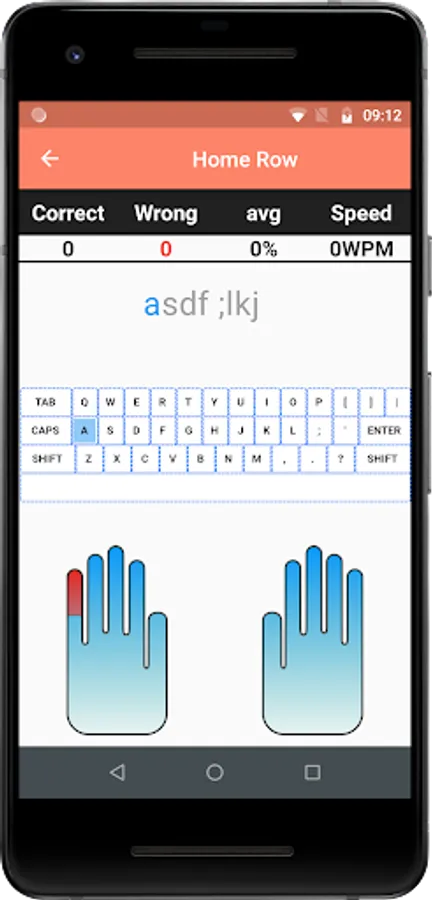
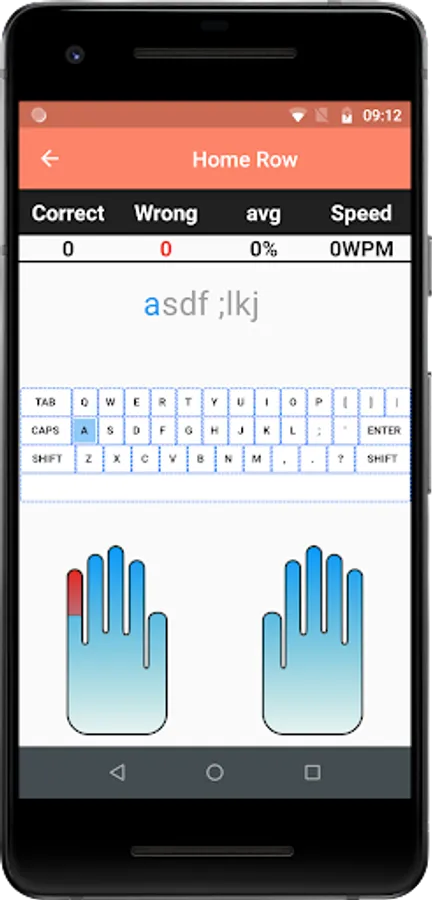
Typing tutor lessons show you result with information like:
» Number of Correct Characters typed
» Number of Wrong Characters typed
» Typing Speed in Words Per Minute (WPM)
» Typing Accuracy in terms of Percentage (%)
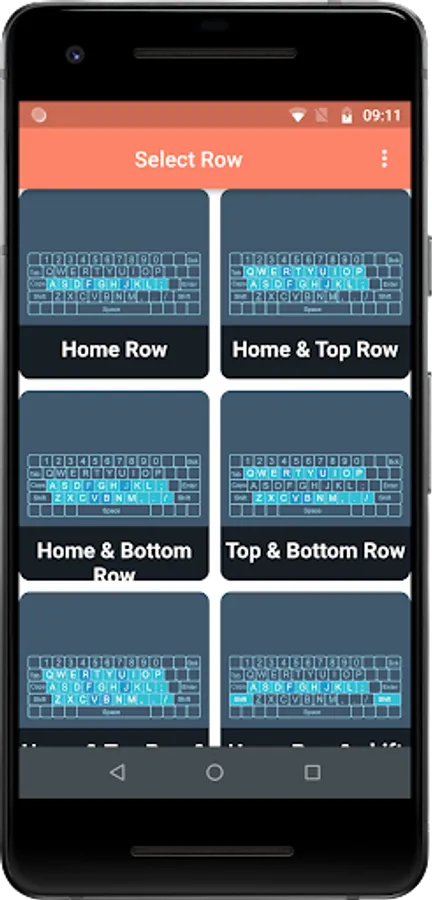
» Top Row Keys Practice
» Bottom Row Keys Practice
» Home Row Keys Practice
Some of the key features of the app are:
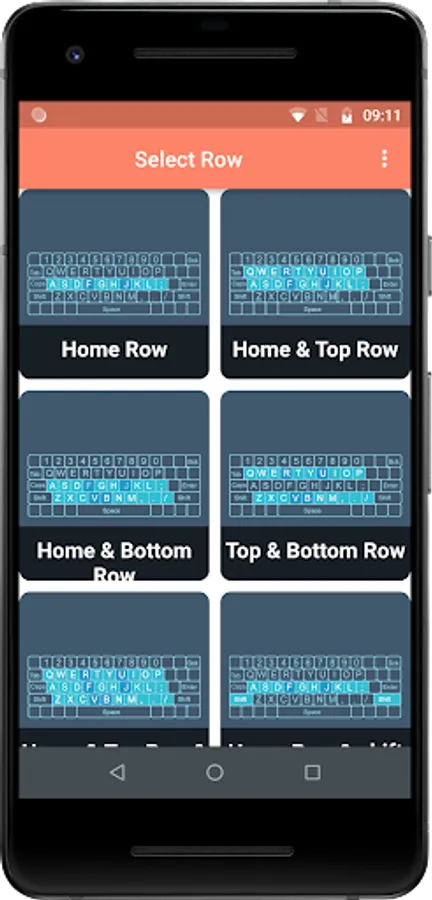
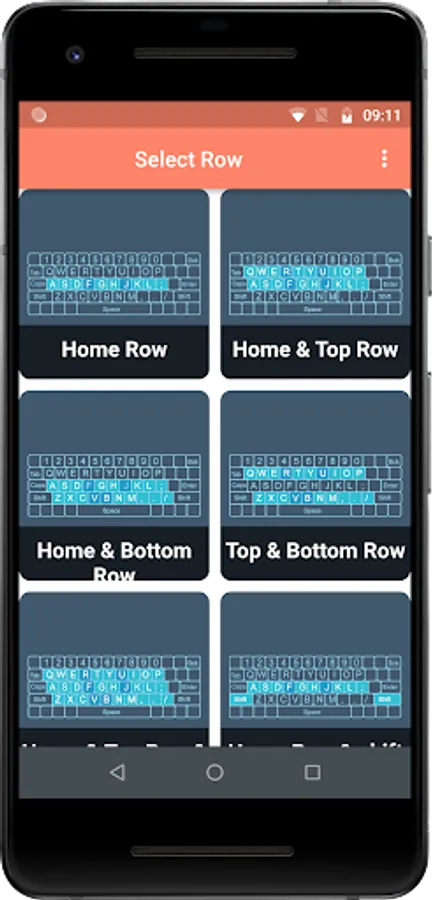
» Character Practice - You can use this practice to start learning to type. Get acquainted with the keypad and start speed typing. Get the statistics Characters Per Minute (CPM) of the typed character. Provide separate row practices like Home Row, Top Row, Bottom Row and a combination of each
» Word Practice - Practice words, with typing lessons. Press "space" to get the next word on the screen. Statistics (WPM - Words Per Minute) will show your accuracy in words per minute (average WPM).
Comprehensive Course Structure: Our well-structured curriculum covers everything from proper finger placement to advanced typing techniques. With engaging exercises, you'll learn to type with precision and speed in no time.
User-Friendly Interface: Enjoy a clean and intuitive interface that makes navigation effortless. The app's sleek design ensures an enjoyable and distraction-free learning experience.
» The App shows your Rank in the scoreboard for the test you appeared
» User can connect the physical keyboard with a phone using OTG Cable.
------------------------------------------------------------------------------------------------------------------------------------
This App is developed at ASWDC by Rajveer Parmar (21010101139), the 4th Sem CE Student. ASWDC is Apps, Software, and Website Development Center @ Darshan University, Rajkot run by students & staff of Computer Science and Engineering Department.
Call us: +91-97277-47317
Write to us: aswdc@darshan.ac.in
Visit: http://www.aswdc.in http://www.darshan.ac.in
Follow us on Facebook: https://www.facebook.com/DarshanUniversity
Follows us on Twitter: https://twitter.com/darshanuniv
Follows us on Instagram: https://www.instagram.com/darshanuniversity/
Typing tutor lessons show you result with information like:
» Number of Correct Characters typed
» Number of Wrong Characters typed
» Typing Speed in Words Per Minute (WPM)
» Typing Accuracy in terms of Percentage (%)
» Top Row Keys Practice
» Bottom Row Keys Practice
» Home Row Keys Practice
Some of the key features of the app are:
» Character Practice - You can use this practice to start learning to type. Get acquainted with the keypad and start speed typing. Get the statistics Characters Per Minute (CPM) of the typed character. Provide separate row practices like Home Row, Top Row, Bottom Row and a combination of each
» Word Practice - Practice words, with typing lessons. Press "space" to get the next word on the screen. Statistics (WPM - Words Per Minute) will show your accuracy in words per minute (average WPM).
Comprehensive Course Structure: Our well-structured curriculum covers everything from proper finger placement to advanced typing techniques. With engaging exercises, you'll learn to type with precision and speed in no time.
User-Friendly Interface: Enjoy a clean and intuitive interface that makes navigation effortless. The app's sleek design ensures an enjoyable and distraction-free learning experience.
» The App shows your Rank in the scoreboard for the test you appeared
» User can connect the physical keyboard with a phone using OTG Cable.
------------------------------------------------------------------------------------------------------------------------------------
This App is developed at ASWDC by Rajveer Parmar (21010101139), the 4th Sem CE Student. ASWDC is Apps, Software, and Website Development Center @ Darshan University, Rajkot run by students & staff of Computer Science and Engineering Department.
Call us: +91-97277-47317
Write to us: aswdc@darshan.ac.in
Visit: http://www.aswdc.in http://www.darshan.ac.in
Follow us on Facebook: https://www.facebook.com/DarshanUniversity
Follows us on Twitter: https://twitter.com/darshanuniv
Follows us on Instagram: https://www.instagram.com/darshanuniversity/
Typing Tutor (Keyboard) Screenshots

Tap to Rate:
Reviews for Typing Tutor (Keyboard)
Donovan George
11/13/2025
low budget super outdated
Sonu Yadav
10/29/2025
great app 👍👍👍👍👍