
In this audio editing app, you can record and non-destructively edit audio files using waveform navigation, markers, and volume adjustments. Includes import and export options, tagging, and integration with the Auphonic web service for encoding and normalization.
AppRecs review analysis
AppRecs rating 3.8. Trustworthiness 77 out of 100. Review manipulation risk 32 out of 100. Based on a review sample analyzed.
★★★☆☆
3.8
AppRecs Rating
Ratings breakdown
5 star
60%
4 star
13%
3 star
7%
2 star
3%
1 star
17%
What to know
✓
Credible reviews
77% trustworthiness score from analyzed reviews
✓
Good user ratings
73% positive sampled reviews
✓
Authentic reviews
Natural distribution, no red flags
About Auphonic Edit
Auphonic Edit is a non-destructive audio editor and recorder with focus on ease of use, high-quality audio and stability.
In combination with the integrated Auphonic web service, you can post-process, encode, tag and publish your podcasts, interviews, music recordings on the go with a single click.
The recorder captures your raw signals from any USB audio interface or the internal microphone without any Android pre-processing in an uncompressed (WAV) or compressed (AAC) format, written to disk every moment to avoid data loss if the app gets killed.
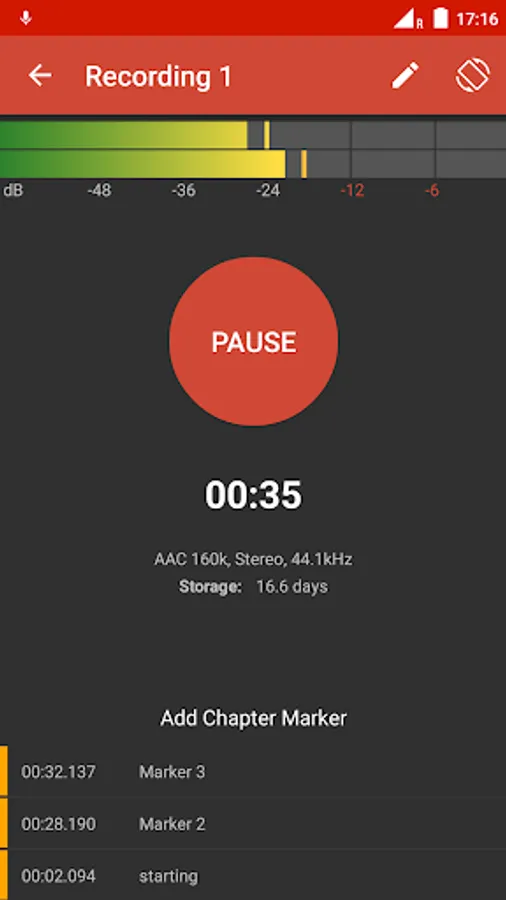
Our recording interface displays the current maximum peak level, available recording time, you can add and edit chapter markers and it also records in background while using other apps.
Audio editors are complex and can get very confusing given the constraint screen of a mobile phone.
Auphonic Edit implements the minimum amount of features required to cover the most common audio editing tasks, conforming to standard native UI idioms of Android:
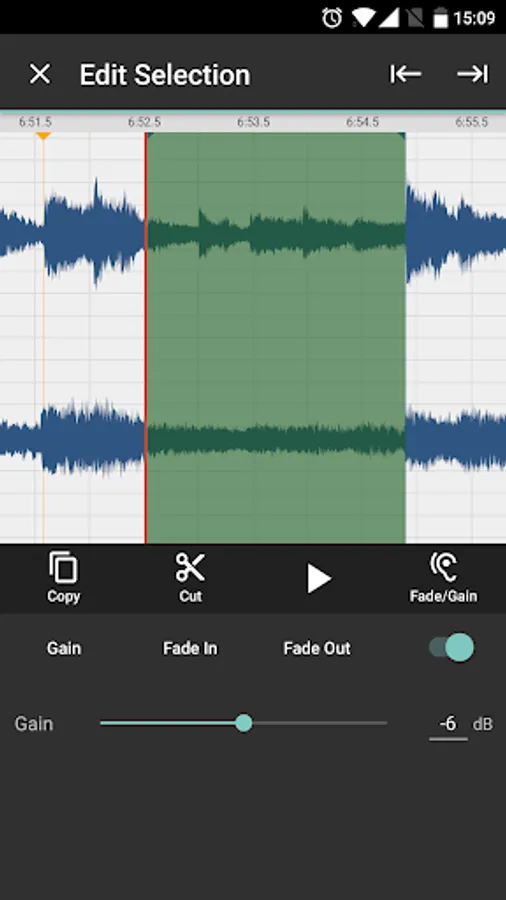
- Full waveform display of all audio files including zooming, seeking, scrolling, etc.
- Non-destructive editing (we always keep the original files): cut files with automatic crossfades, copy/paste (also between different audio sessions) and restore cut regions/files
- Create markers, selections, file objects and use them for exact navigation and editing
- Adjust volume gain of selections, add fade in/out etc.
- Import any files from your device or other apps, including realtime resampling, down/upmixing to fit the current audio session
- Render and share your sessions with any Android app, or export to the Auphonic web service
Features of the (optional) Auphonic web service:
- Encode your audio files in MP3, Opus, AAC/MP4, Ogg Vorbis, ALAC, FLAC, WAV and more
- Metadata/tagging and chapter marks support for all file formats
- Loudness Normalization to new broadcast standards: EBU R128, ATSC A/85, mobile audio and more
- Intelligent Leveler: balances levels between speakers, music and speech – no compressor knowledge required
- Automatic Noise and Hum Reduction: classifies regions with different backgrounds and automatically removes noise
- Filtering of disturbing frequencies
- Automatic Speech Recognition and Audio Search in over 80 languages
- Publish your results automatically via YouTube, SoundCloud, Podlove Publisher, Spreaker, Libsyn, Blubrry, Archive.org, Dropbox, (S)FTP, HTTP, Google Drive, WebDAV, Amazon S3, etc.
- For more information, please see https://auphonic.com/landing
Please note that you need a free Auphonic account to use our web service.
All native recording, editing and sharing can be done completely offline without any account.
In combination with the integrated Auphonic web service, you can post-process, encode, tag and publish your podcasts, interviews, music recordings on the go with a single click.
The recorder captures your raw signals from any USB audio interface or the internal microphone without any Android pre-processing in an uncompressed (WAV) or compressed (AAC) format, written to disk every moment to avoid data loss if the app gets killed.
Our recording interface displays the current maximum peak level, available recording time, you can add and edit chapter markers and it also records in background while using other apps.
Audio editors are complex and can get very confusing given the constraint screen of a mobile phone.
Auphonic Edit implements the minimum amount of features required to cover the most common audio editing tasks, conforming to standard native UI idioms of Android:
- Full waveform display of all audio files including zooming, seeking, scrolling, etc.
- Non-destructive editing (we always keep the original files): cut files with automatic crossfades, copy/paste (also between different audio sessions) and restore cut regions/files
- Create markers, selections, file objects and use them for exact navigation and editing
- Adjust volume gain of selections, add fade in/out etc.
- Import any files from your device or other apps, including realtime resampling, down/upmixing to fit the current audio session
- Render and share your sessions with any Android app, or export to the Auphonic web service
Features of the (optional) Auphonic web service:
- Encode your audio files in MP3, Opus, AAC/MP4, Ogg Vorbis, ALAC, FLAC, WAV and more
- Metadata/tagging and chapter marks support for all file formats
- Loudness Normalization to new broadcast standards: EBU R128, ATSC A/85, mobile audio and more
- Intelligent Leveler: balances levels between speakers, music and speech – no compressor knowledge required
- Automatic Noise and Hum Reduction: classifies regions with different backgrounds and automatically removes noise
- Filtering of disturbing frequencies
- Automatic Speech Recognition and Audio Search in over 80 languages
- Publish your results automatically via YouTube, SoundCloud, Podlove Publisher, Spreaker, Libsyn, Blubrry, Archive.org, Dropbox, (S)FTP, HTTP, Google Drive, WebDAV, Amazon S3, etc.
- For more information, please see https://auphonic.com/landing
Please note that you need a free Auphonic account to use our web service.
All native recording, editing and sharing can be done completely offline without any account.
Auphonic Edit Screenshots




Tap to Rate:
Reviews for Auphonic Edit
Sumbul Asif
11/5/2024
They ask me gmail. Than i want to add gmail account the website is not open and tell me this website is harmful and without adding gmail account i can not edit audio.
Divine Jude
8/17/2024
A worse app Yeah can't even add an external file like a beat it's so annoying 😞