About BrainStorm
Instant clarity for your AI conversations — visualise them as a dynamic mind map.
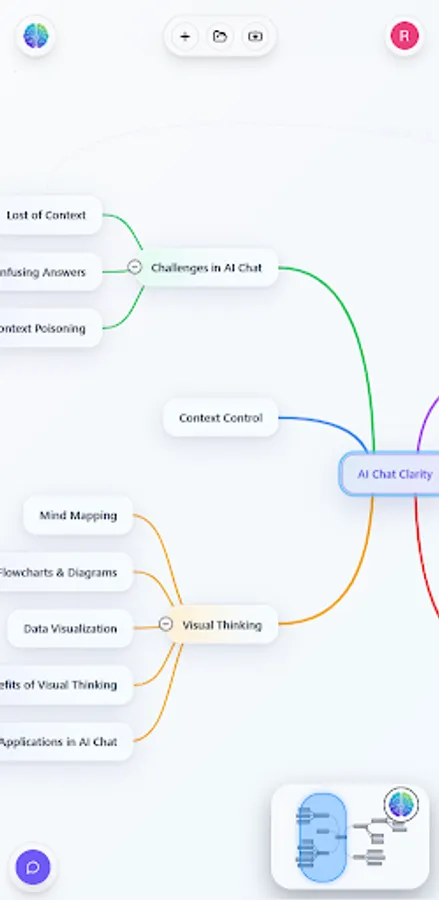
Brainstorm turns long, messy chat threads into a structured visual map, so you can see what you’ve covered, what matters, and where to go next. Instead of scrolling forever, you navigate ideas.
Visual thinking, powered by AI chat:
- Automatically maps your conversation into topics and sub-topics
- Keeps clarity as the chat grows
- Makes it easy to spot gaps, decisions, and next steps
Control the context (for you and the AI):
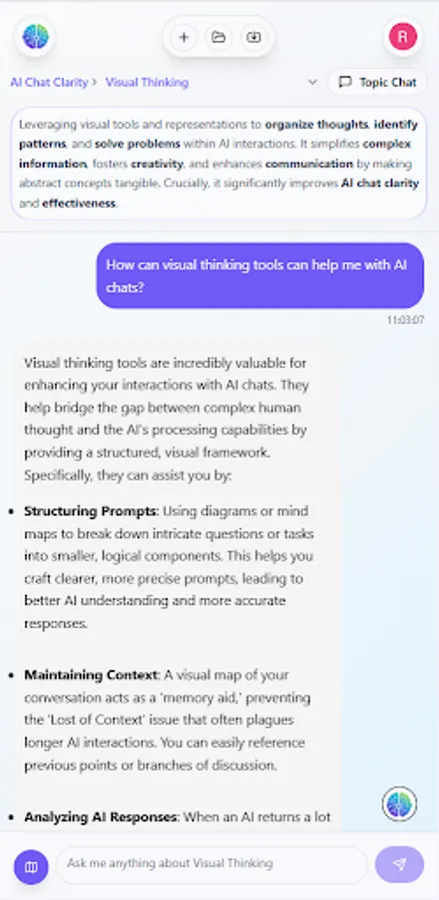
When conversations get complicated, context becomes the problem. Brainstorm helps you choose what’s in scope so you can stay focused
- Select the parts of the conversation that matter right now
- Keep your thinking clean and reduce “lost in the thread” moments
- Help the AI respond with better relevance by guiding the context you’re working with
Navigate ideas, not messages
- Jump to any topic instantly
- Zoom out for the big picture, zoom in for detail
- Expand branches to explore a line of thought without losing the rest
Connect what’s related
- Add links between ideas (not just parent/child)
- Capture real structure: comparisons, dependencies, and “this relates to that”
Built for real work:
Use Brainstorm for:
- Studying and revision
- Planning projects and breaking down tasks
- Research and note-taking
- Writing outlines and structuring arguments
- Problem solving and decision-making
- Any Long conversations with AI
If you use AI, Brainstorm helps you stay oriented — and get to outcomes faster.
Brainstorm turns long, messy chat threads into a structured visual map, so you can see what you’ve covered, what matters, and where to go next. Instead of scrolling forever, you navigate ideas.
Visual thinking, powered by AI chat:
- Automatically maps your conversation into topics and sub-topics
- Keeps clarity as the chat grows
- Makes it easy to spot gaps, decisions, and next steps
Control the context (for you and the AI):
When conversations get complicated, context becomes the problem. Brainstorm helps you choose what’s in scope so you can stay focused
- Select the parts of the conversation that matter right now
- Keep your thinking clean and reduce “lost in the thread” moments
- Help the AI respond with better relevance by guiding the context you’re working with
Navigate ideas, not messages
- Jump to any topic instantly
- Zoom out for the big picture, zoom in for detail
- Expand branches to explore a line of thought without losing the rest
Connect what’s related
- Add links between ideas (not just parent/child)
- Capture real structure: comparisons, dependencies, and “this relates to that”
Built for real work:
Use Brainstorm for:
- Studying and revision
- Planning projects and breaking down tasks
- Research and note-taking
- Writing outlines and structuring arguments
- Problem solving and decision-making
- Any Long conversations with AI
If you use AI, Brainstorm helps you stay oriented — and get to outcomes faster.