Do the synchronization of the one-way to Google Calendar from Cybozu Garoon / Office / cloud.
«Can be synchronized item»
• Start date and time
·End date and time
· Schedule (title: pull-down part)
- Event details (title: free description)
Memo
Schedule was registered as a period schedule ※ are synchronous excluded.
«Operating environment»
Cybozu Garoon Version 2. *. *
Cybozu Garoon Version 3.0. *
Cybozu Garoon Version 3.5. *
Cybozu Garoon Version 4. *
Cybozu Office Version 8.1. *
Cybozu Office Version 9.0. *
Cloud version Gallon
Cloud version of Office
※ important point
This app will get a schedule data over the network.
You must have access to Garoon / Office of the available from Android devices to run the application.
If that can be accessed on the corporate network only Garoon / Office, it is available only if you are connecting to the corporate network the Android terminal in the Wifi or the like.
«About set»
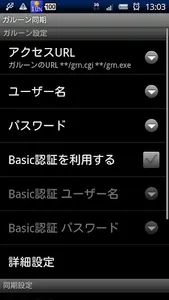
□ access URL
Please enter in the following format to access URL.
Linux: https: //*****/***/grn.cgi
Windows: https: //*****/***/grn.exe
If the SSL certificate is not officially, please put a check in Allow invalid SSL certificate] to open the Advanced Settings.
※ In the case of Office8 is ** / ag.cgi ** / ag.exe
□ user name
Please enter the login name that you enter at the time of login.
Please enter the numerical value of the user ID.
Name and different from that used at the time of login.
※ How to check user ID
1. Log on as usual from the browser to the Office8 / 9, such as a PC
2. Click your name from such schedule
3. The opening of the "details of the User Information" screen, check the user ID
The user name and enter the user ID, please enter as it is a value to be used to log on at the time of the password.
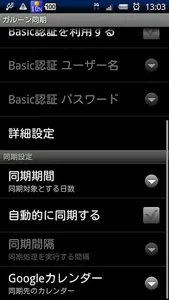
□ set of Android side
Please confirm that account and from the synchronization of the Android Settings screen [calendar synchronization] has become synchronized.
«About notification»
Please set the notification method from the setting screen of this app.
※ notification of appointments that were registered in the previous configuration changes will not be changed.
Depending on the version of Google Calendar that are installed on your Android device ※, also set the notification to "none" may become used a default notification of the calendar.
«How it works»
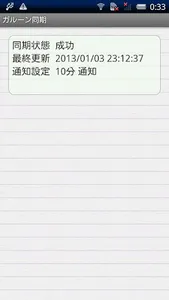
This app will register the Garoon / Office of the schedule data obtained over the Internet to the local calendar of Android devices.
Operation the app itself is carried out at this point, it is then automatically synchronized with the Google Calendar web side in the synchronization function of Android device itself.
Synchronization settings for when the synchronization does not work, in addition to the application of setting Android terminal Please confirm.
«About authority»
□ full Internet access
Available from Garoon / Office to get the schedule data
□ read calendar events plus confidential information
□ additional calendar events, send mail to the change and the guest (no notification to the owner)
Use the acquired schedule data in order to write while comparing the local calendar and the difference
□ Disabling prevent phone of sleep the sleep of the tablet
I used to sleep suppression of the terminal during synchronous operation
«Remarks»
- it may not operate normally depending on the environment.
· If you want to use Wifi only, please do not be automatically disconnected at the time of sleep in the setting of the Android terminal side.
- When contacting the settings and functions, etc., please contact us by e-mail. Please note that you can not answer even if you contact us in the review column.
- "Automatically sync" If you want to use the the "Garoon sync" from the target of the optimization of the battery Please exclude the application
«Can be synchronized item»
• Start date and time
·End date and time
· Schedule (title: pull-down part)
- Event details (title: free description)
Memo
Schedule was registered as a period schedule ※ are synchronous excluded.
«Operating environment»
Cybozu Garoon Version 2. *. *
Cybozu Garoon Version 3.0. *
Cybozu Garoon Version 3.5. *
Cybozu Garoon Version 4. *
Cybozu Office Version 8.1. *
Cybozu Office Version 9.0. *
Cloud version Gallon
Cloud version of Office
※ important point
This app will get a schedule data over the network.
You must have access to Garoon / Office of the available from Android devices to run the application.
If that can be accessed on the corporate network only Garoon / Office, it is available only if you are connecting to the corporate network the Android terminal in the Wifi or the like.
«About set»
□ access URL
Please enter in the following format to access URL.
Linux: https: //*****/***/grn.cgi
Windows: https: //*****/***/grn.exe
If the SSL certificate is not officially, please put a check in Allow invalid SSL certificate] to open the Advanced Settings.
※ In the case of Office8 is ** / ag.cgi ** / ag.exe
□ user name
Please enter the login name that you enter at the time of login.
Please enter the numerical value of the user ID.
Name and different from that used at the time of login.
※ How to check user ID
1. Log on as usual from the browser to the Office8 / 9, such as a PC
2. Click your name from such schedule
3. The opening of the "details of the User Information" screen, check the user ID
The user name and enter the user ID, please enter as it is a value to be used to log on at the time of the password.
□ set of Android side
Please confirm that account and from the synchronization of the Android Settings screen [calendar synchronization] has become synchronized.
«About notification»
Please set the notification method from the setting screen of this app.
※ notification of appointments that were registered in the previous configuration changes will not be changed.
Depending on the version of Google Calendar that are installed on your Android device ※, also set the notification to "none" may become used a default notification of the calendar.
«How it works»
This app will register the Garoon / Office of the schedule data obtained over the Internet to the local calendar of Android devices.
Operation the app itself is carried out at this point, it is then automatically synchronized with the Google Calendar web side in the synchronization function of Android device itself.
Synchronization settings for when the synchronization does not work, in addition to the application of setting Android terminal Please confirm.
«About authority»
□ full Internet access
Available from Garoon / Office to get the schedule data
□ read calendar events plus confidential information
□ additional calendar events, send mail to the change and the guest (no notification to the owner)
Use the acquired schedule data in order to write while comparing the local calendar and the difference
□ Disabling prevent phone of sleep the sleep of the tablet
I used to sleep suppression of the terminal during synchronous operation
«Remarks»
- it may not operate normally depending on the environment.
· If you want to use Wifi only, please do not be automatically disconnected at the time of sleep in the setting of the Android terminal side.
- When contacting the settings and functions, etc., please contact us by e-mail. Please note that you can not answer even if you contact us in the review column.
- "Automatically sync" If you want to use the the "Garoon sync" from the target of the optimization of the battery Please exclude the application
Show More