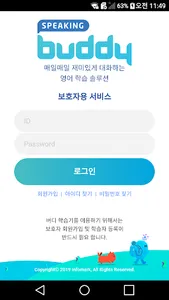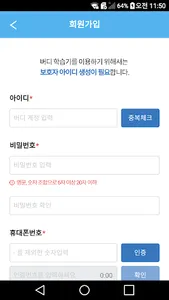
Speaking buddy guardian application. In order to use Speaking Buddy, you must register as a guardian and learner. After registration, you can use the Speaking Buddy freely and check your child's learning activities.
[Speaking Buddy Main Features]
✔ Become a guardian
✔ Learner registration and correction
✔ Check your study history in the study room
✔ View weekly study report
★ Parent Membership
Members who have purchased Speaking Buddy must complete membership registration and identity verification.
★ learner registration and modification
You can register up to three children's information to learn. After registration is complete, you must log in to the Speaking Buddy as a guardian and then specify a learner to use all applications and features normally.
★ Study Room
View your child's learning history. View your learning activities, including weekly average hours of study, study sentences, and achievement by area.
■ Required Access Rights
-Storage: Used to save photos, audio, and video to be sent to registered learners.
■ Optional Access Rights
-Account Information: Used to share photos, audio and video files using SNS account.
-SMS: It is used to automatically enter the ID number when registering parents.
-Phone: Use to check phone-related information stored in the device.
-Camera, Microphone: Used to send attachments to registered children.
----
Developer Contact
-Address: Register BNS Address
-Contact: 1883-8221 or BNS number
-Business registration number: BNS registration number
-Dealer's Declaration Number: BNS Declaration Number
[Speaking Buddy Main Features]
✔ Become a guardian
✔ Learner registration and correction
✔ Check your study history in the study room
✔ View weekly study report
★ Parent Membership
Members who have purchased Speaking Buddy must complete membership registration and identity verification.
★ learner registration and modification
You can register up to three children's information to learn. After registration is complete, you must log in to the Speaking Buddy as a guardian and then specify a learner to use all applications and features normally.
★ Study Room
View your child's learning history. View your learning activities, including weekly average hours of study, study sentences, and achievement by area.
■ Required Access Rights
-Storage: Used to save photos, audio, and video to be sent to registered learners.
■ Optional Access Rights
-Account Information: Used to share photos, audio and video files using SNS account.
-SMS: It is used to automatically enter the ID number when registering parents.
-Phone: Use to check phone-related information stored in the device.
-Camera, Microphone: Used to send attachments to registered children.
----
Developer Contact
-Address: Register BNS Address
-Contact: 1883-8221 or BNS number
-Business registration number: BNS registration number
-Dealer's Declaration Number: BNS Declaration Number
Show More