In this app, you can test IR blaster compatibility and control external devices by emulating an iTach IR device. Includes device testing, emulator setup, and IP configuration options.
AppRecs review analysis
AppRecs rating 2.3. Trustworthiness 0 out of 100. Review manipulation risk 0 out of 100. Based on a review sample analyzed.
★★☆☆☆
2.3
AppRecs Rating
Ratings breakdown
5 star
26%
4 star
4%
3 star
4%
2 star
2%
1 star
64%
What to know
✓
Authentic reviews
No red flags detected
⚠
Mixed user feedback
Average 2.3★ rating suggests room for improvement
⚠
High negative review ratio
66% of sampled ratings are 1–2 stars
About IR Blaster Demo
Demo version of IR Blaster. Use this demo to determine if IR Blaster is compatible with your devices and apps.
Contains all the same functionality as IR Blaster but will stop listening for incoming requests after 20 requests are received.
This app is not yet mature and has not been tested on many devices. Please report any positive or negative feedback to MikeHillAndroid@gmail.com so issues can be addressed. Thanks!
There are 2 reasons you may want to use IR Blaster.
1 - Your remote control app does not have the ability to control your built in IR blaster
2 - You want to control 1 device's built in IR blaster from a 2nd device
Example usage scenario with 1 device:
- Your favorite remote control app has the ability to control an iTach but can't control your built in IR Blaster
- Install IR Blaster on your device
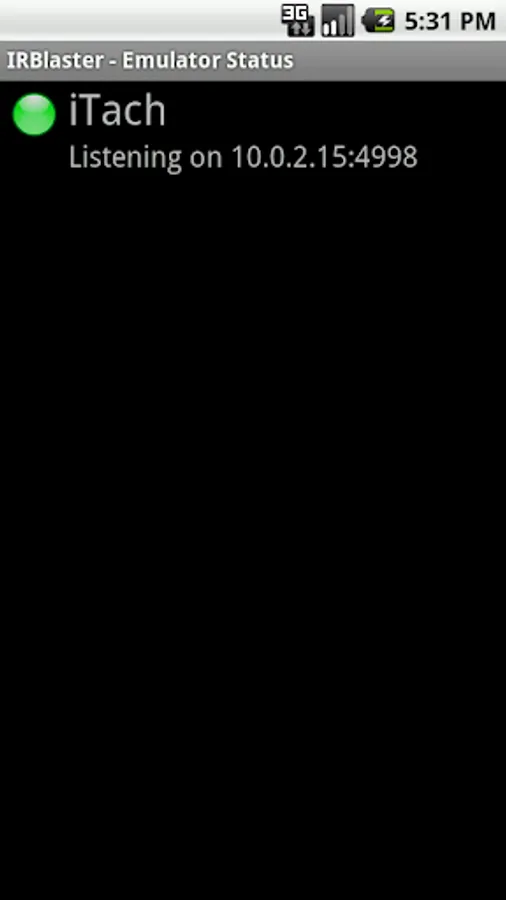
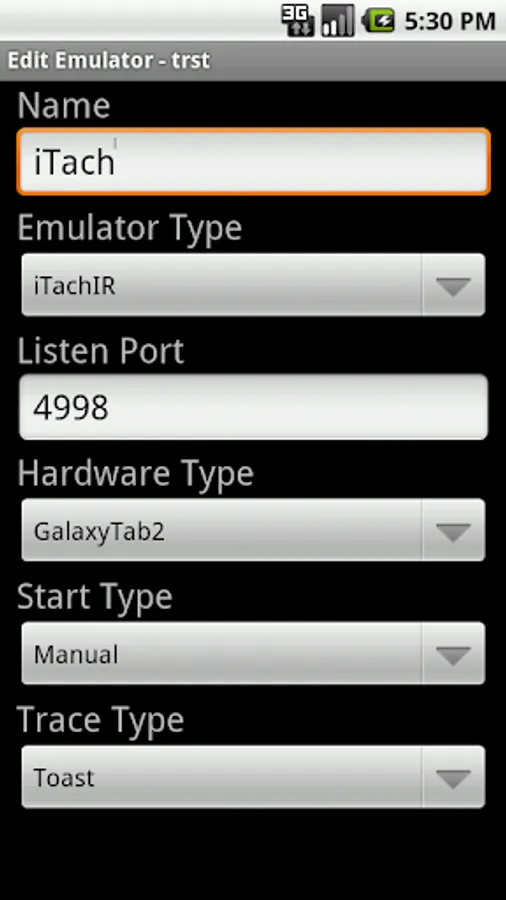
- Start IR Blaster, create an iTach IR emulator and start the emulator
- In your remote app, configure a new iTach device at ip address 127.0.0.1 (the loopback to self ip address)
- Your remote app can now control your internal IR Blaster
Example usage scenario with 2 devices:
- Install this app on a Samsung Galaxy Tab 2 device
- Start the app, add an iTach IR emulator and start the emulator
- Note the ip address and port the emulator is listening on. The ip address and port are separated by a colon.
- From a 2nd device, install any app capable of controlling an iTach IR device (mbhRemote for example)
- Configure the 2nd device to communicate with the ip address and port the 1st device is listening on
- The 2nd device can now control the IR Blaster on the 1st device
Requires a hardware device with a built in IR Blaster.
When using the iTach IR emulator, configure your remote app to send commands to channel 3.
Supported Devices:
Samsung Galaxy Tab 2
Samsung Galaxy S4
Samsung Galaxy S5 (use device type 'Generic IR Device')
Samsung Galaxy Note
Htc One
Emulators:
Global Cache' iTach IR
Supported apps:
Any app that can communicate with an iTach IR device should be able to communicate with IR Blaster
Contains all the same functionality as IR Blaster but will stop listening for incoming requests after 20 requests are received.
This app is not yet mature and has not been tested on many devices. Please report any positive or negative feedback to MikeHillAndroid@gmail.com so issues can be addressed. Thanks!
There are 2 reasons you may want to use IR Blaster.
1 - Your remote control app does not have the ability to control your built in IR blaster
2 - You want to control 1 device's built in IR blaster from a 2nd device
Example usage scenario with 1 device:
- Your favorite remote control app has the ability to control an iTach but can't control your built in IR Blaster
- Install IR Blaster on your device
- Start IR Blaster, create an iTach IR emulator and start the emulator
- In your remote app, configure a new iTach device at ip address 127.0.0.1 (the loopback to self ip address)
- Your remote app can now control your internal IR Blaster
Example usage scenario with 2 devices:
- Install this app on a Samsung Galaxy Tab 2 device
- Start the app, add an iTach IR emulator and start the emulator
- Note the ip address and port the emulator is listening on. The ip address and port are separated by a colon.
- From a 2nd device, install any app capable of controlling an iTach IR device (mbhRemote for example)
- Configure the 2nd device to communicate with the ip address and port the 1st device is listening on
- The 2nd device can now control the IR Blaster on the 1st device
Requires a hardware device with a built in IR Blaster.
When using the iTach IR emulator, configure your remote app to send commands to channel 3.
Supported Devices:
Samsung Galaxy Tab 2
Samsung Galaxy S4
Samsung Galaxy S5 (use device type 'Generic IR Device')
Samsung Galaxy Note
Htc One
Emulators:
Global Cache' iTach IR
Supported apps:
Any app that can communicate with an iTach IR device should be able to communicate with IR Blaster
IR Blaster Demo Screenshots
Tap to Rate: