
AgroPro
Sprint Agrarische Software B.V.
Free
100+
downloads
About AgroPro
For more information, please refer to our website www.agropro.nl
Fast:
Save time with ICT
Clear:
Arrange in a single system, from planning to billing
flexible:
Combine equipment and manpower. And change the schedule at any time
Customization:
Especially for contractors in the agricultural sector
Instruction receivers for the configuration of the app:
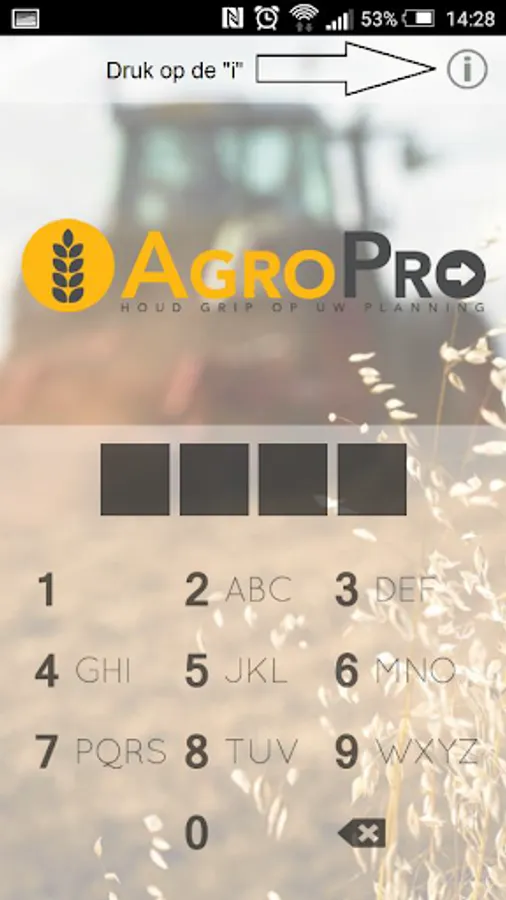
1. Pressing right on the "i" icon appears in the information screen
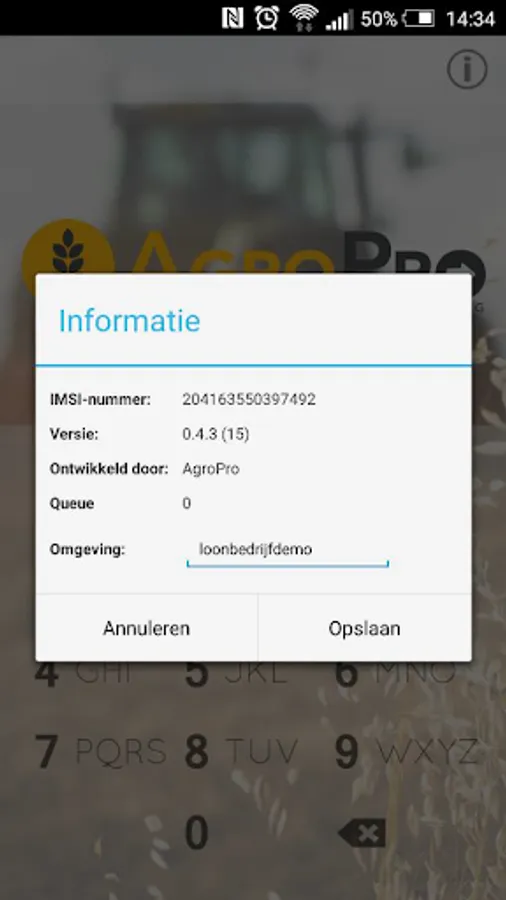
2. The two most important in this screen to link the app to log into the IMSI number and the environment, fill in setting the same name as the web application (usually the company name)
3. In the web application to employees under the heading of basic information, click on the pencil icon for the employee you want to associate with his smartphone and scroll down to the heading "app"
4. Take the IMSI number over from the app and enter a personal identification number (Figure 5)
5. The app is now successfully installed and the employee is linked to the app / smartphone.
6. Repeat steps 1/5 for a new employee.
Fast:
Save time with ICT
Clear:
Arrange in a single system, from planning to billing
flexible:
Combine equipment and manpower. And change the schedule at any time
Customization:
Especially for contractors in the agricultural sector
Instruction receivers for the configuration of the app:
1. Pressing right on the "i" icon appears in the information screen
2. The two most important in this screen to link the app to log into the IMSI number and the environment, fill in setting the same name as the web application (usually the company name)
3. In the web application to employees under the heading of basic information, click on the pencil icon for the employee you want to associate with his smartphone and scroll down to the heading "app"
4. Take the IMSI number over from the app and enter a personal identification number (Figure 5)
5. The app is now successfully installed and the employee is linked to the app / smartphone.
6. Repeat steps 1/5 for a new employee.
AgroPro Screenshots
Tap to Rate: