AppRecs review analysis
AppRecs rating 4.4. Trustworthiness 83 out of 100. Review manipulation risk 22 out of 100. Based on a review sample analyzed.
★★★★☆
4.4
AppRecs Rating
Ratings breakdown
5 star
72%
4 star
10%
3 star
6%
2 star
1%
1 star
11%
What to know
✓
Low review manipulation risk
22% review manipulation risk
✓
Credible reviews
83% trustworthiness score from analyzed reviews
✓
High user satisfaction
82% of sampled ratings are 4+ stars (4.3★ average)
About Cpu Float
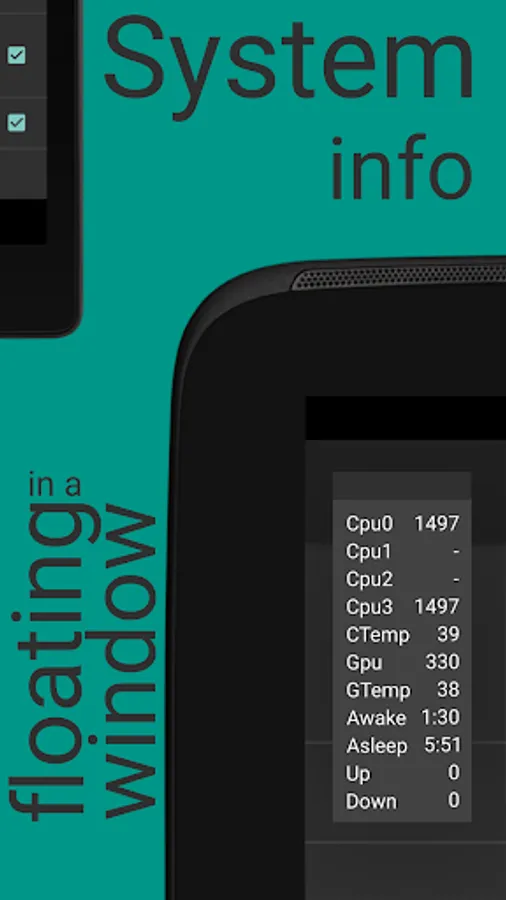
CpuFloat is a floating app which monitors several key pieces of system information so you can monitor your device without leaving the application you are using.
CpuFloat monitors:
• Cpu frequency
• Cpu temperature
• Gpu frequency
• Gpu load; not normalised
• Gpu temperature
• Time awake and in deep sleep
• Battery current
• Battery temperature
• Network speed
Time
This counts the time your gadget has been active and in deep sleep, a battery friendly state. Sometimes apps don´t let your device go into deep sleep, this will shorten the battery time.
Temperature
If available the cpu and gpu temperature are shown. If not available you can choose the temperature sensor in the settings. This has been extensively tested on Qualcomm socs. On other socs this might not work as intended.
Cpu and gpu Trippoint
If the temperature gets higher than the trippoint temperature, it´ll turn red. You can change the value of the trippoint temperature in the settings.
Flexibility
You can choose what to monitor and where to show the floating window. CpuFloat can be a big vertical floating view with lots of information or a smaller, less intrusive horizontal view.
CpuFloat is a compact system tool with minimal permissions; vibrate, read sdcard, draw over other apps. There are no ads and it doesn´t use internet data.
Notice about changing app permissions on android M (6) and up :
Because of security reasons you can only change app permissions if there are no screen overlays or floating apps running, else you´ll get this error message:
Screen overlay detected.
To change this permission setting, you first have to turn off the screen overlay from Settings > Apps.
Just exit CpuFloat and try again, if it still doesn´t work, there´s another app using a screen overlay.
Credits to:
♥ CM Calculator apk for user interface idea
♥ M11kkaa (xda developer) for temperature file paths
♥ Existz (xda developer) for awake and deep sleep time
♥ Consp1racy for SeekBarPreference
♥ Grarak for gpu and temperature file paths
♥ The Tester for catching exceptions and throwing ideas
For help or suggestions visit
http://forum.xda-developers.com/oneplus-one/themes-apps/app-cpufloat-t3204420
CpuFloat monitors:
• Cpu frequency
• Cpu temperature
• Gpu frequency
• Gpu load; not normalised
• Gpu temperature
• Time awake and in deep sleep
• Battery current
• Battery temperature
• Network speed
Time
This counts the time your gadget has been active and in deep sleep, a battery friendly state. Sometimes apps don´t let your device go into deep sleep, this will shorten the battery time.
Temperature
If available the cpu and gpu temperature are shown. If not available you can choose the temperature sensor in the settings. This has been extensively tested on Qualcomm socs. On other socs this might not work as intended.
Cpu and gpu Trippoint
If the temperature gets higher than the trippoint temperature, it´ll turn red. You can change the value of the trippoint temperature in the settings.
Flexibility
You can choose what to monitor and where to show the floating window. CpuFloat can be a big vertical floating view with lots of information or a smaller, less intrusive horizontal view.
CpuFloat is a compact system tool with minimal permissions; vibrate, read sdcard, draw over other apps. There are no ads and it doesn´t use internet data.
Notice about changing app permissions on android M (6) and up :
Because of security reasons you can only change app permissions if there are no screen overlays or floating apps running, else you´ll get this error message:
Screen overlay detected.
To change this permission setting, you first have to turn off the screen overlay from Settings > Apps.
Just exit CpuFloat and try again, if it still doesn´t work, there´s another app using a screen overlay.
Credits to:
♥ CM Calculator apk for user interface idea
♥ M11kkaa (xda developer) for temperature file paths
♥ Existz (xda developer) for awake and deep sleep time
♥ Consp1racy for SeekBarPreference
♥ Grarak for gpu and temperature file paths
♥ The Tester for catching exceptions and throwing ideas
For help or suggestions visit
http://forum.xda-developers.com/oneplus-one/themes-apps/app-cpufloat-t3204420
Cpu Float Screenshots



Tap to Rate:
Reviews for Cpu Float
JAW DINKER
11/23/2025
EXCELLENT APP.
Abu Dzaky
10/31/2025
perfect