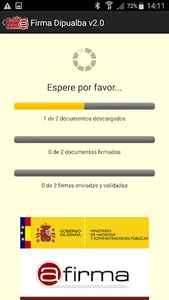
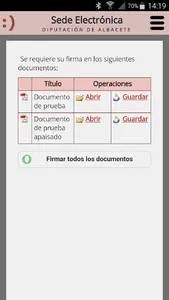
This application allows the electronic signature from Android devices in any of the Electronic Headquarters of the SEDIPUALB @ platform.
Instructions for signing using Dipualba Signature:
1.- Install this application on the Android device.
2.- Install the user's digital certificate on the device. To do this, simply send by email (or any other means) the file with the certificate and private key (with extension .pfx or .p12) and open it.
3.- Open the Electronic Office using a dedicated browser (Android browser, Google Chrome, Mozilla Firefox and Microsoft Edge are supported). The use of embedded WebView browsers, which use some applications such as Google search engine or assistant or GMail, are not supported. In the case of accessing from GMail, it is necessary to deactivate the option "open web links in GMail" in "general settings".
4.- When the time comes, by clicking on the "sign" button of the Electronic Office, Android will ask the user to choose an application with which to open the link. It is necessary to choose the "Signature Dipualba" app (it is possible to indicate that Android remembers this selection for future signatures).
This application does not create any icon in the system, since it cannot be opened directly.
This application does not allow the general signing of documents. It only allows the signing of documents of the Electronic Headquarters of the entities attached to the SEDIPUALB @ platform.
More information about the SEDIPUALB @ platform
"Firma Dipualba" is a fork of the "Mobile client @firma" 1.3 adapted to the SEDIPUALB @ signature system.
---
License information of the mobile client @firma
Copyright 2011, 2012 Government of Spain
Mobile client @firma is Free Software; you can redistribute it and / or modify it under the terms of at least one of these two licenses;
- The "GNU General Public License" as published by the Free Software Foundation; version 2 of the License, or (at your option) any later version.
- The "European Software License"; Version 1.1 of the License, or (at your option) any later version.
Instructions for signing using Dipualba Signature:
1.- Install this application on the Android device.
2.- Install the user's digital certificate on the device. To do this, simply send by email (or any other means) the file with the certificate and private key (with extension .pfx or .p12) and open it.
3.- Open the Electronic Office using a dedicated browser (Android browser, Google Chrome, Mozilla Firefox and Microsoft Edge are supported). The use of embedded WebView browsers, which use some applications such as Google search engine or assistant or GMail, are not supported. In the case of accessing from GMail, it is necessary to deactivate the option "open web links in GMail" in "general settings".
4.- When the time comes, by clicking on the "sign" button of the Electronic Office, Android will ask the user to choose an application with which to open the link. It is necessary to choose the "Signature Dipualba" app (it is possible to indicate that Android remembers this selection for future signatures).
This application does not create any icon in the system, since it cannot be opened directly.
This application does not allow the general signing of documents. It only allows the signing of documents of the Electronic Headquarters of the entities attached to the SEDIPUALB @ platform.
More information about the SEDIPUALB @ platform
"Firma Dipualba" is a fork of the "Mobile client @firma" 1.3 adapted to the SEDIPUALB @ signature system.
---
License information of the mobile client @firma
Copyright 2011, 2012 Government of Spain
Mobile client @firma is Free Software; you can redistribute it and / or modify it under the terms of at least one of these two licenses;
- The "GNU General Public License" as published by the Free Software Foundation; version 2 of the License, or (at your option) any later version.
- The "European Software License"; Version 1.1 of the License, or (at your option) any later version.
Show More