The #1 Quote-generation Tool for:
✅Construction & Renovation Contractors
✅Architects
✅Interior Designers
Take your Business to the Next Level with My Site Book
Features of Site Book:
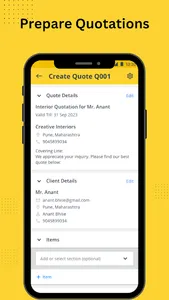
☑ Prepare itemized quotes with unmatched flexibility
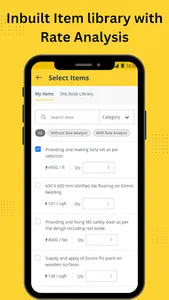
- Pick the relevant items from the built-in library and get going.
- Group the items which need to be under the same section.
- Manage the project-specific record of quote revisions.
- Once the deal is closed, mark the final quote as approved.
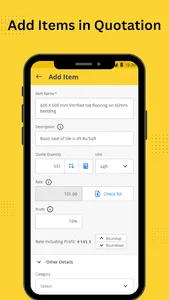
☑ Diverse options for determining quantities
- Enter the quantity manually.
- Use the calculator to do the math.
- Derive the quantity from drawings using digital take-off tool.
☑ Understand the profitability of each quote
- Add profit markup to each line item.
- Add profit markup or discount to overall quote.
- You can review the estimated cost and profit per quote, while ensuring that your - clients are only provided with the quoted price.
☑ Enhance the impression by incorporating photos with quotes
- Upload photos of your selection or mood board to the quote.
- Your clients will see all the photos when they open the quotation.
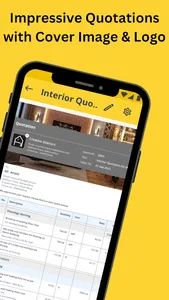
☑ Professional quotes to win client’s confidence
- Add your Company logo.
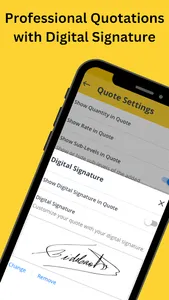
- Validate the quote using a Digital signature.
☑ Cloud based tool for seamless collaboration
- Prepare the quote on the fly by collaborating with your office teamsmates.
- Share the latest quote with your clients for real-time approval.
Site book is available on Mobile as well as on Web.
📩 Incase of any support/ queries please feel free to reach out at support@mysitebook.io
✅Construction & Renovation Contractors
✅Architects
✅Interior Designers
Take your Business to the Next Level with My Site Book
Features of Site Book:
☑ Prepare itemized quotes with unmatched flexibility
- Pick the relevant items from the built-in library and get going.
- Group the items which need to be under the same section.
- Manage the project-specific record of quote revisions.
- Once the deal is closed, mark the final quote as approved.
☑ Diverse options for determining quantities
- Enter the quantity manually.
- Use the calculator to do the math.
- Derive the quantity from drawings using digital take-off tool.
☑ Understand the profitability of each quote
- Add profit markup to each line item.
- Add profit markup or discount to overall quote.
- You can review the estimated cost and profit per quote, while ensuring that your - clients are only provided with the quoted price.
☑ Enhance the impression by incorporating photos with quotes
- Upload photos of your selection or mood board to the quote.
- Your clients will see all the photos when they open the quotation.
☑ Professional quotes to win client’s confidence
- Add your Company logo.
- Validate the quote using a Digital signature.
☑ Cloud based tool for seamless collaboration
- Prepare the quote on the fly by collaborating with your office teamsmates.
- Share the latest quote with your clients for real-time approval.
Site book is available on Mobile as well as on Web.
📩 Incase of any support/ queries please feel free to reach out at support@mysitebook.io
Show More