AppRecs review analysis
AppRecs rating . Trustworthiness 75 out of 100. Review manipulation risk 20 out of 100. Based on a review sample analyzed.
★
AppRecs Rating
Ratings breakdown
5 star
0%
4 star
0%
3 star
0%
2 star
100%
1 star
0%
What to know
✓
Low review manipulation risk
20% review manipulation risk
✓
Credible reviews
75% trustworthiness score from analyzed reviews
⚠
Mixed user feedback
Average 2.0★ rating suggests room for improvement
About CARADA健診サポート
◆Registration is easy◆
Simply install the app, register for a new account, scan the account registration QR code provided by the medical examination institution, and enter the necessary information.
*QR codes for account registration will be distributed only at medical examination institutions affiliated with CARADA Medical Examination Support.
◆Introduction of functions◆
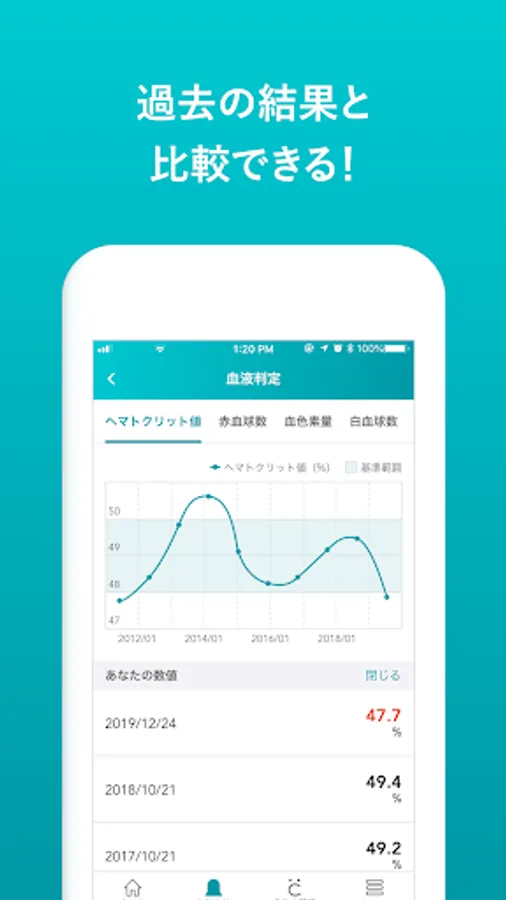
[Graphic display of medical examination results]
Changes in health checkup results are displayed in a graph, allowing you to understand changes from year to year. Also, you can see at a glance that it is outside the standard value.
[Explanation of inspection items]
Each test item has an explanation, making it easier to understand the meaning of the numbers and related diseases.
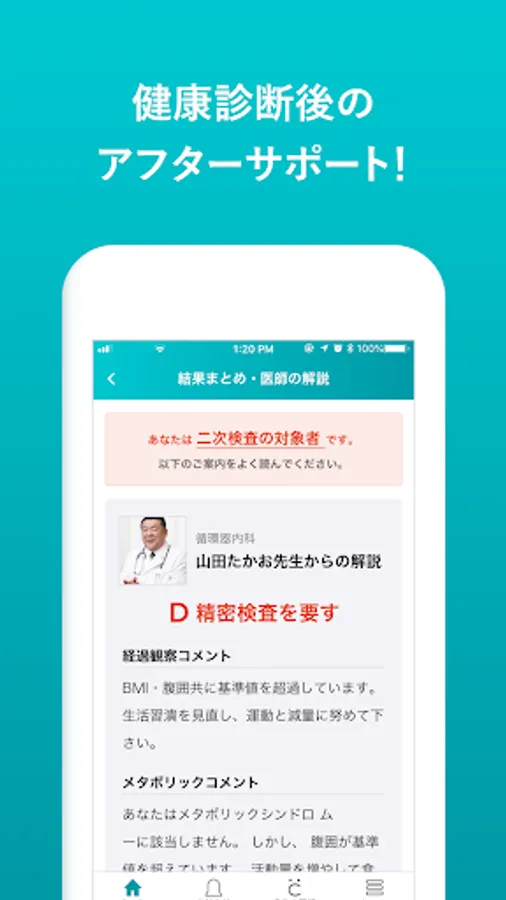
[Secondary inspection information]
Even if a secondary inspection is required, you can receive guidance on what to do next through the app.
*Features provided vary depending on the affiliated medical examination institution.
◆Compatible terminals◆
Android8 or higher device
*Tablets and other devices are not recommended.
◆Contact us◆
If you have any questions regarding usage, please contact us using the inquiry form within the app. I will respond later.
[If you are not logged in]
[Contact Us] at the bottom right of the top page > [Proceed to Inquiry]
[If you are already logged in]
[Menu] > [Inquiry] > [Create inquiry email]
*CARADA and ●ARADA (● with a C above it) are trademarks owned by MTI Corporation.
Simply install the app, register for a new account, scan the account registration QR code provided by the medical examination institution, and enter the necessary information.
*QR codes for account registration will be distributed only at medical examination institutions affiliated with CARADA Medical Examination Support.
◆Introduction of functions◆
[Graphic display of medical examination results]
Changes in health checkup results are displayed in a graph, allowing you to understand changes from year to year. Also, you can see at a glance that it is outside the standard value.
[Explanation of inspection items]
Each test item has an explanation, making it easier to understand the meaning of the numbers and related diseases.
[Secondary inspection information]
Even if a secondary inspection is required, you can receive guidance on what to do next through the app.
*Features provided vary depending on the affiliated medical examination institution.
◆Compatible terminals◆
Android8 or higher device
*Tablets and other devices are not recommended.
◆Contact us◆
If you have any questions regarding usage, please contact us using the inquiry form within the app. I will respond later.
[If you are not logged in]
[Contact Us] at the bottom right of the top page > [Proceed to Inquiry]
[If you are already logged in]
[Menu] > [Inquiry] > [Create inquiry email]
*CARADA and ●ARADA (● with a C above it) are trademarks owned by MTI Corporation.
CARADA健診サポート Screenshots
Tap to Rate:
Reviews for CARADA健診サポート
N. Kubo
9/27/2024
検査値が何を示すものなのか、また、基準値より高い場合、低い場合の意味など、検査項目の解説を入れてほしい。毎回ネットでわざわざ調べるのは、不便。