AJT - Jpegtran for Android
Kame
100+
downloads
Free
AppRecs review analysis
AppRecs rating 4.5. Trustworthiness 68 out of 100. Review manipulation risk 21 out of 100. Based on a review sample analyzed.
★★★★☆
4.5
AppRecs Rating
Ratings breakdown
5 star
100%
4 star
0%
3 star
0%
2 star
0%
1 star
0%
What to know
✓
Low review manipulation risk
21% review manipulation risk
✓
High user satisfaction
100% of sampled ratings are 5 stars
About AJT - Jpegtran for Android
Summary
=======
Jpegtran is CUI tool developed by IJG(Independent JPEG Group).
This software is Jpegtran ported to Android.
Jpegtran can perform the following operations without quality loss.
- Rotation in 90 degree units (-rotate)
- Make grayscale image (Drop color components) (- grayscale)
- Flipping horizontal / verticval / XY axes (-flip, -transpose, -transverse)
- Cut out part of image (-crop)
- Partial fill of image (-wipe)
- Optimization of Huffman table (-optimize)
- Conversion to progressive JPEG (-progressive)
- Add restart marker (-restart)
How to use
==========
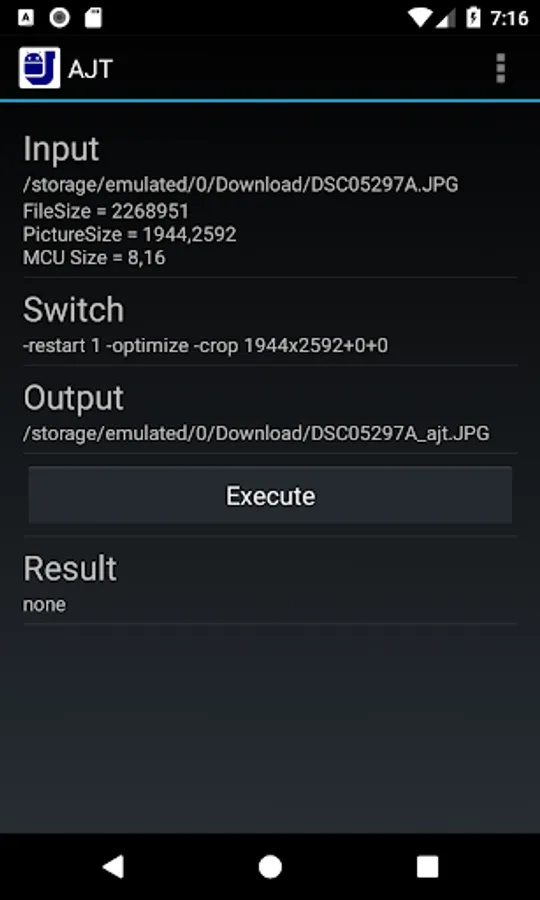
- Tap [Input]. Since the gallery opens, choose a JPEG image.
- Tap [Switch] to select the operation to be performed on the JPEG image.
- The output file name automatically generated and displayed to [Output].
If you want to change, tap [Output].
- Press the [Execute] button
- When OK is displayed in [Result], processing is finished.
By tapping [Result], you can check the result.
Crop and Wipe
=============
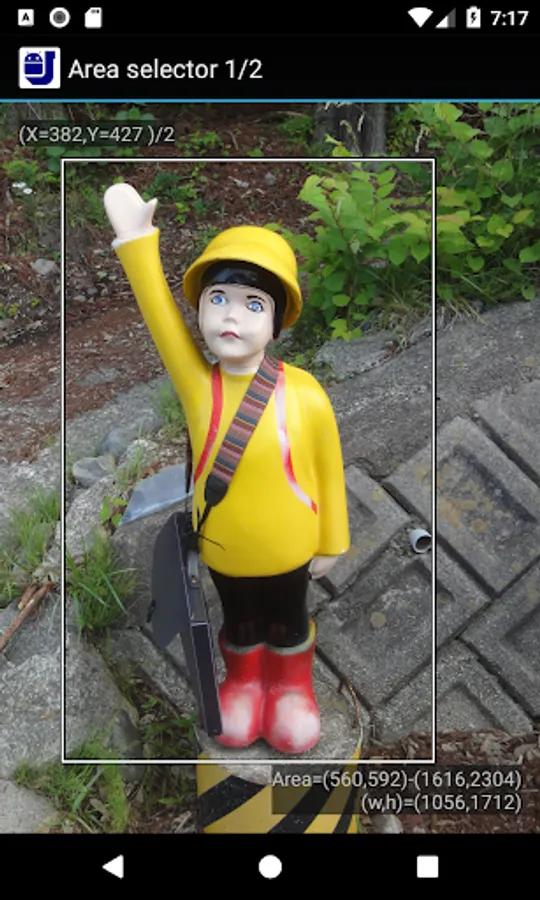
The area of Crop and Wipe can be specified while watching the image.
Choose [Switch] -> [Transform] -> [AreaSelector].
An image is displayed and a white line is displayed at the boundary.
Drag this white line and specify the area.
Image information can be displayed by long tapping.
Other operations
=============
Press Menu key, or press three dots on title bar, menu will be displayed.
- Input selector
You can choose to use the gallery to select images or use the built-in file selector.
- Default output
You can select how to automatically generate filenames.
File name appended with "_ajt" in the same directory.
Save to specified directory.
To long tap [Input], you can check the source JPEG image.
Example of operation
====================
Here is an example of the operation to cut out part of an image.
- Tap [Input] and select an image
- Choose [Switch] -> [Entropy coding] -> [-optimize]
You can reduce the file size with this operation.
- Select [Switch] -> [Transform] -> [TransformType] -> [Crop]
- Select [Switch] -> [Transform] -> [TransformType] -> [AareSelector]
As the image is displayed, drag the white frame to make the area of the image.
- Tap [Executte] to execute "Jpegtran"
- Tap [Result] and check the result image.
About this software
===================
This software is based on part on the work of the Independent JPEG Group.
=======
Jpegtran is CUI tool developed by IJG(Independent JPEG Group).
This software is Jpegtran ported to Android.
Jpegtran can perform the following operations without quality loss.
- Rotation in 90 degree units (-rotate)
- Make grayscale image (Drop color components) (- grayscale)
- Flipping horizontal / verticval / XY axes (-flip, -transpose, -transverse)
- Cut out part of image (-crop)
- Partial fill of image (-wipe)
- Optimization of Huffman table (-optimize)
- Conversion to progressive JPEG (-progressive)
- Add restart marker (-restart)
How to use
==========
- Tap [Input]. Since the gallery opens, choose a JPEG image.
- Tap [Switch] to select the operation to be performed on the JPEG image.
- The output file name automatically generated and displayed to [Output].
If you want to change, tap [Output].
- Press the [Execute] button
- When OK is displayed in [Result], processing is finished.
By tapping [Result], you can check the result.
Crop and Wipe
=============
The area of Crop and Wipe can be specified while watching the image.
Choose [Switch] -> [Transform] -> [AreaSelector].
An image is displayed and a white line is displayed at the boundary.
Drag this white line and specify the area.
Image information can be displayed by long tapping.
Other operations
=============
Press Menu key, or press three dots on title bar, menu will be displayed.
- Input selector
You can choose to use the gallery to select images or use the built-in file selector.
- Default output
You can select how to automatically generate filenames.
File name appended with "_ajt" in the same directory.
Save to specified directory.
To long tap [Input], you can check the source JPEG image.
Example of operation
====================
Here is an example of the operation to cut out part of an image.
- Tap [Input] and select an image
- Choose [Switch] -> [Entropy coding] -> [-optimize]
You can reduce the file size with this operation.
- Select [Switch] -> [Transform] -> [TransformType] -> [Crop]
- Select [Switch] -> [Transform] -> [TransformType] -> [AareSelector]
As the image is displayed, drag the white frame to make the area of the image.
- Tap [Executte] to execute "Jpegtran"
- Tap [Result] and check the result image.
About this software
===================
This software is based on part on the work of the Independent JPEG Group.