In this lip sync app, you can create videos by matching mouth movements to audio recordings using automated scenes. Includes scene creation tools and audio synchronization features.
AppRecs review analysis
AppRecs rating 3.3. Trustworthiness 79 out of 100. Review manipulation risk 16 out of 100. Based on a review sample analyzed.
★★★☆☆
3.3
AppRecs Rating
Ratings breakdown
5 star
43%
4 star
0%
3 star
14%
2 star
29%
1 star
14%
What to know
✓
Low review manipulation risk
16% review manipulation risk
✓
Credible reviews
79% trustworthiness score from analyzed reviews
⚠
High negative review ratio
43% of sampled ratings are 1–2 stars
About MeMelody - Lip Sync
A goat singing "Merry Christmas", a bird beatboxing, your friend singing heavy metal 🎤
It's, always fun to watch the result, when somebody is edited to sing/say something that was made just from a short mouth opening video.
But the video editing... well... it takes ages ⏳
Introducing "MeMelody - Lip Sync" 🥳 An app that makes lip synchronization easy and fun with unique reusable automation:
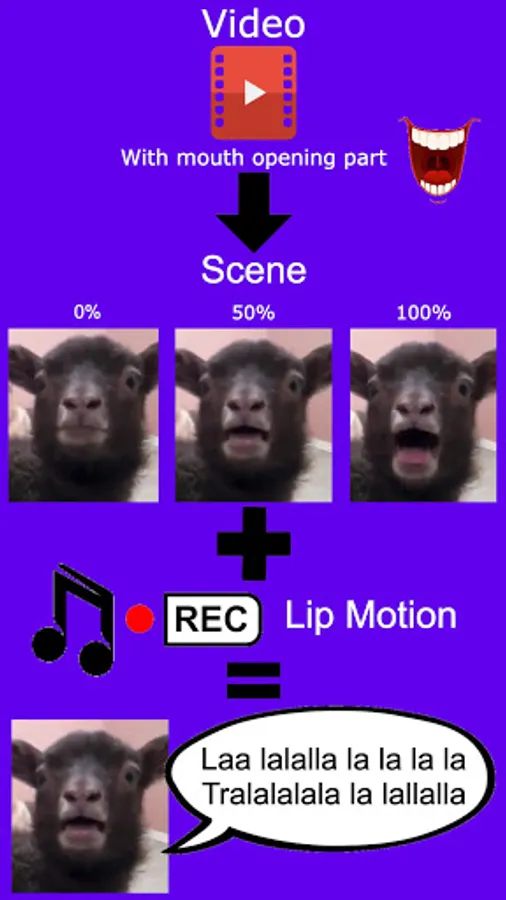
Mouth opening scenes -> Audio lip-sync recording -> Generate video, Enjoy 😎
Why did I make this app?
I've been a video editor for 16 years and a programmer for 12 years. I created lip sync videos with famous desktop editing tools. An AMV of 4 minutes took me 4 months. Hundreds of micro-short videos to match the lip motion. Despite the time, the result was amazing. Got 1.800.000+ views. As a programmer, I've been thinking about how to make a tool, to scale up the production of such high-quality videos with automation. This is how "MeMelody - Lip Sync" was born 🐣
How to use it: (warning, long text ahead)
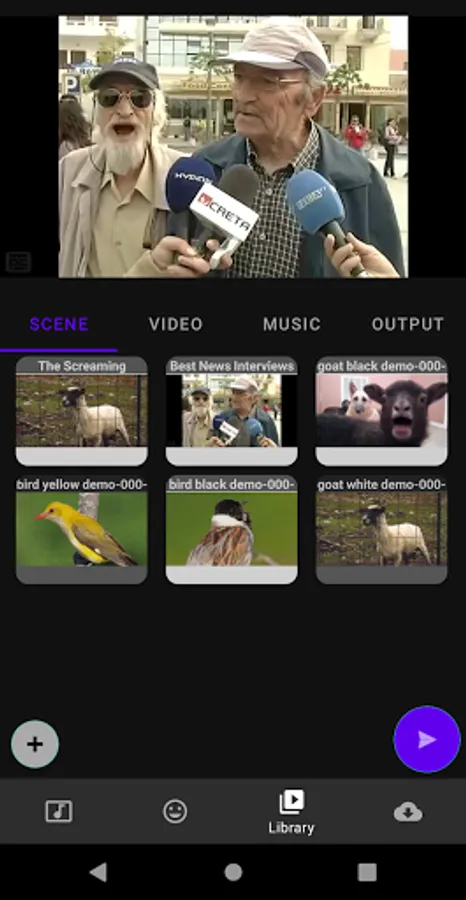
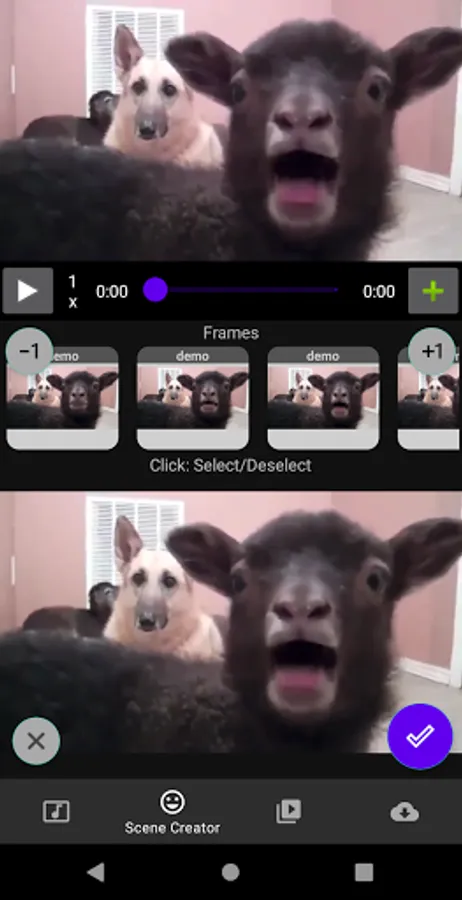
First, we need to create the mouth opening scenes. Add a video in the "Library" and select it in the "Scene Creator". Navigate to the place where the mouth is opening and see how the frames of your video appeared above the timeline bar. Select the frame where the mouth is fully closed and click the "+Add Frame" button. Select the next frame where the mouth is a little bit open and again click the "+Add Frame". Repeat this until you reached the mouth fully opened frame. Click the save button and you're done 🙌 Good job! You can check your scenes in the Library.
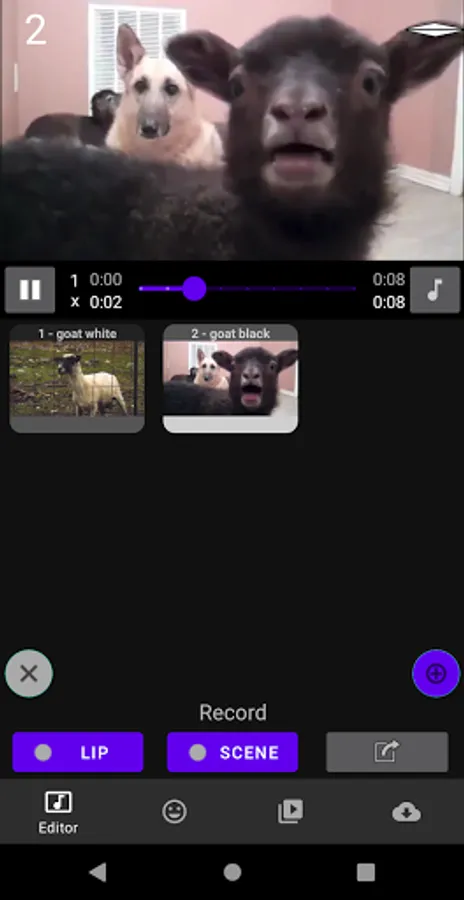
Second, we need to record the lip motion based on an audio file (music/speech/talk...). Add an audio file in the "Library" and select it in the "Editor", the main page. Press the "Lip" then "Play" buttons to start recording the lip motion with the vertical slider. While the audio is playing, move the slider up (mouth open) and down (mouth closed). You can slow down the music to have a more precise result. When you're done, click on the "Lip" button to save and finish your lip motion recording.
Third, select scenes and record the transition between them. From the Library, select multiple scenes you want to use in your video and send them to the "Editor" page. Press the "Scene" then "Play" buttons to start recording the scene transition by tapping on different scenes while the music is playing. This will memorize the order and time when the selected scenes should appear next. When you're done, click the "Scene" button to save and finish your transition recording.
Last, preview and generate the video. Almost there 🏁 Press the play button to preview your outcome. If you want to modify anything, you can repeat the lip motion and scene transition recordings anytime. It will also be saved offline, so you can reuse it anytime. You can also trim the audio by clicking on the start and end times at the desired time positions.
If everything is alright, press the "Save" button, wait a bit, and... Your video is ready! 🥳🥳🥳 YOU DID IT!!! Congratulations! Enjoy 😎
It's, always fun to watch the result, when somebody is edited to sing/say something that was made just from a short mouth opening video.
But the video editing... well... it takes ages ⏳
Introducing "MeMelody - Lip Sync" 🥳 An app that makes lip synchronization easy and fun with unique reusable automation:
Mouth opening scenes -> Audio lip-sync recording -> Generate video, Enjoy 😎
Why did I make this app?
I've been a video editor for 16 years and a programmer for 12 years. I created lip sync videos with famous desktop editing tools. An AMV of 4 minutes took me 4 months. Hundreds of micro-short videos to match the lip motion. Despite the time, the result was amazing. Got 1.800.000+ views. As a programmer, I've been thinking about how to make a tool, to scale up the production of such high-quality videos with automation. This is how "MeMelody - Lip Sync" was born 🐣
How to use it: (warning, long text ahead)
First, we need to create the mouth opening scenes. Add a video in the "Library" and select it in the "Scene Creator". Navigate to the place where the mouth is opening and see how the frames of your video appeared above the timeline bar. Select the frame where the mouth is fully closed and click the "+Add Frame" button. Select the next frame where the mouth is a little bit open and again click the "+Add Frame". Repeat this until you reached the mouth fully opened frame. Click the save button and you're done 🙌 Good job! You can check your scenes in the Library.
Second, we need to record the lip motion based on an audio file (music/speech/talk...). Add an audio file in the "Library" and select it in the "Editor", the main page. Press the "Lip" then "Play" buttons to start recording the lip motion with the vertical slider. While the audio is playing, move the slider up (mouth open) and down (mouth closed). You can slow down the music to have a more precise result. When you're done, click on the "Lip" button to save and finish your lip motion recording.
Third, select scenes and record the transition between them. From the Library, select multiple scenes you want to use in your video and send them to the "Editor" page. Press the "Scene" then "Play" buttons to start recording the scene transition by tapping on different scenes while the music is playing. This will memorize the order and time when the selected scenes should appear next. When you're done, click the "Scene" button to save and finish your transition recording.
Last, preview and generate the video. Almost there 🏁 Press the play button to preview your outcome. If you want to modify anything, you can repeat the lip motion and scene transition recordings anytime. It will also be saved offline, so you can reuse it anytime. You can also trim the audio by clicking on the start and end times at the desired time positions.
If everything is alright, press the "Save" button, wait a bit, and... Your video is ready! 🥳🥳🥳 YOU DID IT!!! Congratulations! Enjoy 😎
MeMelody - Lip Sync Screenshots
Tap to Rate:
Reviews for MeMelody - Lip Sync
Wemimo Simiat
9/28/2025
good
fanie Heyns
8/13/2025
It keeps bombing out once I upload video