Synovus Gateway Mobile
Synovus Bank
4.5 ★
197 ratings
10,000+
downloads
Free
With this mobile banking app, you can monitor accounts, transfer funds, pay bills, and manage deposits. Includes features like account management, fund transfers, alerts, and mobile deposit.
AppRecs review analysis
AppRecs rating 4.6. Trustworthiness 0 out of 100. Review manipulation risk 0 out of 100. Based on a review sample analyzed.
★★★★☆
4.6
AppRecs Rating
Ratings breakdown
5 star
79%
4 star
9%
3 star
2%
2 star
4%
1 star
7%
What to know
✓
High user satisfaction
88% of sampled ratings are 4+ stars (4.5★ average)
✓
Authentic reviews
No red flags detected
About Synovus Gateway Mobile
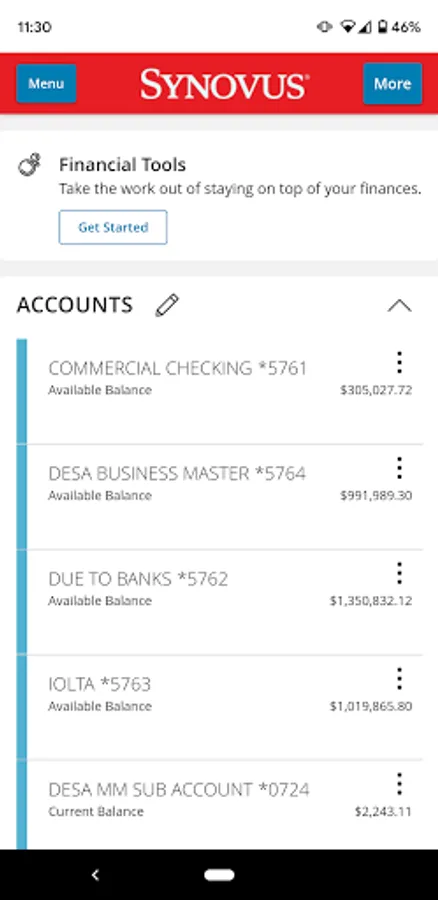
The Synovus Gateway Mobile Banking app provides Synovus commercial customers secure and easy-to-use cash management tools with the ability to bank and manage business anytime, anywhere, across any device. With the Synovus Gateway Mobile Banking app, businesses can monitor accounts, transfer funds, pay vendors and employees, manage deposits and much more.
Synovus Gateway Mobile Banking app offers a single point of control to service modules, such as:
• Accounts and Transactions
• Information Reporting and Intraday Reporting¹
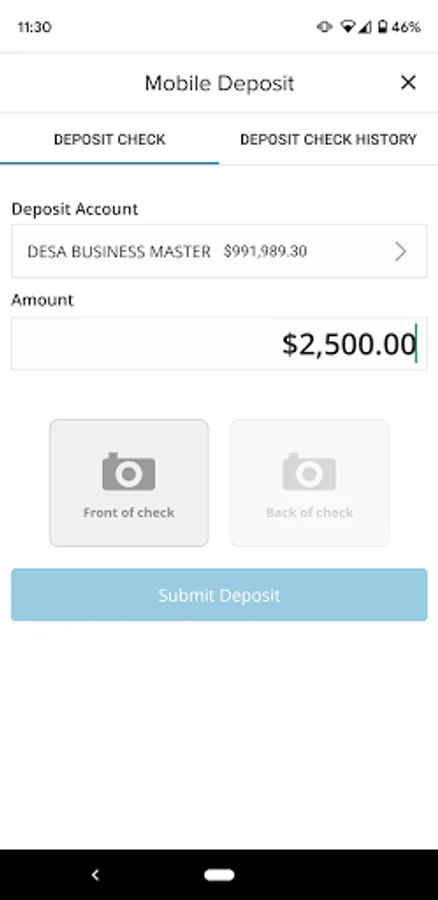
• Mobile Deposit
• User and Policy Management
• Statements
• Robust Alerts
• Business Bill Pay²
• Zelle® for your business²
• External Account Aggregation²
• Financial Management Tools²
• Stop Payments
• Automated Clearing House (ACH)¹
• Domestic and International Wire Transfer¹
• Positive Pay¹
Permissions
• Location permissions are necessary to determine your current location to display nearby Synovus locations/ATMs and provide mapping directions
• Camera permissions are necessary for you to use the Mobile Deposit feature or to scan a Zelle® QR Code
• Internet access permissions are necessary for the app to connect with Synovus Gateway Mobile Banking app
• Minimum system requirement: Android 9 or higher
• Access to your device’s contacts is required for Zelle®
• Access to your device’s photos is required for Zelle® when selecting a QR code from your saved images
Our Digital Privacy Statement explains how we collect, share, and use your information. For complete details, please refer to our Digital Privacy Statement at https://www.synovus.com/internet-privacy-statement/.
About Synovus Gateway
• The Synovus Gateway Mobile Banking App is free to download. Use of the Synovus Gateway Mobile Banking app requires your mobile service provider’s data and/or text plan for which charges may apply.
• You must be enrolled in Synovus Gateway with established Synovus Gateway login credentials and have a compatible device. Registration is required to use the Synovus Gateway mobile app. Your company administrator will enable access for use.
Disclaimers:
1 Separate approval, agreement, fees and/or additional balances may apply.
2 Enrollment required. Separate approval and / or agreement may apply.
The service marks and trademarks used herein belong to their respective owners.
Synovus Bank, Member FDIC and Equal Housing Lender ©2024 Synovus Bank
Synovus Gateway Mobile Banking app offers a single point of control to service modules, such as:
• Accounts and Transactions
• Information Reporting and Intraday Reporting¹
• Mobile Deposit
• User and Policy Management
• Statements
• Robust Alerts
• Business Bill Pay²
• Zelle® for your business²
• External Account Aggregation²
• Financial Management Tools²
• Stop Payments
• Automated Clearing House (ACH)¹
• Domestic and International Wire Transfer¹
• Positive Pay¹
Permissions
• Location permissions are necessary to determine your current location to display nearby Synovus locations/ATMs and provide mapping directions
• Camera permissions are necessary for you to use the Mobile Deposit feature or to scan a Zelle® QR Code
• Internet access permissions are necessary for the app to connect with Synovus Gateway Mobile Banking app
• Minimum system requirement: Android 9 or higher
• Access to your device’s contacts is required for Zelle®
• Access to your device’s photos is required for Zelle® when selecting a QR code from your saved images
Our Digital Privacy Statement explains how we collect, share, and use your information. For complete details, please refer to our Digital Privacy Statement at https://www.synovus.com/internet-privacy-statement/.
About Synovus Gateway
• The Synovus Gateway Mobile Banking App is free to download. Use of the Synovus Gateway Mobile Banking app requires your mobile service provider’s data and/or text plan for which charges may apply.
• You must be enrolled in Synovus Gateway with established Synovus Gateway login credentials and have a compatible device. Registration is required to use the Synovus Gateway mobile app. Your company administrator will enable access for use.
Disclaimers:
1 Separate approval, agreement, fees and/or additional balances may apply.
2 Enrollment required. Separate approval and / or agreement may apply.
The service marks and trademarks used herein belong to their respective owners.
Synovus Bank, Member FDIC and Equal Housing Lender ©2024 Synovus Bank
Synovus Gateway Mobile Screenshots
Tap to Rate:
Reviews for Synovus Gateway Mobile
loyd pricent
12/18/2025
Bankimg info not upto date. I make cash deposit but they show up on the account at random times. Debits some time show up in the mornings or before midnight no consistency.
Christo Magana
12/17/2025
Just great 👍