With this audio converter, you can select multiple files or folders, customize format options, and convert audio files offline or online. Includes support for various audio formats, video to audio conversion, and online processing.
AppRecs review analysis
AppRecs rating 3.5. Trustworthiness 71 out of 100. Review manipulation risk 38 out of 100. Based on a review sample analyzed.
★★★☆☆
3.5
AppRecs Rating
Ratings breakdown
5 star
50%
4 star
10%
3 star
2%
2 star
7%
1 star
31%
What to know
✓
Credible reviews
71% trustworthiness score from analyzed reviews
✓
Authentic reviews
Natural distribution, no red flags
⚠
High negative review ratio
38% of sampled ratings are 1–2 stars
About Audio Converter
Audio Converter is an easy-to-use app for Android to convert audio WAV, WMA, MP3, OGG, AAC, AU, FLAC, M4A, MKA, AIFF or RA file offline or online.
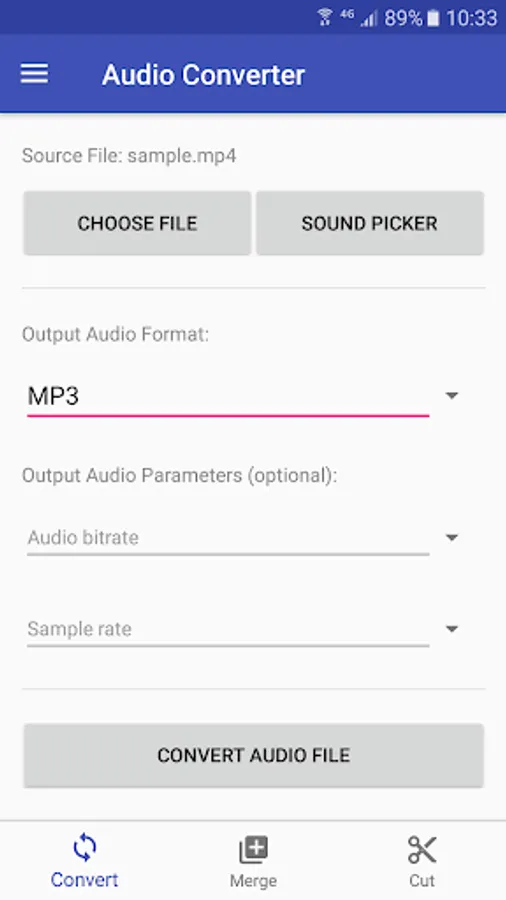
Audio Converter takes three simple steps to finish audio conversion. First choose multiple audio files or choose a folder to add all audio files in it, then set options and target audio format you want to convert to. Options for target audio include audio bitrate and sample rate. Finally tap the "Convert audio files" button to start conversion. The conversion may take a few seconds to minutes depending on the audio file size and CPU performance of your phone.
Audio Converter also supports video to audio conversion. For example, you can use this app to convert MKV, WMV, M4V, AVI, MOV, MPEG or MP4 video file to MP3 file.
Additionally, we provide free online audio conversion service which doesn't occupy your phone CPU.
Audio Converter takes three simple steps to finish audio conversion. First choose multiple audio files or choose a folder to add all audio files in it, then set options and target audio format you want to convert to. Options for target audio include audio bitrate and sample rate. Finally tap the "Convert audio files" button to start conversion. The conversion may take a few seconds to minutes depending on the audio file size and CPU performance of your phone.
Audio Converter also supports video to audio conversion. For example, you can use this app to convert MKV, WMV, M4V, AVI, MOV, MPEG or MP4 video file to MP3 file.
Additionally, we provide free online audio conversion service which doesn't occupy your phone CPU.
Audio Converter Screenshots
Tap to Rate:
Reviews for Audio Converter
Vincent Mashigo
6/27/2025
the most wanted app I've ever come across
officialbramham
1/23/2025
Super app