Mobile Transfer Express
Brother Industries, Ltd.
3.8 ★
store rating
100,000+
downloads
Free
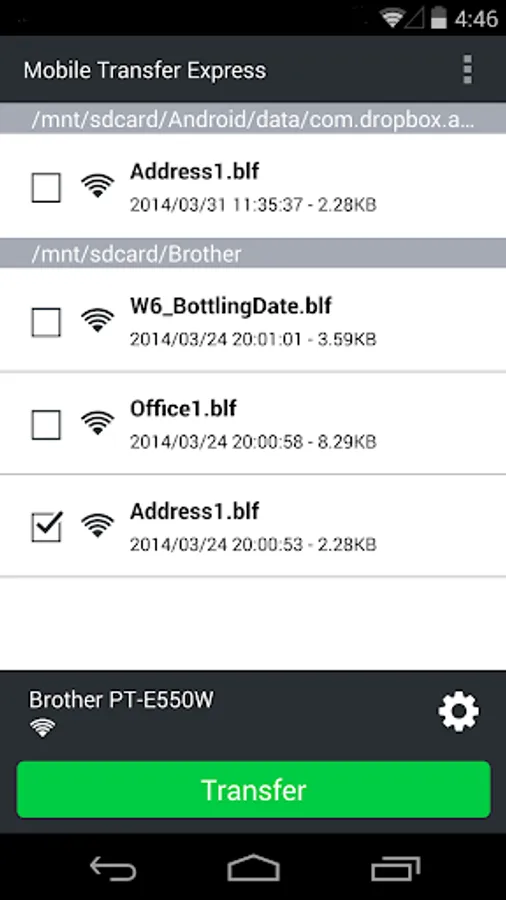
In this app, users can transfer label templates, databases, and images to compatible label printers using Bluetooth or Wi-Fi. Includes cloud sharing, file saving from emails, and USB transfer options.
AppRecs review analysis
AppRecs rating 3.3. Trustworthiness 59 out of 100. Review manipulation risk 36 out of 100. Based on a review sample analyzed.
★★★☆☆
3.3
AppRecs Rating
Ratings breakdown
5 star
55%
4 star
12%
3 star
8%
2 star
4%
1 star
20%
What to know
✓
Good user ratings
68% positive sampled reviews
✓
Authentic reviews
Natural distribution, no red flags
About Mobile Transfer Express
[Description]
Mobile Transfer Express is an application that allows you to use a mobile device to transfer compatible label templates, databases and images with P-touch Transfer Manager (Windows version) onto a label printer.
[How to use]
Create a Transfer File before using this application.
Check FAQ for instructions on creating a Transfer File.
This application can be used in the following ways:
- Sharing Transfer Files saved to the cloud by using the application's sharing function
- Saving Transfer Files attached to email messages onto the mobile device
- Saving Transfer Files onto the mobile device from a computer connected with a USB cable
[Key Features]
Load *.BLF & *.PDZ files from any app.
Utilize mobile device or cloud services as unlimited external storage of the printer.
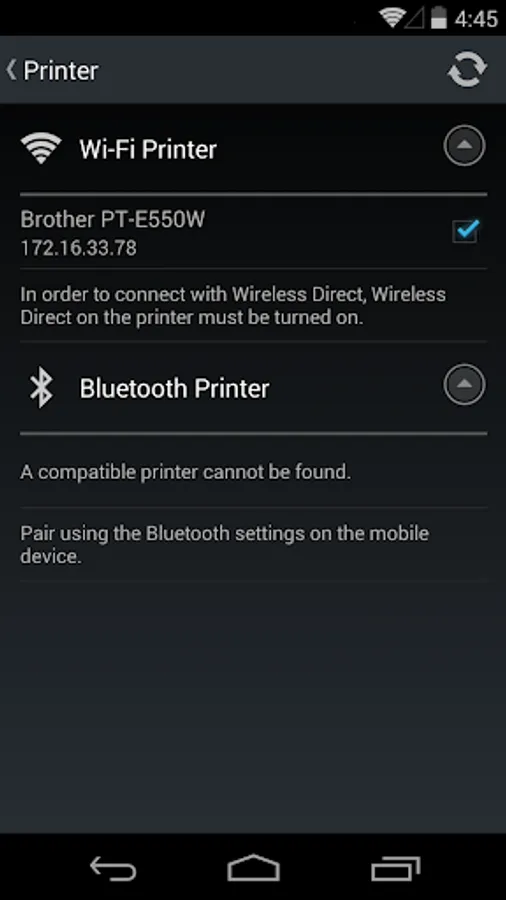
Connect to the printer using Bluetooth or Wi-Fi.
[Compatible machines]
MW-145MFi, MW-260MFi, PJ-822, PJ-823, PJ-862, PJ-863, PJ-883, PJ-722, PJ-723, PJ-762, PJ-763, PJ-763MFi, PJ-773, PT-D800W, PT-E550W, PT-E800W, PT-E850TKW, PT-P750W, PT-P900W, PT-P950NW, QL-1110NWB, QL-1115NWB, QL-810W, QL-820NWB, RJ-2030, RJ-2050, RJ-2140, RJ-2150, RJ-3050, RJ-3050Ai, RJ-3150, RJ-3150Ai, RJ-3230B, RJ-3250WB, RJ-3235B, RJ-3255WB, RJ-4030, RJ-4030Ai, RJ-4040, RJ-4230B, RJ-4250WB, RJ-4235B, RJ-4255WB, TD-2120N, TD-2125N, TD-2130N, TD-2135N, TD-4550DNWB, TD-4215D, TD-4415D, TD-4425DN, TD-4425DNF, TD-4455DNWB, TD-4525DN, TD-4555DNWB, TD-4555DNWBF, TD-2125NWB, TD-2135NWB, TD-2310D, TD-2320D, TD-2320DF, TD-2320DSA, TD-2350D, TD-2350DF, TD-2350DSA, TD-2350DFSA,
PT-E310BT,PT-E560BT
[Compatible OS]
Android 9.0 or above
Improved connectivity between the printer and your device.
[For Android 9 Pie or later]
Location services must be enabled to connect to your printer via Wireless Direct.
To help us improve the application, send your feedback to Feedback-mobile-apps-lm@brother.com. Please note that we may not be able to respond to individual emails.[Description]
Mobile Transfer Express is an application that allows you to use a mobile device to transfer compatible label templates, databases and images with P-touch Transfer Manager (Windows version) onto a label printer.
[How to use]
Create a Transfer File before using this application.
Check FAQ for instructions on creating a Transfer File.
This application can be used in the following ways:
- Sharing Transfer Files saved to the cloud by using the application's sharing function
- Saving Transfer Files attached to email messages onto the mobile device
- Saving Transfer Files onto the mobile device from a computer connected with a USB cable
[Key Features]
Load *.BLF & *.PDZ files from any app.
Utilize mobile device or cloud services as unlimited external storage of the printer.
Connect to the printer using Bluetooth or Wi-Fi.
[Compatible machines]
MW-145MFi, MW-260MFi, PJ-822, PJ-823, PJ-862, PJ-863, PJ-883, PJ-722, PJ-723, PJ-762, PJ-763, PJ-763MFi, PJ-773, PT-D800W, PT-E550W, PT-E800W, PT-E850TKW, PT-P750W, PT-P900W, PT-P950NW, QL-1110NWB, QL-1115NWB, QL-810W, QL-820NWB, RJ-2030, RJ-2050, RJ-2140, RJ-2150, RJ-3050, RJ-3050Ai, RJ-3150, RJ-3150Ai, RJ-3230B, RJ-3250WB, RJ-3235B, RJ-3255WB, RJ-4030, RJ-4030Ai, RJ-4040, RJ-4230B, RJ-4250WB, RJ-4235B, RJ-4255WB, TD-2120N, TD-2125N, TD-2130N, TD-2135N, TD-4550DNWB, TD-4215D, TD-4415D, TD-4425DN, TD-4425DNF, TD-4455DNWB, TD-4525DN, TD-4555DNWB, TD-4555DNWBF, TD-2125NWB, TD-2135NWB, TD-2310D, TD-2320D, TD-2320DF, TD-2320DSA, TD-2350D, TD-2350DF, TD-2350DSA, TD-2350DFSA,
PT-E310BT,PT-E560BT
[Compatible OS]
Android 9.0 or above
Improved connectivity between the printer and your device.
[For Android 9 Pie or later]
Location services must be enabled to connect to your printer via Wireless Direct.
To help us improve the application, send your feedback to Feedback-mobile-apps-lm@brother.com. Please note that we may not be able to respond to individual emails.
Mobile Transfer Express is an application that allows you to use a mobile device to transfer compatible label templates, databases and images with P-touch Transfer Manager (Windows version) onto a label printer.
[How to use]
Create a Transfer File before using this application.
Check FAQ for instructions on creating a Transfer File.
This application can be used in the following ways:
- Sharing Transfer Files saved to the cloud by using the application's sharing function
- Saving Transfer Files attached to email messages onto the mobile device
- Saving Transfer Files onto the mobile device from a computer connected with a USB cable
[Key Features]
Load *.BLF & *.PDZ files from any app.
Utilize mobile device or cloud services as unlimited external storage of the printer.
Connect to the printer using Bluetooth or Wi-Fi.
[Compatible machines]
MW-145MFi, MW-260MFi, PJ-822, PJ-823, PJ-862, PJ-863, PJ-883, PJ-722, PJ-723, PJ-762, PJ-763, PJ-763MFi, PJ-773, PT-D800W, PT-E550W, PT-E800W, PT-E850TKW, PT-P750W, PT-P900W, PT-P950NW, QL-1110NWB, QL-1115NWB, QL-810W, QL-820NWB, RJ-2030, RJ-2050, RJ-2140, RJ-2150, RJ-3050, RJ-3050Ai, RJ-3150, RJ-3150Ai, RJ-3230B, RJ-3250WB, RJ-3235B, RJ-3255WB, RJ-4030, RJ-4030Ai, RJ-4040, RJ-4230B, RJ-4250WB, RJ-4235B, RJ-4255WB, TD-2120N, TD-2125N, TD-2130N, TD-2135N, TD-4550DNWB, TD-4215D, TD-4415D, TD-4425DN, TD-4425DNF, TD-4455DNWB, TD-4525DN, TD-4555DNWB, TD-4555DNWBF, TD-2125NWB, TD-2135NWB, TD-2310D, TD-2320D, TD-2320DF, TD-2320DSA, TD-2350D, TD-2350DF, TD-2350DSA, TD-2350DFSA,
PT-E310BT,PT-E560BT
[Compatible OS]
Android 9.0 or above
Improved connectivity between the printer and your device.
[For Android 9 Pie or later]
Location services must be enabled to connect to your printer via Wireless Direct.
To help us improve the application, send your feedback to Feedback-mobile-apps-lm@brother.com. Please note that we may not be able to respond to individual emails.[Description]
Mobile Transfer Express is an application that allows you to use a mobile device to transfer compatible label templates, databases and images with P-touch Transfer Manager (Windows version) onto a label printer.
[How to use]
Create a Transfer File before using this application.
Check FAQ for instructions on creating a Transfer File.
This application can be used in the following ways:
- Sharing Transfer Files saved to the cloud by using the application's sharing function
- Saving Transfer Files attached to email messages onto the mobile device
- Saving Transfer Files onto the mobile device from a computer connected with a USB cable
[Key Features]
Load *.BLF & *.PDZ files from any app.
Utilize mobile device or cloud services as unlimited external storage of the printer.
Connect to the printer using Bluetooth or Wi-Fi.
[Compatible machines]
MW-145MFi, MW-260MFi, PJ-822, PJ-823, PJ-862, PJ-863, PJ-883, PJ-722, PJ-723, PJ-762, PJ-763, PJ-763MFi, PJ-773, PT-D800W, PT-E550W, PT-E800W, PT-E850TKW, PT-P750W, PT-P900W, PT-P950NW, QL-1110NWB, QL-1115NWB, QL-810W, QL-820NWB, RJ-2030, RJ-2050, RJ-2140, RJ-2150, RJ-3050, RJ-3050Ai, RJ-3150, RJ-3150Ai, RJ-3230B, RJ-3250WB, RJ-3235B, RJ-3255WB, RJ-4030, RJ-4030Ai, RJ-4040, RJ-4230B, RJ-4250WB, RJ-4235B, RJ-4255WB, TD-2120N, TD-2125N, TD-2130N, TD-2135N, TD-4550DNWB, TD-4215D, TD-4415D, TD-4425DN, TD-4425DNF, TD-4455DNWB, TD-4525DN, TD-4555DNWB, TD-4555DNWBF, TD-2125NWB, TD-2135NWB, TD-2310D, TD-2320D, TD-2320DF, TD-2320DSA, TD-2350D, TD-2350DF, TD-2350DSA, TD-2350DFSA,
PT-E310BT,PT-E560BT
[Compatible OS]
Android 9.0 or above
Improved connectivity between the printer and your device.
[For Android 9 Pie or later]
Location services must be enabled to connect to your printer via Wireless Direct.
To help us improve the application, send your feedback to Feedback-mobile-apps-lm@brother.com. Please note that we may not be able to respond to individual emails.