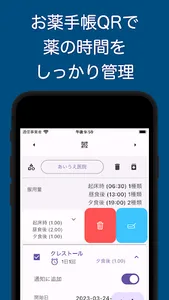
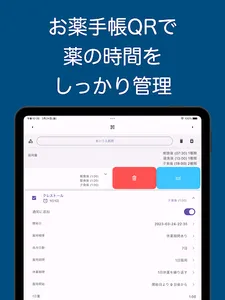
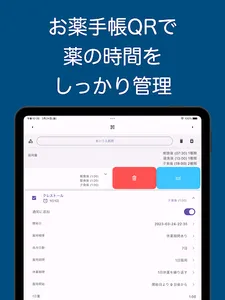
Read the electronic medication notebook QR code and easily register a medication notification alarm!
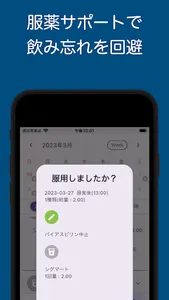
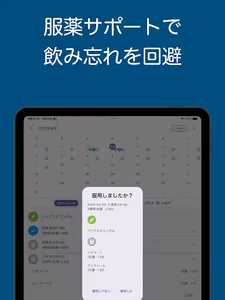
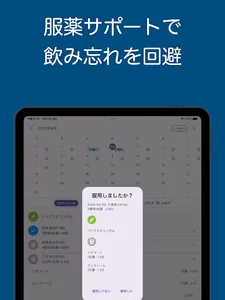
Let's manage medicine and prevent forgetting to take medicine!
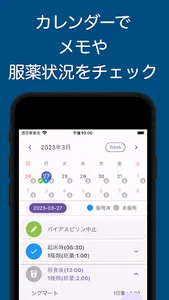
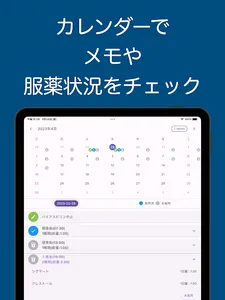
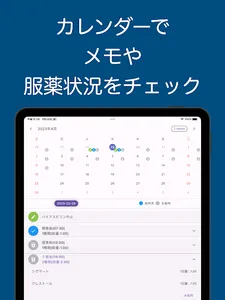
Easy check on the calendar to see if you took medicine!
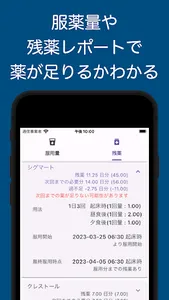
Equipped with remaining medicine calculation and dosage check (single package calculation) functions!
This application is created for the purpose of notifying the time to take medicine, calculating the dose per dose, and calculating the remaining medicine based on the read data using the electronic medicine notebook QR code.
The readable QR code standard is based on "JAHIS Electronic Medicine Notebook Data Format Specifications Ver.2.4" (2020.3).
[Overview of the app]
・It is an application that can be used to manage medicines by registering medicine information by reading medicine notebook QR. With simple input, you will be notified of the remaining amount of medicine and the time of the next dose with a reminder to prevent you from forgetting to take it. Even if you take many medicines, you can manage them at a glance with the calendar.
-Efficient drug management. If you leave your medication history as a notebook, you can easily check the type and amount of medicine. The function to automatically calculate the type and amount of medicine makes it easier to check medication. It also helps prevent forgetting to drink.
- Medication reminders can be set in advance, so you don't have to enter them over and over again. By using the filter function, depending on how you use it, you can also enter a special dosing method from the QR code.
[Outline of usage]
In this application, the screen is roughly divided into 4 parts.
You can manage all the time for usage and the distribution settings of usage data read by QR code on the "setting screen".
● Drug registration screen
・This is the screen for registering drug information, which is the basis for calculating reports and taking medication status.
・You can register by reading the medicine notebook QR code or pressing the add button of the medicine.
・It is related to dose calculation, remaining medicine calculation, alarm, etc.
● Report screen
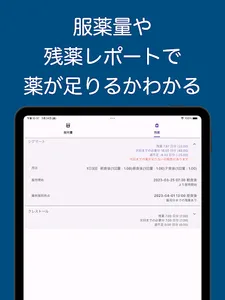
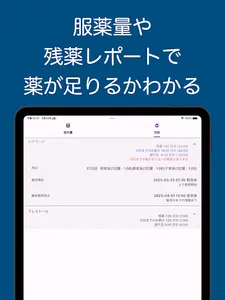
・Based on the registered medicine, you can see the dosage and remaining medicine report.
- In the dose report, you can see the dose by time of taking, the name of the drug taken, etc.
・In the remaining medicine report, you can see how many days you have leftover medicine, how many days you have taken the current leftover medicine, and how many days until which time you took it.
● Medication status screen
・You can check memos, taken data, and untaken data in a calendar format.
・You can not only leave special notes in the memo, but also reflect the contents of the memo in the medication reminder on the specified day.
・Dose data will be recorded and displayed on the calendar. It also records what you have taken.
・The unmedicated data is displayed as a summary of the time and content of the medicine to be taken from now on.
●Setting screen
- You can check how to use this application.
・You can set the actual usage to be sorted from the usage name of the information read by the QR code.
Let's manage medicine and prevent forgetting to take medicine!
Easy check on the calendar to see if you took medicine!
Equipped with remaining medicine calculation and dosage check (single package calculation) functions!
This application is created for the purpose of notifying the time to take medicine, calculating the dose per dose, and calculating the remaining medicine based on the read data using the electronic medicine notebook QR code.
The readable QR code standard is based on "JAHIS Electronic Medicine Notebook Data Format Specifications Ver.2.4" (2020.3).
[Overview of the app]
・It is an application that can be used to manage medicines by registering medicine information by reading medicine notebook QR. With simple input, you will be notified of the remaining amount of medicine and the time of the next dose with a reminder to prevent you from forgetting to take it. Even if you take many medicines, you can manage them at a glance with the calendar.
-Efficient drug management. If you leave your medication history as a notebook, you can easily check the type and amount of medicine. The function to automatically calculate the type and amount of medicine makes it easier to check medication. It also helps prevent forgetting to drink.
- Medication reminders can be set in advance, so you don't have to enter them over and over again. By using the filter function, depending on how you use it, you can also enter a special dosing method from the QR code.
[Outline of usage]
In this application, the screen is roughly divided into 4 parts.
You can manage all the time for usage and the distribution settings of usage data read by QR code on the "setting screen".
● Drug registration screen
・This is the screen for registering drug information, which is the basis for calculating reports and taking medication status.
・You can register by reading the medicine notebook QR code or pressing the add button of the medicine.
・It is related to dose calculation, remaining medicine calculation, alarm, etc.
● Report screen
・Based on the registered medicine, you can see the dosage and remaining medicine report.
- In the dose report, you can see the dose by time of taking, the name of the drug taken, etc.
・In the remaining medicine report, you can see how many days you have leftover medicine, how many days you have taken the current leftover medicine, and how many days until which time you took it.
● Medication status screen
・You can check memos, taken data, and untaken data in a calendar format.
・You can not only leave special notes in the memo, but also reflect the contents of the memo in the medication reminder on the specified day.
・Dose data will be recorded and displayed on the calendar. It also records what you have taken.
・The unmedicated data is displayed as a summary of the time and content of the medicine to be taken from now on.
●Setting screen
- You can check how to use this application.
・You can set the actual usage to be sorted from the usage name of the information read by the QR code.
Show More