
AppRecs review analysis
AppRecs rating . Trustworthiness 55 out of 100. Review manipulation risk 39 out of 100. Based on a review sample analyzed.
★
AppRecs Rating
Ratings breakdown
5 star
100%
4 star
0%
3 star
0%
2 star
0%
1 star
0%
What to know
✓
High user satisfaction
100% of sampled ratings are 5 stars
About Font2MTZ - HyperOS Font Themes
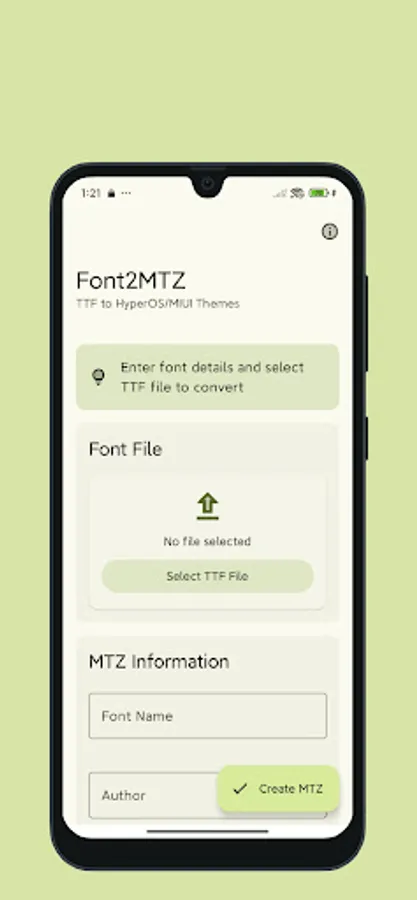
Font2MTZ is the simplest way to convert your favorite TTF fonts to MTZ format for use with HyperOS and MIUI themes. Create custom font themes for your Xiaomi, Redmi, or POCO device with just a few taps!
✨ KEY FEATURES:
- Simple Conversion: Select a TTF font file and convert it to MTZ format in seconds
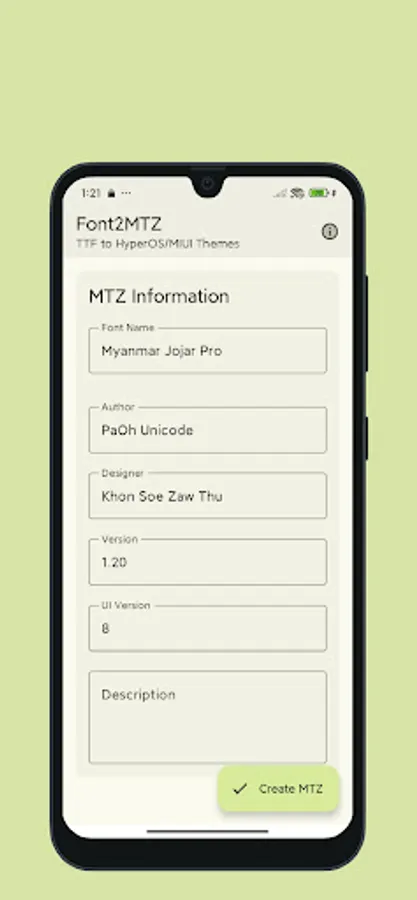
- Automatic Font Detection: App automatically reads and fills in font metadata when available
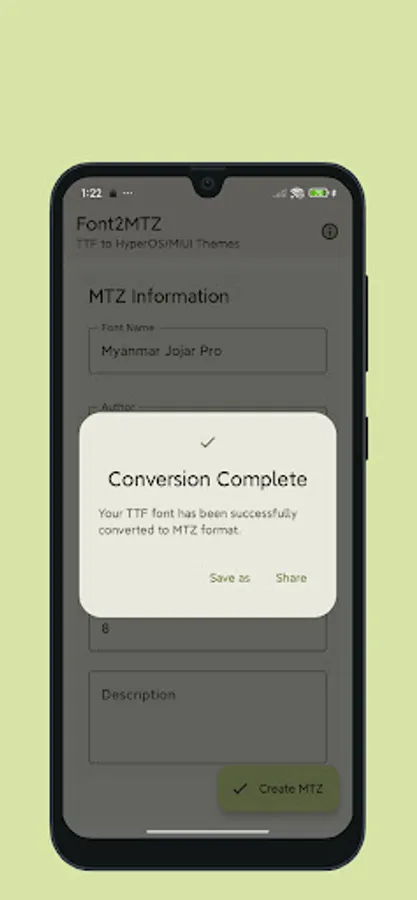
- Save or Share: Easily save converted fonts to your device or share directly with other apps
- Beautiful UI: Clean, intuitive interface following Material Design 3 guidelines
📱 CUSTOM FONTS FOR YOUR DEVICE:
Font2MTZ makes it easy to personalize your HyperOS or MIUI device with custom fonts. Once converted, your MTZ font theme can be applied using the built-in theme manager on your device.
💡 HOW TO USE:
1. Select a TTF font file from your device
2. The app will automatically fill in available font information
3. Add any missing details if needed
4. Tap "Create MTZ" to convert your font
5. Save or share the resulting MTZ file
6. Apply the font using your device's theme manager
📝 SUPPORTED FONTS:
- All standard TTF font files
- Works with most professionally designed and free TTF fonts
- Compatible with single font files (not font families)
📱 COMPATIBILITY:
- Creates MTZ files compatible with HyperOS and MIUI devices
- Works with Xiaomi, Redmi, and POCO devices
- Supported on MIUI 8 and above
- HyperOS fully supported
Note: This app is not affiliated with Xiaomi, Redmi, POCO, or MIUI. MTZ is a file format for themes used by HyperOS and MIUI.
✨ KEY FEATURES:
- Simple Conversion: Select a TTF font file and convert it to MTZ format in seconds
- Automatic Font Detection: App automatically reads and fills in font metadata when available
- Save or Share: Easily save converted fonts to your device or share directly with other apps
- Beautiful UI: Clean, intuitive interface following Material Design 3 guidelines
📱 CUSTOM FONTS FOR YOUR DEVICE:
Font2MTZ makes it easy to personalize your HyperOS or MIUI device with custom fonts. Once converted, your MTZ font theme can be applied using the built-in theme manager on your device.
💡 HOW TO USE:
1. Select a TTF font file from your device
2. The app will automatically fill in available font information
3. Add any missing details if needed
4. Tap "Create MTZ" to convert your font
5. Save or share the resulting MTZ file
6. Apply the font using your device's theme manager
📝 SUPPORTED FONTS:
- All standard TTF font files
- Works with most professionally designed and free TTF fonts
- Compatible with single font files (not font families)
📱 COMPATIBILITY:
- Creates MTZ files compatible with HyperOS and MIUI devices
- Works with Xiaomi, Redmi, and POCO devices
- Supported on MIUI 8 and above
- HyperOS fully supported
Note: This app is not affiliated with Xiaomi, Redmi, POCO, or MIUI. MTZ is a file format for themes used by HyperOS and MIUI.
Font2MTZ - HyperOS Font Themes Screenshots
Tap to Rate:
Reviews for Font2MTZ - HyperOS Font Themes
exe
11/21/2025
useful