
MagicPlay: AirPlay for Android
doubleTwist ™
3.0 ★
303 ratings
10,000+
downloads
$2.99
In this app, you can stream music and videos from your Android device to AirPlay-compatible receivers and Apple TV. Includes support for wireless speakers, Apple TV, and compatibility with doubleTwist Player.
AppRecs review analysis
AppRecs rating 3.0. Trustworthiness 0 out of 100. Review manipulation risk 0 out of 100. Based on a review sample analyzed.
★★★☆☆
3.0
AppRecs Rating
Ratings breakdown
5 star
25%
4 star
20%
3 star
15%
2 star
5%
1 star
35%
What to know
✓
Authentic reviews
Natural distribution, no red flags
⚠
Mixed user feedback
Average 3.0★ rating suggests room for improvement
⚠
High negative review ratio
40% of sampled ratings are 1–2 stars
About MagicPlay: AirPlay for Android
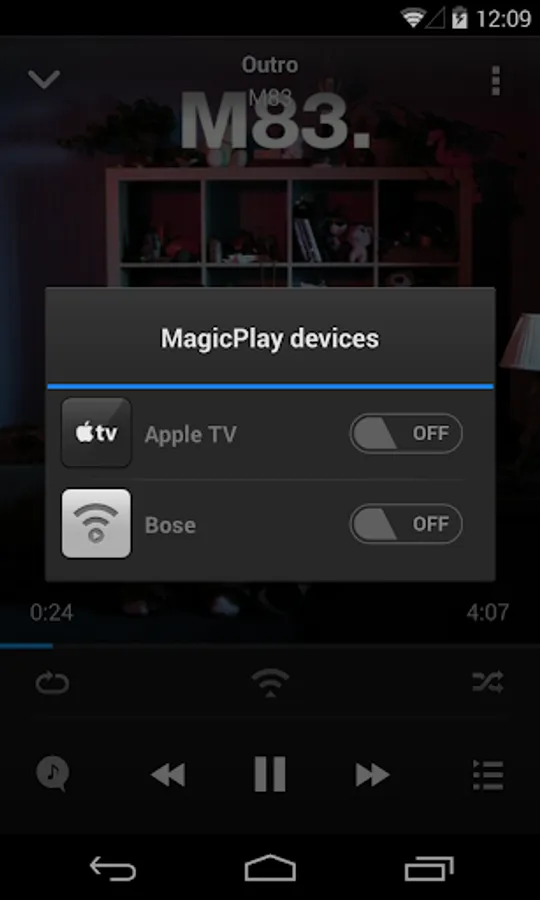
doubleTwist’s MagicPlay brings AirPlay music and video support to Android. Stream your music to your Apple TV and AirPlay-compatible wireless speakers.
The most user friendly way to AirPlay on Android, trusted by millions.
Stream music from your Android phone or tablet to wireless speakers and Apple TV:
♬ AirPlay music from Android to WiFi speakers and receivers such as Zeppelin Air, Bose and Yamaha.
♬ AirPlay music to Apple TV (black model) and AirPort Express.
Stream videos (mp4 format) to Apple TV.
MagicPlay: AirPlay for Android is an upgrade to the free doubleTwist Player, unlocking AirPlay music and video support. It will NOT work without the free doubleTwist Player so please download it after you install this app. If you have previously purchased doubleTwist Pro or AirSync you do not need to buy this app as the functionality is already automatically unlocked for you.
Bonus: this package also adds AirPlay support to the Google Play Music app on rooted devices. See our blog for more details (http://blog.doubletwist.com/2014/04/22/airplay-support-for-google-play-music/). Note that this particular feature does not require doubleTwist Player to be installed.
NOTE: For streaming to Apple TV, confirm you've disabled Device Verification under Settings > AirPlay > Security > Require Device Verification on your Apple device. This setting exists on firmware version 6.1 or higher. If you have an older firmware, don't worry about it.
Join our Community:
Get tips and ask questions on our public Google+ group: https://plus.google.com/communities/114410062688956839568
Follow us on Twitter: https://twitter.com/doubletwist
Facebook: https://www.facebook.com/doubletwist.official
Need Help on how to AirPlay? Visit http://www.doubletwist.com/help/
Time to pump up the bass on your speakers using AirPlay on Android!
doubleTwist has been described by the New York Times as the "iTunes for Android".
AirPlay and iTunes are registered trademarks of Apple Inc.
The most user friendly way to AirPlay on Android, trusted by millions.
Stream music from your Android phone or tablet to wireless speakers and Apple TV:
♬ AirPlay music from Android to WiFi speakers and receivers such as Zeppelin Air, Bose and Yamaha.
♬ AirPlay music to Apple TV (black model) and AirPort Express.
Stream videos (mp4 format) to Apple TV.
MagicPlay: AirPlay for Android is an upgrade to the free doubleTwist Player, unlocking AirPlay music and video support. It will NOT work without the free doubleTwist Player so please download it after you install this app. If you have previously purchased doubleTwist Pro or AirSync you do not need to buy this app as the functionality is already automatically unlocked for you.
Bonus: this package also adds AirPlay support to the Google Play Music app on rooted devices. See our blog for more details (http://blog.doubletwist.com/2014/04/22/airplay-support-for-google-play-music/). Note that this particular feature does not require doubleTwist Player to be installed.
NOTE: For streaming to Apple TV, confirm you've disabled Device Verification under Settings > AirPlay > Security > Require Device Verification on your Apple device. This setting exists on firmware version 6.1 or higher. If you have an older firmware, don't worry about it.
Join our Community:
Get tips and ask questions on our public Google+ group: https://plus.google.com/communities/114410062688956839568
Follow us on Twitter: https://twitter.com/doubletwist
Facebook: https://www.facebook.com/doubletwist.official
Need Help on how to AirPlay? Visit http://www.doubletwist.com/help/
Time to pump up the bass on your speakers using AirPlay on Android!
doubleTwist has been described by the New York Times as the "iTunes for Android".
AirPlay and iTunes are registered trademarks of Apple Inc.
MagicPlay: AirPlay for Android Screenshots

Tap to Rate: