AppRecs review analysis
AppRecs rating . Trustworthiness 71 out of 100. Review manipulation risk 26 out of 100. Based on a review sample analyzed.
★
AppRecs Rating
Ratings breakdown
5 star
50%
4 star
50%
3 star
0%
2 star
0%
1 star
0%
What to know
✓
Low review manipulation risk
26% review manipulation risk
✓
Credible reviews
71% trustworthiness score from analyzed reviews
✓
High user satisfaction
100% of sampled ratings are 4+ stars (4.5★ average)
About ATAK Plugin: GRG Builder
ATTENTION: This is an ATAK Plugin. To use this extended capability, the ATAK baseline must be installed. Download the ATAK baseline here: https://play.google.com/store/apps/details?id=com.atakmap.app.civ
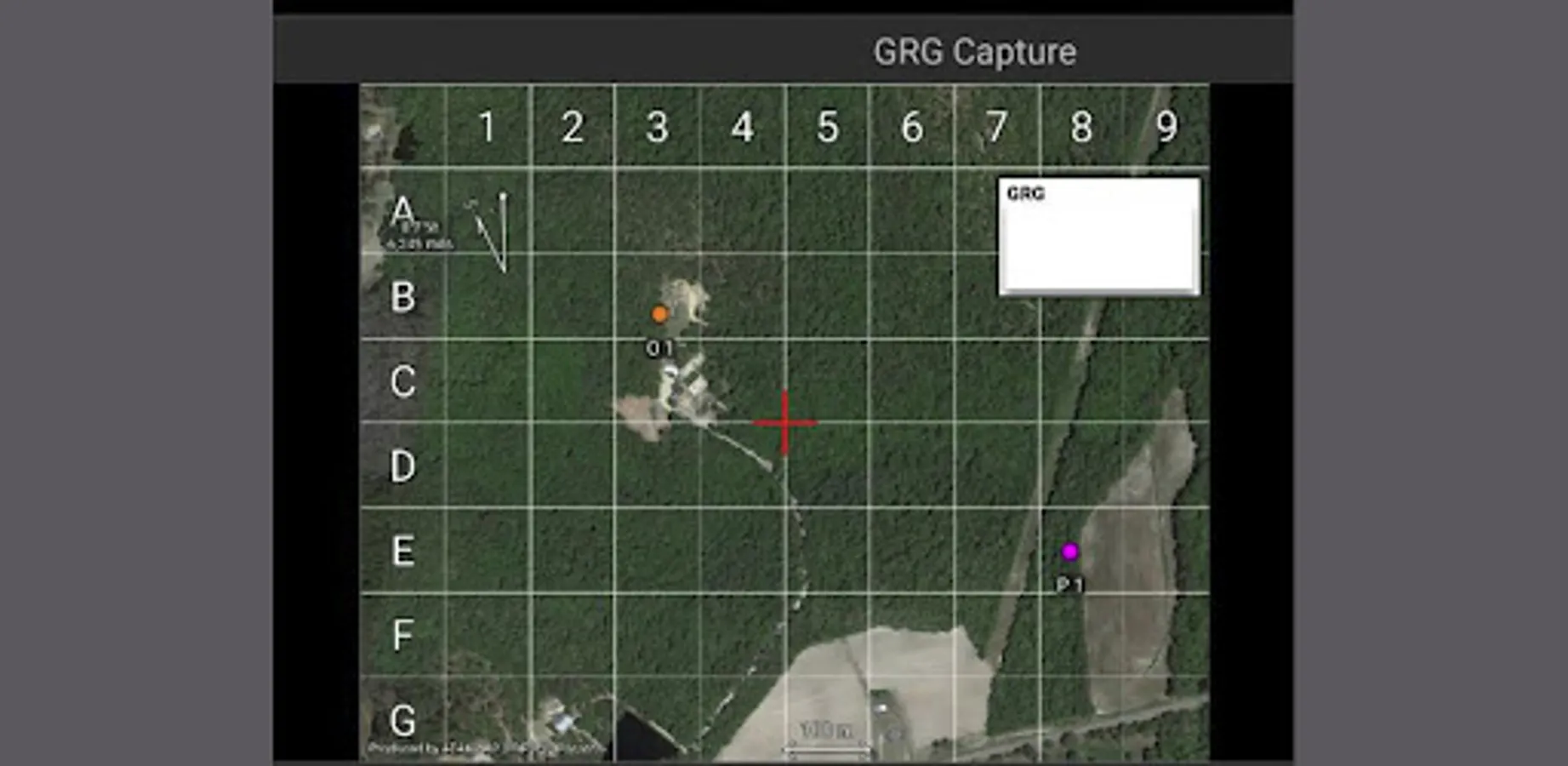
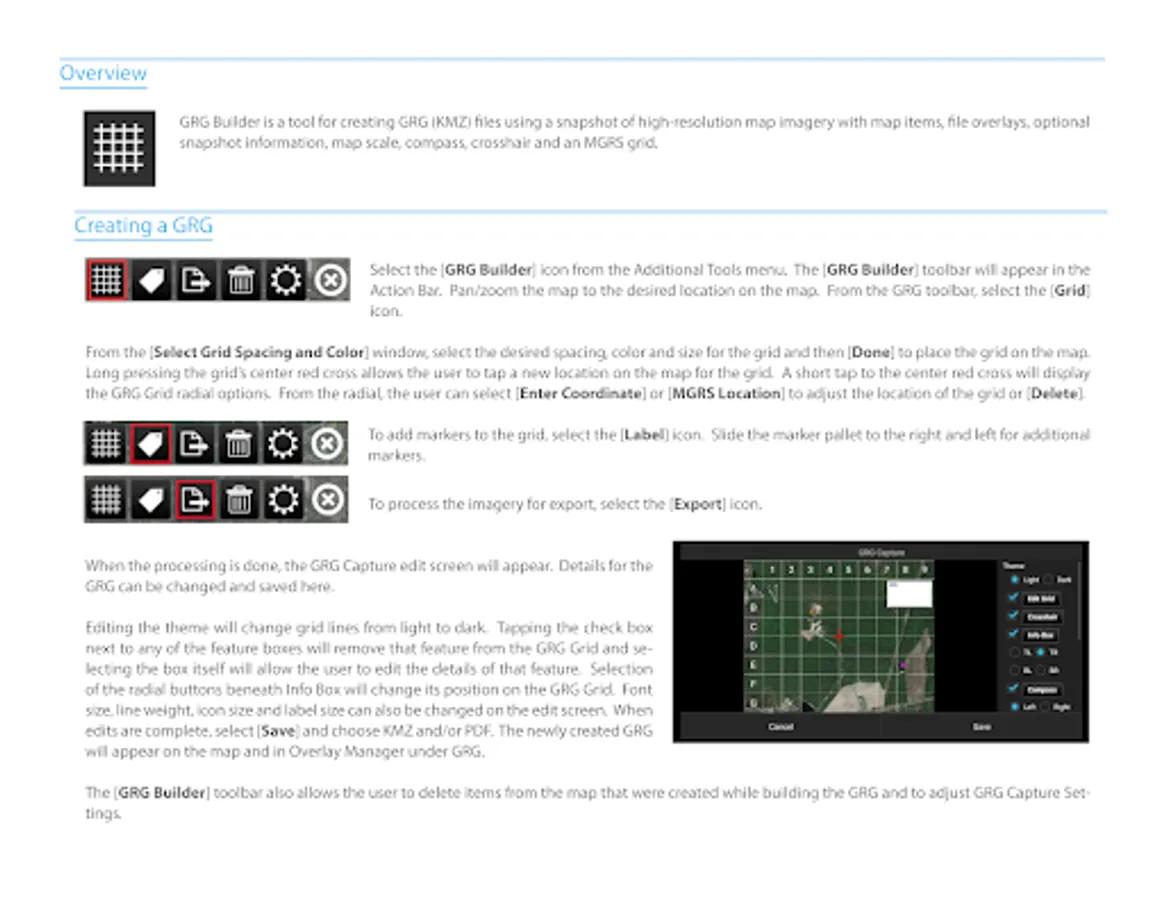
The GRG Builder is a tool for creating GRG (KMZ) files using a snapshot of the ATAK map view, map items, and optional overlays such as snapshot information, map scale, compass, and an MGRS grid. There are 3 buttons displayed in the toolbar which help the user setup a GRG:
The "Grid" button (white grid icon)
The "Labels" button (white label icon)
The "Export" button (white export icon)
The "Grid" button allows the user to drop an 8x10 MGRS-aligned grid onto the center of the map. When first selected, a dialog appears allowing the user to choose the grid spacing (in meters). While the grid is active the button will be highlighted green. Pressing the button while the grid is
active will clear the grid.
The "Labels" button opens the point dropper drop-down to the spot map and label menu. By default the label point dropper will be activated.
The "Export" button begins the imagery processing tool. If the grid has been dropped the image will automatically snap to the grid extents. A dialog is displayed showing the progress of the high resolution map capture. Once finished the user has control over several of the styles and features drawn onto the final output image before saving. Users can control the visibility position of overlays as well as the size of map items and labels.
GRGs are saved in the KMZ format to the /atak/tools/grgbuilder/ folder.
The GRG Builder is a tool for creating GRG (KMZ) files using a snapshot of the ATAK map view, map items, and optional overlays such as snapshot information, map scale, compass, and an MGRS grid. There are 3 buttons displayed in the toolbar which help the user setup a GRG:
The "Grid" button (white grid icon)
The "Labels" button (white label icon)
The "Export" button (white export icon)
The "Grid" button allows the user to drop an 8x10 MGRS-aligned grid onto the center of the map. When first selected, a dialog appears allowing the user to choose the grid spacing (in meters). While the grid is active the button will be highlighted green. Pressing the button while the grid is
active will clear the grid.
The "Labels" button opens the point dropper drop-down to the spot map and label menu. By default the label point dropper will be activated.
The "Export" button begins the imagery processing tool. If the grid has been dropped the image will automatically snap to the grid extents. A dialog is displayed showing the progress of the high resolution map capture. Once finished the user has control over several of the styles and features drawn onto the final output image before saving. Users can control the visibility position of overlays as well as the size of map items and labels.
GRGs are saved in the KMZ format to the /atak/tools/grgbuilder/ folder.
ATAK Plugin: GRG Builder Screenshots
Tap to Rate:
Reviews for ATAK Plugin: GRG Builder
WOA! Wild Orchid Adventures
7/16/2024
Super practical plug-in, I use it to screen shot high res imagery/data and to share with stakeholders. It often misses labels, track files are not in correct position, and sometimes point colour's change. Hoping an update fixes this.
Henrik Lopperi
7/17/2023
Very good feature