
Chrome River SNAP
Emburse, Inc.
4.0 ★
174 ratings
100,000+
downloads
Free
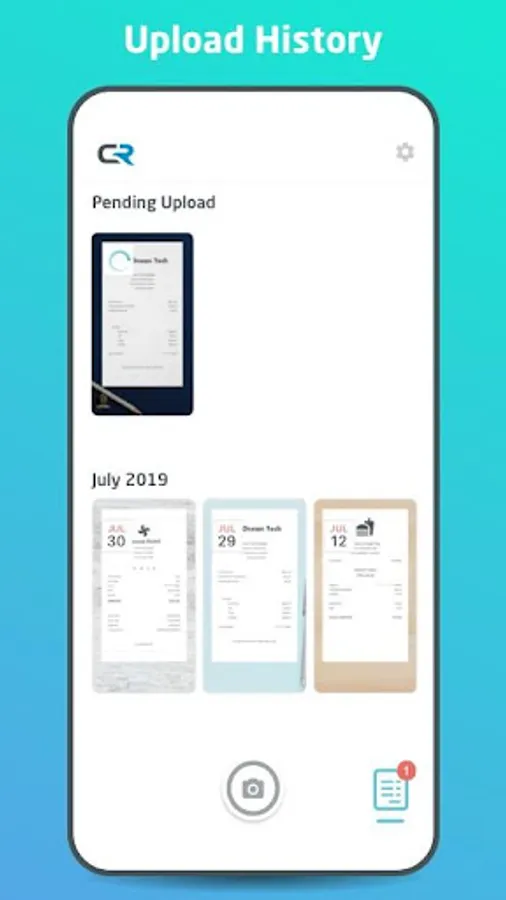
With this receipt management app, you can capture and upload receipt images during business trips and share existing receipts from your gallery. Includes offline functionality and an upload review gallery.
AppRecs review analysis
AppRecs rating 4.1. Trustworthiness 84 out of 100. Review manipulation risk 20 out of 100. Based on a review sample analyzed.
★★★★☆
4.1
AppRecs Rating
Ratings breakdown
5 star
65%
4 star
10%
3 star
4%
2 star
5%
1 star
15%
What to know
✓
Low review manipulation risk
20% review manipulation risk
✓
Credible reviews
84% trustworthiness score from analyzed reviews
✓
High user satisfaction
75% of sampled ratings are 4+ stars (4.0★ average)
About Chrome River SNAP
Managing paper expense receipts during a business trip can be a hassle and can slow down expense report creation and submission. Chrome River now offers Chrome River SNAP - an optional app for business travelers to eliminate the need to keep a stack of paper receipts and decrease the amount of time necessary to create an expense report later.
Note: This is a standalone utility app for capturing and uploading receipt images. To create and submit expense reports using the receipt images captured and uploaded automatically by this utility app, users should log into the Chrome River web app.
With Chrome River SNAP, you can:
• Capture and upload receipt images as expenses occur. Images will be uploaded to the Chrome River EXPENSE Receipt Gallery
• Share existing receipt images from your smartphone's photo gallery app or third-party photo apps
• Separate your business from your personal life. Images taken with Chrome River SNAP are uploaded to the EXPENSE Receipt Gallery and are not saved to your personal photo library.
Here's how Chrome River SNAP works:
• Simply take a photo of a receipt using the Chrome River SNAP app and upload!
• Share an existing receipt image, open the image in any photo gallery app and tap the "share" icon and look for the CR SNAP icon to upload your image to the EXPENSE Receipt Gallery.
• Go to the Upload Gallery to review all the pending and successfully uploaded receipts sent from your device.
CAN I USE THIS APP WITHOUT AN INTERNET CONNECTION?
Yes, whether you have an internet connection or not, you will be able to use Chrome River SNAP. There may be times when an internet connection is temporarily unavailable and in this case, the image will remain in Chrome River SNAP until you are in a location with a stronger connection, and it is then uploaded. We encourage you to not close the app until a green check mark has been designated to a photo, indicating that the photo has been successfully uploaded to Chrome River EXPENSE.
Learn more at www.chromeriver.com.
You must be an existing Chrome River EXPENSE user to use Chrome River SNAP.
System requirements: Chrome River is committed to provide support for mainstream Android devices, but we recognize that the Android hardware is so diverse that we cannot ensure adequate testing for all devices.
Note: This is a standalone utility app for capturing and uploading receipt images. To create and submit expense reports using the receipt images captured and uploaded automatically by this utility app, users should log into the Chrome River web app.
With Chrome River SNAP, you can:
• Capture and upload receipt images as expenses occur. Images will be uploaded to the Chrome River EXPENSE Receipt Gallery
• Share existing receipt images from your smartphone's photo gallery app or third-party photo apps
• Separate your business from your personal life. Images taken with Chrome River SNAP are uploaded to the EXPENSE Receipt Gallery and are not saved to your personal photo library.
Here's how Chrome River SNAP works:
• Simply take a photo of a receipt using the Chrome River SNAP app and upload!
• Share an existing receipt image, open the image in any photo gallery app and tap the "share" icon and look for the CR SNAP icon to upload your image to the EXPENSE Receipt Gallery.
• Go to the Upload Gallery to review all the pending and successfully uploaded receipts sent from your device.
CAN I USE THIS APP WITHOUT AN INTERNET CONNECTION?
Yes, whether you have an internet connection or not, you will be able to use Chrome River SNAP. There may be times when an internet connection is temporarily unavailable and in this case, the image will remain in Chrome River SNAP until you are in a location with a stronger connection, and it is then uploaded. We encourage you to not close the app until a green check mark has been designated to a photo, indicating that the photo has been successfully uploaded to Chrome River EXPENSE.
Learn more at www.chromeriver.com.
You must be an existing Chrome River EXPENSE user to use Chrome River SNAP.
System requirements: Chrome River is committed to provide support for mainstream Android devices, but we recognize that the Android hardware is so diverse that we cannot ensure adequate testing for all devices.
Chrome River SNAP Screenshots


Tap to Rate:
Reviews for Chrome River SNAP
Thomas Nelson II
9/10/2025
love it
Kevin Acheson
6/24/2025
doesn't work. CR app also doesn't want to load.