Android Wear (SmartWatch 3)
This is a clock app for soccer referees.
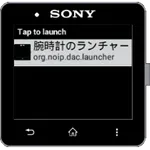
I was developing with SmartWatch 2 (SW2), but I remade it as an Android Wear version. Only the functions that I thought were necessary were implemented. We have made improvements so that other models can work, and now we have confirmed the operation with Casio PRO TREK Smart.
You can measure match time and running time, vibrate when time is up, and score notes.
■ Preparation
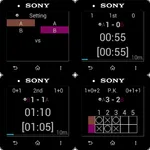
Tap "15min" at the bottom of the screen to set the match time.
Tap "A" and "B" on the left and right of the screen to set the team name.
It's convenient to focus on the kick-off.
* Since SmartWatch 3 cannot input characters, only one character can be toggled.
■ First half
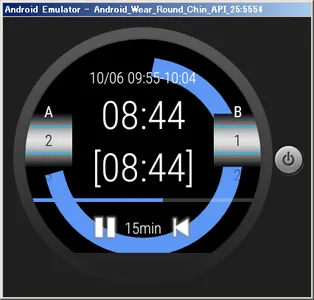
Tap the center of the screen or the PLAY icon to kick off.
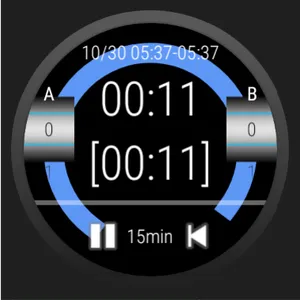
The start time of the game is recorded in the first half of the time (such as "01/01 12: 00-12: 00").
After that, when you tap the center of the screen or the PAUSE / PLAY icon, the running time will be stopped / restarted.
If the total stop time exceeds 30 seconds, a guideline for the additional time is displayed next to the match time (such as "15 + 1min").
The left and right scores can be operated by swiping up and down.
Vibrate once when the match type has elapsed, and continuously vibrate when the running time reaches the match time.
Vibrate also stops when running time stops.
■ Half time
Let's do half time measurement with running time stopped.
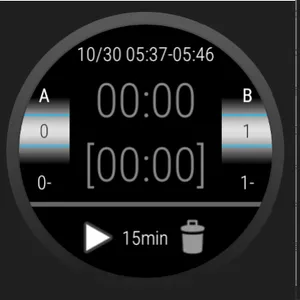
Tap the PREV icon at the bottom of the screen to reset the clock and record the first half score (like "1-").
The focus of the team name will move and you will know which team will kick off in the second half.
■ Second half
The operation is the same as the first half.
If you follow 3 periods, extension, P.K., etc., repeat the previous steps.
When the match is over, tap the trash can icon to clear the match start time and score.
【Note】
It is recommended to have an ordinary clock in case of rain or running out of battery.
This is a clock app for soccer referees.
I was developing with SmartWatch 2 (SW2), but I remade it as an Android Wear version. Only the functions that I thought were necessary were implemented. We have made improvements so that other models can work, and now we have confirmed the operation with Casio PRO TREK Smart.
You can measure match time and running time, vibrate when time is up, and score notes.
■ Preparation
Tap "15min" at the bottom of the screen to set the match time.
Tap "A" and "B" on the left and right of the screen to set the team name.
It's convenient to focus on the kick-off.
* Since SmartWatch 3 cannot input characters, only one character can be toggled.
■ First half
Tap the center of the screen or the PLAY icon to kick off.
The start time of the game is recorded in the first half of the time (such as "01/01 12: 00-12: 00").
After that, when you tap the center of the screen or the PAUSE / PLAY icon, the running time will be stopped / restarted.
If the total stop time exceeds 30 seconds, a guideline for the additional time is displayed next to the match time (such as "15 + 1min").
The left and right scores can be operated by swiping up and down.
Vibrate once when the match type has elapsed, and continuously vibrate when the running time reaches the match time.
Vibrate also stops when running time stops.
■ Half time
Let's do half time measurement with running time stopped.
Tap the PREV icon at the bottom of the screen to reset the clock and record the first half score (like "1-").
The focus of the team name will move and you will know which team will kick off in the second half.
■ Second half
The operation is the same as the first half.
If you follow 3 periods, extension, P.K., etc., repeat the previous steps.
When the match is over, tap the trash can icon to clear the match start time and score.
【Note】
It is recommended to have an ordinary clock in case of rain or running out of battery.
Show More