※ Free Sample version is also published in
Android Wear (SmartWatch 3)
LiveWare extension for SmartWatch 2
Smart Connect extension for Control API
Smart Connect extension for SmartWatch 2
Junior is a clock app for soccer referee.
Quaternary towards the referee is recommended for such.
I had purchased a SmartWatch 2 (SW2) for this app.
It is cheap when compared to the commercially available referees watch
SmartWatch 3 also because was available, was also compatible with Android Wear.
Please refer to the end of the sentence of ★ for Android Wear.
The following is the description of the SmartWatch 2.
Measurement of the match time and the running time, vibration when the time is up, you can, such as notes of the score.
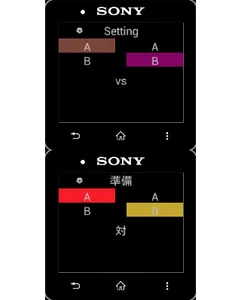
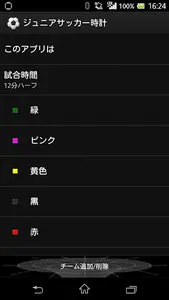
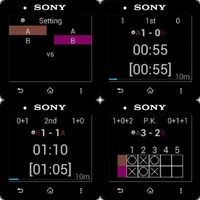
You can game time and team registration in the configuration screen.
The team consists of a team name and team colors.
You can swap the order by drag-and-drop and long tap the team.
You can delete the team and best to drop it below. However, you can not in two teams below.
You can add the team and the most tapping the bottom.
■ Preparation
Choose Tap a match to the team.
If you have six teams or more switches in the up and down swipe.
Kick-off of the side when you touch the top of the screen will change.
You may determine the both sides toward the headquarters seat.
Go to the first half of the option key.
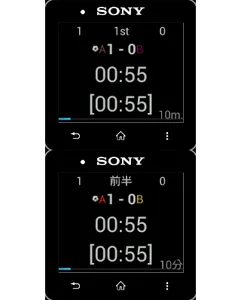
■ first half
Start by tapping the watch part.
Running time will stop and restart and subsequent tap the clock part.
Score in both of the team by long tap the left and right at the top of the screen will go.
You can cancel at the back key.
Watch will vibrate when the running time reaches to game time.
Go break in the option key to the (half-time).
■ break (half-time)
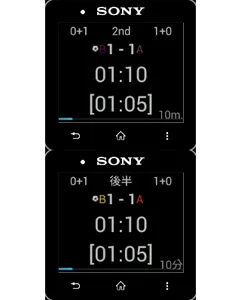
It swaps the left and right of the team in preparation for the second half.
Break in it will be the only display of the elapsed time.
Go to the second half of the option key.
■ second half
Operation is the same as the first half.
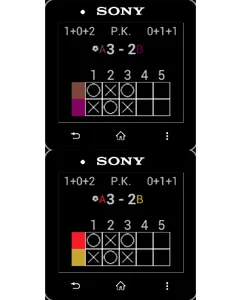
In the case of a tie, go to P.K. in the option key.
■ P.K.
Set who plays first in the bottom of the screen tap.
Results by long tap the left and right at the top of the screen will go.
Success in the attack side of the long tap, it will fail in the defensive side of the long tap.
You can cancel at the back key.
Please be terminated at appropriate because the number of people is no limitation.
■ About resume function
Because there was that would cut off the connection to be moving violently, it was to add this function.
If the lost connection during the timer operation, such as before the second half and break in, to restore the state at the next startup.
The timer continues to operate.
The return on the back key will be up to the state at the time of the resume.
【Caution】
The risk was reduced by the resume function, it is recommended that you use in the other clock and set just in case an official game, and the like.
In particular, since can not be successfully operated on a rainy day, please be careful.
★ Android Wear plate "junior soccer Clock 3"
In this application we are brethren. Please for more information see here.
https://play.google.com/store/apps/details?id=jp.mydns.dac.refereewatch3
Android Wear (SmartWatch 3)
LiveWare extension for SmartWatch 2
Smart Connect extension for Control API
Smart Connect extension for SmartWatch 2
Junior is a clock app for soccer referee.
Quaternary towards the referee is recommended for such.
I had purchased a SmartWatch 2 (SW2) for this app.
It is cheap when compared to the commercially available referees watch
SmartWatch 3 also because was available, was also compatible with Android Wear.
Please refer to the end of the sentence of ★ for Android Wear.
The following is the description of the SmartWatch 2.
Measurement of the match time and the running time, vibration when the time is up, you can, such as notes of the score.
You can game time and team registration in the configuration screen.
The team consists of a team name and team colors.
You can swap the order by drag-and-drop and long tap the team.
You can delete the team and best to drop it below. However, you can not in two teams below.
You can add the team and the most tapping the bottom.
■ Preparation
Choose Tap a match to the team.
If you have six teams or more switches in the up and down swipe.
Kick-off of the side when you touch the top of the screen will change.
You may determine the both sides toward the headquarters seat.
Go to the first half of the option key.
■ first half
Start by tapping the watch part.
Running time will stop and restart and subsequent tap the clock part.
Score in both of the team by long tap the left and right at the top of the screen will go.
You can cancel at the back key.
Watch will vibrate when the running time reaches to game time.
Go break in the option key to the (half-time).
■ break (half-time)
It swaps the left and right of the team in preparation for the second half.
Break in it will be the only display of the elapsed time.
Go to the second half of the option key.
■ second half
Operation is the same as the first half.
In the case of a tie, go to P.K. in the option key.
■ P.K.
Set who plays first in the bottom of the screen tap.
Results by long tap the left and right at the top of the screen will go.
Success in the attack side of the long tap, it will fail in the defensive side of the long tap.
You can cancel at the back key.
Please be terminated at appropriate because the number of people is no limitation.
■ About resume function
Because there was that would cut off the connection to be moving violently, it was to add this function.
If the lost connection during the timer operation, such as before the second half and break in, to restore the state at the next startup.
The timer continues to operate.
The return on the back key will be up to the state at the time of the resume.
【Caution】
The risk was reduced by the resume function, it is recommended that you use in the other clock and set just in case an official game, and the like.
In particular, since can not be successfully operated on a rainy day, please be careful.
★ Android Wear plate "junior soccer Clock 3"
In this application we are brethren. Please for more information see here.
https://play.google.com/store/apps/details?id=jp.mydns.dac.refereewatch3
Show More