
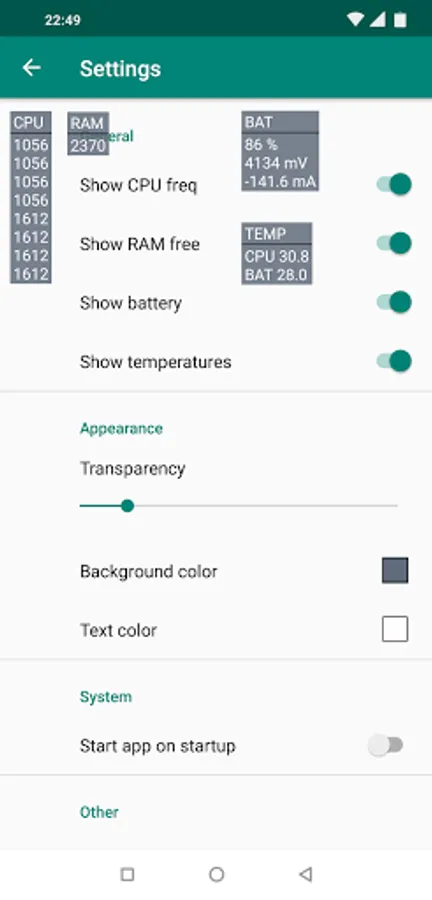
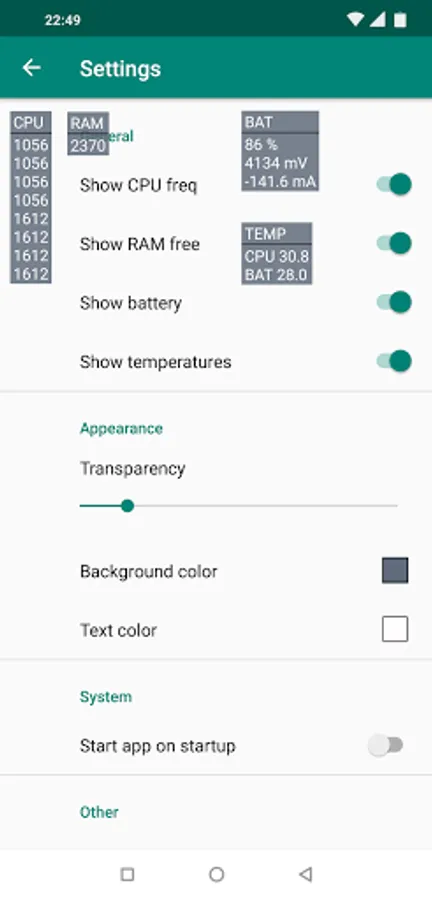
With this monitoring app, you can display overlays over your device's interface to view real-time sensor data such as CPU, GPU, RAM, and battery readings. Includes customization options like transparency, text scaling, and various sensor data displays.
AppRecs review analysis
AppRecs rating 3.8. Trustworthiness 75 out of 100. Review manipulation risk 20 out of 100. Based on a review sample analyzed.
★★★☆☆
3.8
AppRecs Rating
Ratings breakdown
5 star
43%
4 star
23%
3 star
10%
2 star
17%
1 star
7%
What to know
✓
Low review manipulation risk
20% review manipulation risk
✓
Credible reviews
75% trustworthiness score from analyzed reviews
✓
Good user ratings
67% positive sampled reviews
About DevInfoOverlay
Show overlays over apps to monitor current readings.
Overlays:
- CPU freq
- RAM free
- Battery (percent, voltage, charge / discharge speed)
- CPU load (for some qcom works without root, for most need root)
- GPU load, freq (for qcom, exynos, some mtk; for most devices work only with root)
- Refresh rate
- Traffic (network speed)
- Wi-Fi connection info (v1.2.7)
Style:
- Transparency
- Text scaling
- Colors (If you have license of Device Info HW+)
Options:
- No interactive widget
(disable move widget and block click)
- Update interval
- Show as notification.
- Change which sensor use as CPU temperature from all temperature sensor list.
For some devices blocked access to cpu load and thermal info.
You can switch to use root.
Test options:
- Area no limits
(You can move overlay to statusbar and turn on option 'no interactive widget')
-------------------------------
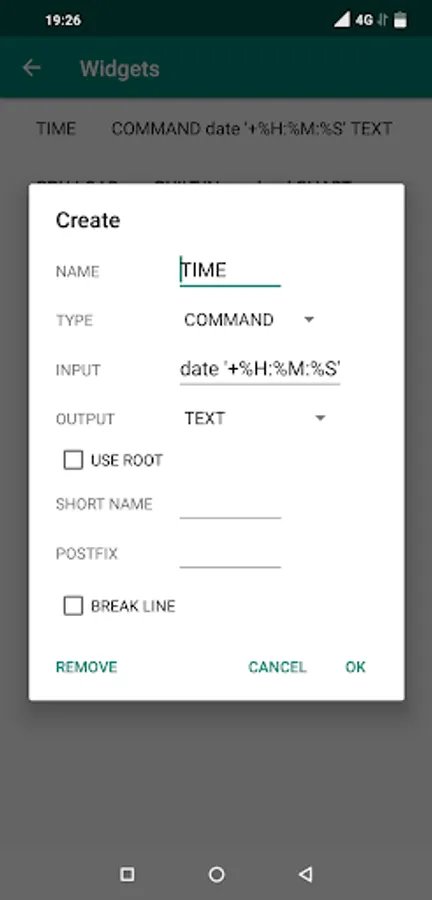
Custom Widgets
- a more flexible way to output what you want.
What type can be used:
- Built-in functions
- Shell command
- Temperature
Built-in functions:
- memory: free, busy
- CPU: load, frequency
- GPU: load, frequency
- Battery: voltage
- Battery: charge percentage
- Charge/discharge (PRO)
Output options:
- Text (all will be in one overlay)
- Chart
- Progressbar
- Statusbar (you can adjust in the setting offset and alignment)
Break line - will be displayed on a new line for the status bar can be done in several lines
3 widgets for everyone and 5 if you have license of Device Info HW+
Overlays:
- CPU freq
- RAM free
- Battery (percent, voltage, charge / discharge speed)
- CPU load (for some qcom works without root, for most need root)
- GPU load, freq (for qcom, exynos, some mtk; for most devices work only with root)
- Refresh rate
- Traffic (network speed)
- Wi-Fi connection info (v1.2.7)
Style:
- Transparency
- Text scaling
- Colors (If you have license of Device Info HW+)
Options:
- No interactive widget
(disable move widget and block click)
- Update interval
- Show as notification.
- Change which sensor use as CPU temperature from all temperature sensor list.
For some devices blocked access to cpu load and thermal info.
You can switch to use root.
Test options:
- Area no limits
(You can move overlay to statusbar and turn on option 'no interactive widget')
-------------------------------
Custom Widgets
- a more flexible way to output what you want.
What type can be used:
- Built-in functions
- Shell command
- Temperature
Built-in functions:
- memory: free, busy
- CPU: load, frequency
- GPU: load, frequency
- Battery: voltage
- Battery: charge percentage
- Charge/discharge (PRO)
Output options:
- Text (all will be in one overlay)
- Chart
- Progressbar
- Statusbar (you can adjust in the setting offset and alignment)
Break line - will be displayed on a new line for the status bar can be done in several lines
3 widgets for everyone and 5 if you have license of Device Info HW+
DevInfoOverlay Screenshots
Tap to Rate:
Reviews for DevInfoOverlay
Chukwunonsoezie Chukwunonso (Chuks)
12/28/2025
it ₦oes this best of what the API allows
Fr id
12/20/2025
Would be cool to add a proper overlay in the status bar for android 16. Now it just adds a program icon, doesn't show battery temp or other stuff. Thanks for a good program regardless!