With this Wi-Fi Monitor+ app, you can view Wi-Fi connection details, available networks, and connected devices. It supports network filtering and provides extra info for supported routers. Includes network lists, device details, support for filtering, and scanning capabilities.
AppRecs review analysis
AppRecs rating 4.4. Trustworthiness 76 out of 100. Review manipulation risk 37 out of 100. Based on a review sample analyzed.
★★★★☆
4.4
AppRecs Rating
Ratings breakdown
5 star
93%
4 star
3%
3 star
0%
2 star
0%
1 star
3%
What to know
✓
Credible reviews
76% trustworthiness score from analyzed reviews
✓
High user satisfaction
93% of sampled ratings are 5 stars
✓
Authentic reviews
No red flags detected
About Wi-Fi Monitor+
Sorry for inconvenience, Google pause sales apps for developers from my country!!!
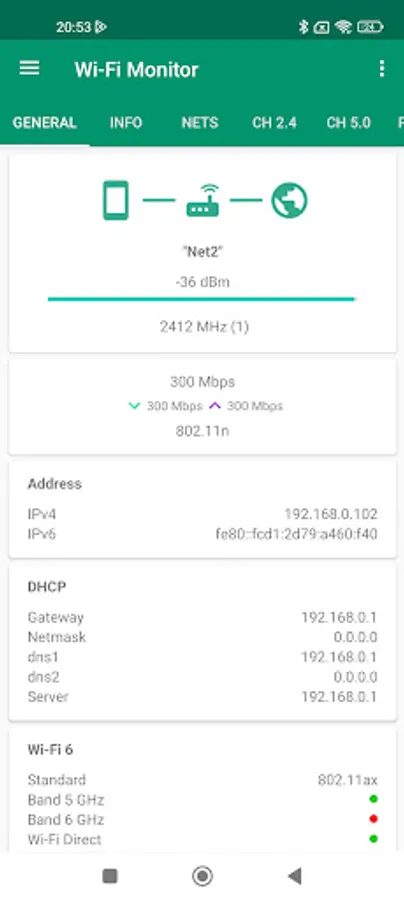
GENERAL
- the information about Wi-Fi connection
For getting public IP address, press on internet/earth icon
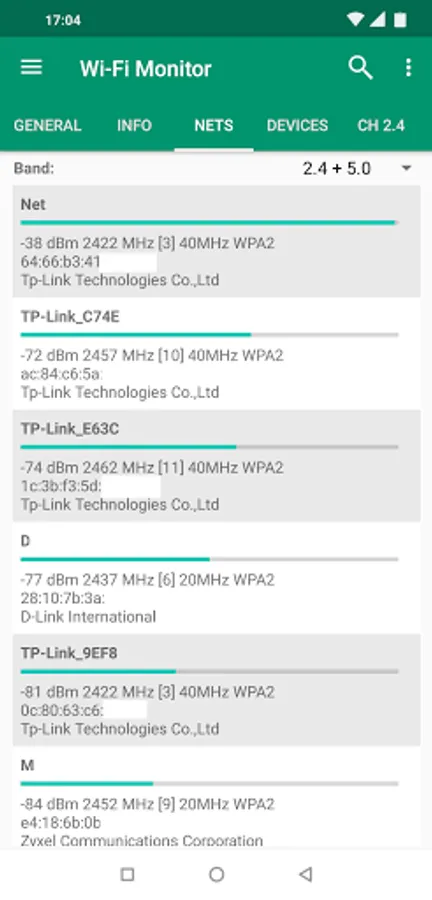
NETS
- the list of available Wi-Fi networks
- Support filtering of results
- You can open details for net
for android 11+ for most routers available extra info like model, vendor
(channels, country, streams, extensions in PRO)
CH 2.4/5.0
- the charts for available networks by channels groupped for 2.4 or 5.0 GHz
- you can switch to mode with channel width (used center freq for channel)
- you can pause updating
- support scaling by fingers or maximize by double tap
POWER
- chart with power for net at time interval
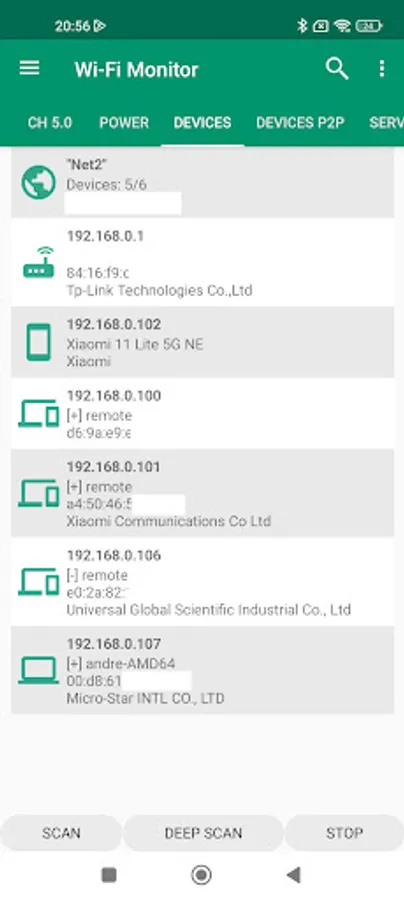
DEVICES
- the devices connected to your Wi-Fi network
- the quick scan in subnet a.b.c.x
- the deep scan in subnet a.b.x.x (android 13 and lower)
- Try detect hostname, router model
- Support filtering of results
- You can open details
* On Android 13+ with target sdk33 standard method for detect devices not available.
App trying find used IP addresses, you can increase timeout by press "..." button
DEVICES P2P
- Uses Wi-Fi direct for scan nearby wi-fi devices with announcement like TV, printers
- In menu options get vendor by mac
HELP
With new android releases added restrictions for work with Wi-Fi, if something doesn't work, read this help.
If on your device doesn't show net list and android 6.0+, check that location permission is granted.
If permission already granted, check that location turn on. Some devices with 7.0+ required it too.
If on your device doesn't show net name (unknown ssid), then for your device need permission and for last android releases location turn on.
If not found devices in your network, press scan (or deep scan for public network).
If you on android 13, you can increase timeout by press "..." button
* for android 11+ your device's MAC address blocked with target sdk30
PRO VERSION
Theme
- Supports all a light, dark and black theme, choose what you like.
In the free version, black available 2 weeks for the test.
Report in menu info center.
General info, nets, devices. You can choose what include in report.
You can save info to html or PDF file format and open or share by email.
In free version available test for 7 days.
Also supports multiple reports, you can choose previous and open it or share.
Copy text by long press in menu lists.
Extra info about net for android 11+
Tab services in network
- Also this supports development to improve app.
Requirements :
- Android 4.0.3 and above
Permissions :
- INTERNET is required for getting info about connection.
- ACCESS_WIFI_STATE is required for info about wi-fi connection.
- CHANGE_WIFI_STATE is required for active nets scan.
- ACCESS_COARSE_LOCATION is required for getting the list of available networks. For 6.0 and above.
- ACCESS_FINE_LOCATION is required for getting the list of available networks. For 10 and above.
- NEARBY_WIFI_DEVICES is required for getting the list of p2p devices. For 13 and above.
- READ/WRITE EXTERNAL_STORAGE is required for report, open in browser.
Wi-Fi Monitor+ Screenshots


Tap to Rate:
Reviews for Wi-Fi Monitor+
Wayne Morris
2/10/2024
Does everything you need (and more) and does it well. Great app!
Miran Rijavec
1/22/2024
It seems this app (after others with the same purpose) became my preference. I like that vivid colors with the possibility to visualise central chanel as well as enlarged view to curse that greedy users covering 40 MHz on 2.4 GHz Wi-Fi band. I mostly keep on 5 GHz (6 is non existent in my country and probably in EU. It's my daily routine to check the population of the Wi-Fi band. The price is more than honest, could be more. Thanks, be happy! LpM