
AppRecs review analysis
AppRecs rating 1.7. Trustworthiness 69 out of 100. Review manipulation risk 27 out of 100. Based on a review sample analyzed.
★☆☆☆☆
1.7
AppRecs Rating
Ratings breakdown
5 star
11%
4 star
0%
3 star
11%
2 star
0%
1 star
78%
What to know
✓
Low review manipulation risk
27% review manipulation risk
⚠
Mixed user feedback
Average 1.7★ rating suggests room for improvement
About StopwatchVideo
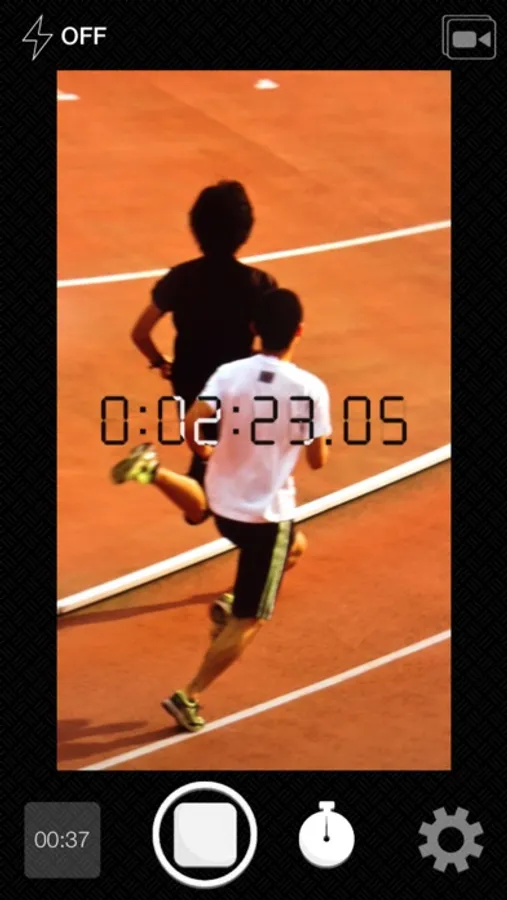
StopwatchVideo, as its name suggests, is an app that put a stopwatch and video camera together.
You can compose a display of stopwatch to a video on realtime, also a video in Camera Roll.
Feature:
- In addition to a normal stopwatch function, it is equipped with a countdown mode.
- You can customize appearance of stopwatch.
- Three video quality settings: SD, HD, and full HD.
How to use:
- (If you want to use a video in Camera Roll) Tap the icon of top right corner, and select a video in Camera Roll.
- Tap recording button to start recording.
- Tap stopwatch button to start measuring.
- Tap again stopwatch button to stop measuring.
- Tap recording button to stop recording.
- A video will be saved directly to your Camera Roll.
- You can check a video from thumbnail of bottom left corner
You can compose a display of stopwatch to a video on realtime, also a video in Camera Roll.
Feature:
- In addition to a normal stopwatch function, it is equipped with a countdown mode.
- You can customize appearance of stopwatch.
- Three video quality settings: SD, HD, and full HD.
How to use:
- (If you want to use a video in Camera Roll) Tap the icon of top right corner, and select a video in Camera Roll.
- Tap recording button to start recording.
- Tap stopwatch button to start measuring.
- Tap again stopwatch button to stop measuring.
- Tap recording button to stop recording.
- A video will be saved directly to your Camera Roll.
- You can check a video from thumbnail of bottom left corner
StopwatchVideo Screenshots

Tap to Rate:
Reviews for StopwatchVideo
Scottito 98
Satisfied
This app has never failed and is helpful with recording splits for our cross country team.
suicideclassic
Unfortunately crashes on loading videos
even as short as short 50s