
AppRecs review analysis
AppRecs rating 4.2. Trustworthiness 52 out of 100. Review manipulation risk 28 out of 100. Based on a review sample analyzed.
★★★★☆
4.2
AppRecs Rating
Ratings breakdown
5 star
80%
4 star
0%
3 star
0%
2 star
0%
1 star
20%
What to know
✓
High user satisfaction
80% of sampled ratings are 4+ stars (4.2★ average)
About AwSnap!
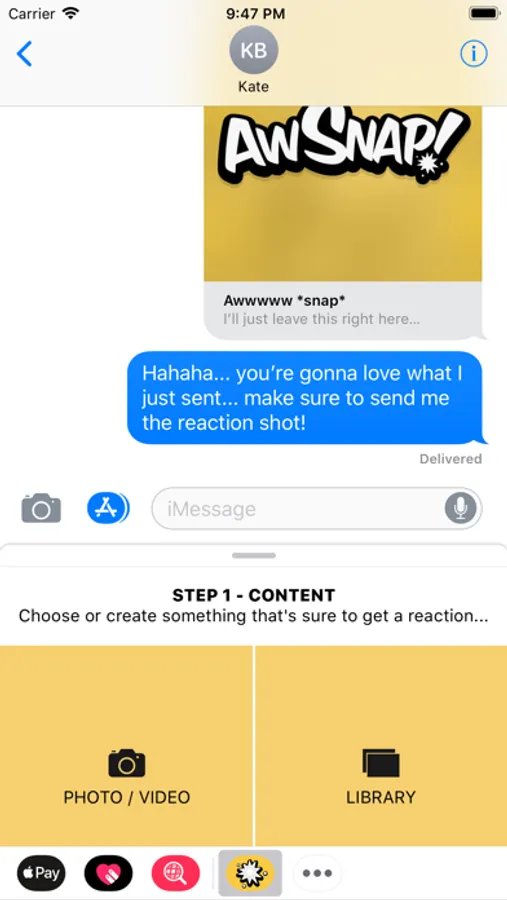
AwSnap! is the ONLY iMessage app that lets you capture the look on your friend’s face while they're viewing the photos and videos you send.
It's crazy simple:
1. Choose or create a photo or video
2. Set the perfect second to capture their reaction and send
3. They can't see the message until they tap to open it, once they open it their reaction will be captured
4. They can choose to send their reaction back to you (we don't automatically send it back and give them a chance to review the photo)
It's crazy simple, tons of fun and the results are hilarious!
***PLEASE NOTE***
We've noticed some confusion regarding how to access iMessage apps when downloaded from the app store.
Because iMessage apps do not place an app icon on your home screen, when you download the AwSnap! app you'll need to access it through the iMessage app to use it.
Here's how to do that:
1. Open iMessage
2. Create a new message or enter an existing one
3. Swipe through your iMessage apps until you get to the icon with 3 dots, tap that.
4. Find AwSnap in the list and swipe to delete.
It's crazy simple:
1. Choose or create a photo or video
2. Set the perfect second to capture their reaction and send
3. They can't see the message until they tap to open it, once they open it their reaction will be captured
4. They can choose to send their reaction back to you (we don't automatically send it back and give them a chance to review the photo)
It's crazy simple, tons of fun and the results are hilarious!
***PLEASE NOTE***
We've noticed some confusion regarding how to access iMessage apps when downloaded from the app store.
Because iMessage apps do not place an app icon on your home screen, when you download the AwSnap! app you'll need to access it through the iMessage app to use it.
Here's how to do that:
1. Open iMessage
2. Create a new message or enter an existing one
3. Swipe through your iMessage apps until you get to the icon with 3 dots, tap that.
4. Find AwSnap in the list and swipe to delete.
AwSnap! Screenshots

Tap to Rate:
Reviews for AwSnap!
King chip sock
Innovative
I love the new iMessage apps, and this one is one I use daily for family and friends alike! It's so different (in a good way) and easy to pick up, no learning curve needed!
Rain527
Love sharing - laugh every time
I'm loving the app so far! My friends and I are having a blast sharing crazy reactions to our goofy posts. I'm already thinking of all the scary and funny images I'm sending to them for this Halloween!