
With this app, you can create and customize greeting cards for various occasions by editing text and adding stickers. Includes augmented reality graphics, sharing options, and printable templates.
AppRecs review analysis
AppRecs rating 4.5. Trustworthiness 57 out of 100. Review manipulation risk 37 out of 100. Based on a review sample analyzed.
★★★★☆
4.5
AppRecs Rating
Ratings breakdown
5 star
73%
4 star
14%
3 star
8%
2 star
4%
1 star
1%
What to know
✓
High user satisfaction
73% of sampled ratings are 5 stars
✓
Authentic reviews
Natural distribution, no red flags
About eCards mobile
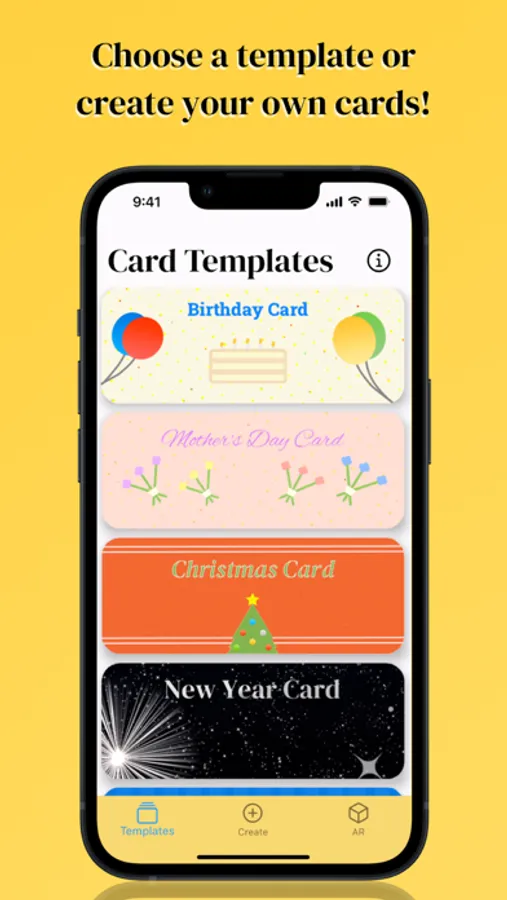
Create greeting cards on the go with eCards mobile! Simply replace the text on the cards and share them with your family and friends!
All template cards can be scanned with the app to reveal beautiful Augmented Reality graphics that are sure to impress the receivers of your card!
With greeting cards for the following occasions:
- Birthday
- Mother's Day
- Father's Day
- Valentine's Day
- Christmas
- New Year
- Easter
- Thanksgiving
- Dia de Muertos / Day of the Dead
- Halloween
Additionally, you can create your own greeting cards!
Tips:
- On the create tab, remember to press and hold on a sticker before dragging it. Also, you can change the size of stickers by using two fingers (moving them closer reduces sticker size, moving them apart increases sticker size). To remove a sticker simply drag it to the bottom of the screen.
- eCards mobile greeting cards can be shared digitally and can also be printed after saving to camera roll. Either way, the template cards can be scanned with the app to reveal a themed AR experience.
All template cards can be scanned with the app to reveal beautiful Augmented Reality graphics that are sure to impress the receivers of your card!
With greeting cards for the following occasions:
- Birthday
- Mother's Day
- Father's Day
- Valentine's Day
- Christmas
- New Year
- Easter
- Thanksgiving
- Dia de Muertos / Day of the Dead
- Halloween
Additionally, you can create your own greeting cards!
Tips:
- On the create tab, remember to press and hold on a sticker before dragging it. Also, you can change the size of stickers by using two fingers (moving them closer reduces sticker size, moving them apart increases sticker size). To remove a sticker simply drag it to the bottom of the screen.
- eCards mobile greeting cards can be shared digitally and can also be printed after saving to camera roll. Either way, the template cards can be scanned with the app to reveal a themed AR experience.
eCards mobile Screenshots


Tap to Rate:
Reviews for eCards mobile
MJ Short For Micheal Jordan
My E-Card Regards
Excellent For Any Occasion
BlueMagicChic
free card
Thank you