AppRecs review analysis
AppRecs rating 2.8. Trustworthiness 71 out of 100. Review manipulation risk 25 out of 100. Based on a review sample analyzed.
★★☆☆☆
2.8
AppRecs Rating
Ratings breakdown
5 star
30%
4 star
20%
3 star
0%
2 star
0%
1 star
50%
What to know
✓
Low review manipulation risk
25% review manipulation risk
✓
Credible reviews
71% trustworthiness score from analyzed reviews
⚠
Mixed user feedback
Average 2.8★ rating suggests room for improvement
About Network Speed Tester Client
*** Important: to use this app you need to have Network Speed Tester for macOS or Network Speed Tester Server for iOS installed and running on your local network. ***
Example Uses
- Find bottlenecks in your wireless network
- Optimize the placement of your wifi router, try different locations until you get the best network performance
- Measure impact of wifi range extenders
- Find the best spot for watching streaming movies in your home
Features Overview
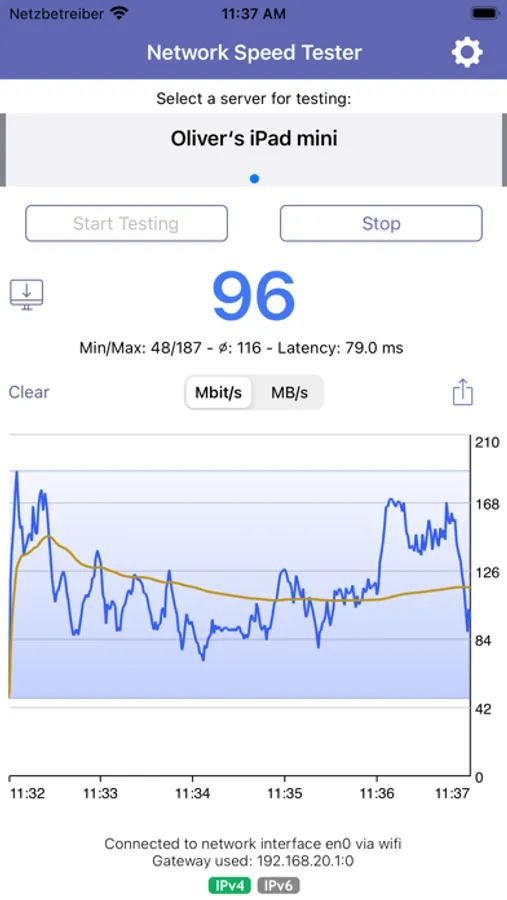
- Accurate performance measuring of your network using client-server technology
- Get actual realworld network throughput
- Graphical visualization
- Find test servers automatically via Bonjour services
- Share results
Network Speed Tester Client Screenshots
Tap to Rate:
Reviews for Network Speed Tester Client
XweAponX
Forces another app-buy
At startup. No mention of any “server” requirement in the app entry. Junk- pass on this, just use Ookla
ericpardee
You need to use the server and client
This software is the client only, you need to run the server software on another ios device or on a Mac, I don’t think the negative reviews understood that. I was testing my new access point and this software appears to work, though it’s difficult to know how accurate it is. I wish you could run multiple tests in this app, save the results in the app, adds notes, ability to compare results, things like this