AppRecs review analysis
AppRecs rating 4.5. Trustworthiness 61 out of 100. Review manipulation risk 29 out of 100. Based on a review sample analyzed.
★★★★☆
4.5
AppRecs Rating
Ratings breakdown
5 star
100%
4 star
0%
3 star
0%
2 star
0%
1 star
0%
What to know
✓
Low review manipulation risk
29% review manipulation risk
✓
High user satisfaction
100% of sampled ratings are 5 stars
About Dancing Decibels
ShambaTimes is now Dancing Decibels!
Your live music / festival event app with Dancing Decibels! Now more than just Schedules for Shambhala!
With Dancing Decibels you have multiple ways to view and search the schedule and can easily favorite an artist with a simple tap. Don't miss that can't miss set! Set an alarm!
Schedules by Grid - The grid view gives a great overview of the whole schedule, making it easy to see conflicts and who's playing. Zoom in and out with the pinch gesture to see more times at once.
Schedules by Time - View which artists are playing in 30 minute increments, swipe left / right to change the time, or select from the time list on the left. Tap a stage to jump to Schedules by Stage.
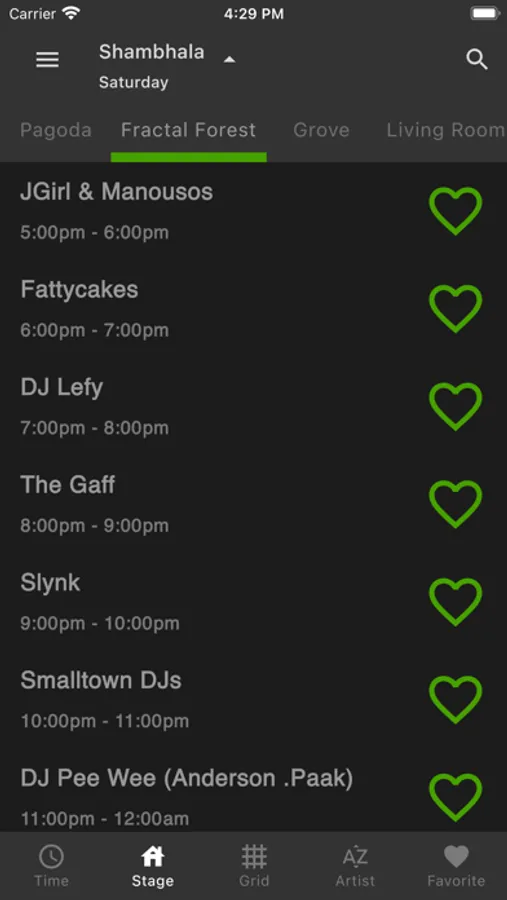
Schedules by Stage - Lists of who is playing at each stage for each day. If they're currently playing, it will show it. Tap an artist to jump to it in Schedules by Time.
Favourites - Flag artists as your favourite and you can keep an eye on them here so you don't miss them! You can rank your favorites to provide more depth to your schedule.
Artist List - A full list of all the artists playing, with the ability to filter them by genre to explore what's out there.
Search - From any page you can search for the artist by typing in their name. Clicking on the results will take you to the artist on that screen. On the settings screen, it will jump you to Time.
Night Mode - No more straining your eyes on white backgrounds at 2AM. With an always on, or automatic switching mode, your eyes are set!
Really like an Artist you just heard? Favourite it! No more trying to remember, who that really awesome artist was at 3:00 AM in the morning.
Don't want to forget who you saw? You can flag artists as seen by long pressing any heart once their set has begun.
See you all at Shambhala!
Your live music / festival event app with Dancing Decibels! Now more than just Schedules for Shambhala!
With Dancing Decibels you have multiple ways to view and search the schedule and can easily favorite an artist with a simple tap. Don't miss that can't miss set! Set an alarm!
Schedules by Grid - The grid view gives a great overview of the whole schedule, making it easy to see conflicts and who's playing. Zoom in and out with the pinch gesture to see more times at once.
Schedules by Time - View which artists are playing in 30 minute increments, swipe left / right to change the time, or select from the time list on the left. Tap a stage to jump to Schedules by Stage.
Schedules by Stage - Lists of who is playing at each stage for each day. If they're currently playing, it will show it. Tap an artist to jump to it in Schedules by Time.
Favourites - Flag artists as your favourite and you can keep an eye on them here so you don't miss them! You can rank your favorites to provide more depth to your schedule.
Artist List - A full list of all the artists playing, with the ability to filter them by genre to explore what's out there.
Search - From any page you can search for the artist by typing in their name. Clicking on the results will take you to the artist on that screen. On the settings screen, it will jump you to Time.
Night Mode - No more straining your eyes on white backgrounds at 2AM. With an always on, or automatic switching mode, your eyes are set!
Really like an Artist you just heard? Favourite it! No more trying to remember, who that really awesome artist was at 3:00 AM in the morning.
Don't want to forget who you saw? You can flag artists as seen by long pressing any heart once their set has begun.
See you all at Shambhala!
Dancing Decibels Screenshots




Tap to Rate:
Reviews for Dancing Decibels
Watergun101
Awesome app
Great to see how this app is growing. Used it last year for schedule updates and time changes and will keep using it during the festival ✌️
BimmerGuy330i
Best Shambhala Schedule App
Shambatimes is by far the best Shambhala schedule app. I was saying that Shambhala should just purchase this and use it for their official app, it’s that much better.