AppRecs review analysis
AppRecs rating 4.0. Trustworthiness 65 out of 100. Review manipulation risk 30 out of 100. Based on a review sample analyzed.
★★★★☆
4.0
AppRecs Rating
Ratings breakdown
5 star
0%
4 star
0%
3 star
100%
2 star
0%
1 star
0%
About EyeCanDo
To use the app, you will first set up your device(iPad or iPhone) for positioning properly. Make sure your device is in front of your face and look still at the activate button to enter.
After setup, you will need to do calibration. Make your eye gaze follow the blue dots during the calibration process and click the back button when you finish.
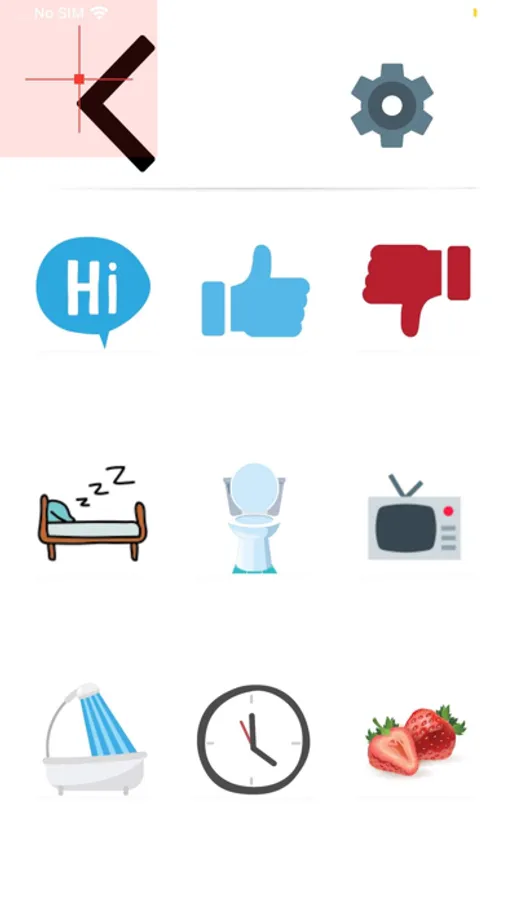
After the calibration, you can go to the main interface of EyeCanDo. Some example functionalities include:
Text to Speech: built-in phrases expressing feeling, need or basic answers. When an item is selected with gaze, a speech synthesizer will utter the sentence.
Music: You can play your music from your Apple Music with eye gaze for selection and control.
Emergency: When selected, a siren will be played for asking emergency help.
Typing: You can use eye gaze to type with a virtual keyboard.
Settings: You can customize the app, such as changing brightness and volume.
EyeCanDo Screenshots
Tap to Rate:
Reviews for EyeCanDo
Zenmaster43
Great idea and nice design, but needs work
I like the concept and the layout, but I can’t get it to track my eyes vertically and it is not very accurate when I wear my blue filtered reading glasses, which I need in order to actually read any text. So, I can’t get it to actually select an icon, because the cross-hairs remain at the top section, away from all icons. Also, instructions for calibration would be very helpful. Perhaps that’s where it could be adjusted to track more accurately. I look forward to a newer version that includes improvements on these issues. Also, I don’t see if there is a way to add user defined icons for texts entered by eye control, but that would be a real big help to have.