About mobileinearMix
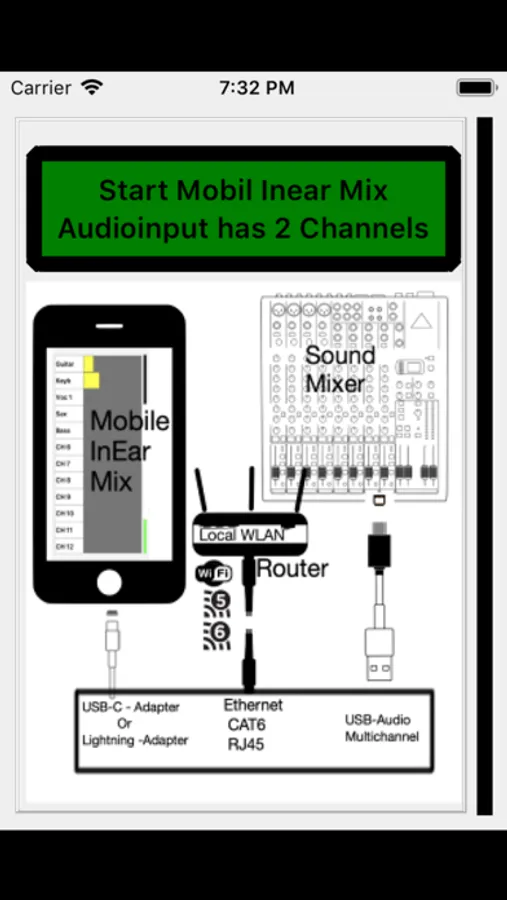
The multichannel mixer sound from front mixer is transferred over Wifi to the musicians on stage and they customize their individuell sound mix by themselves and hear it over mobile devices earbuds. Connect your front mixer with mobile device via Connector/Adapter and send signal over Router Wifi5+ to stage. You need a wifi5+ Router connected with ethernet to mobile device and a multichannel audio usb-compliant interface on your stage mixer. The musicians need the mobileinearStage App to receive the sound from mobileinearMix. You can download mobileinearStage from Appstore.
Do following steps on your device:
-Connect your USB-Audio Interface with your mobile device/tablet with an usb cable
-Connect your Wifi5 or Wifi6 Router with your device/tablet with an ethernet cable
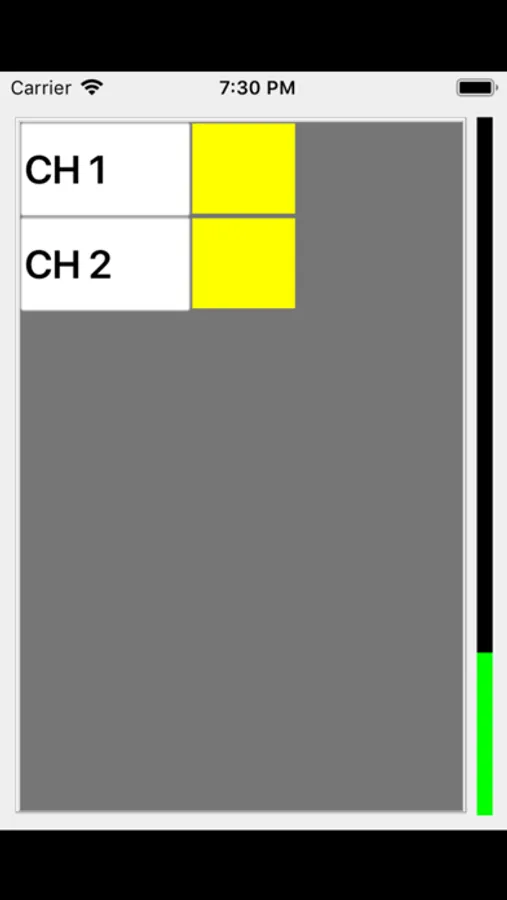
-Start mobileinearMix on your device/tablet
-Rename the audio channels to real stage instrument titles or build channelgroups with a group name
Thats all !!!
-The musicians mobile devices can receive and mix individually their sound on stage with mobileinearStage-App.
-No time consuming and boring stagemonitor soundcheck
-No tons of stage monitor boxes
-No tons of audio routing and sending equipment and cables
-individual mixed digital sound quality for every musician easy to make by a fingertip on his mobile device
Do following steps on your device:
-Connect your USB-Audio Interface with your mobile device/tablet with an usb cable
-Connect your Wifi5 or Wifi6 Router with your device/tablet with an ethernet cable
-Start mobileinearMix on your device/tablet
-Rename the audio channels to real stage instrument titles or build channelgroups with a group name
Thats all !!!
-The musicians mobile devices can receive and mix individually their sound on stage with mobileinearStage-App.
-No time consuming and boring stagemonitor soundcheck
-No tons of stage monitor boxes
-No tons of audio routing and sending equipment and cables
-individual mixed digital sound quality for every musician easy to make by a fingertip on his mobile device