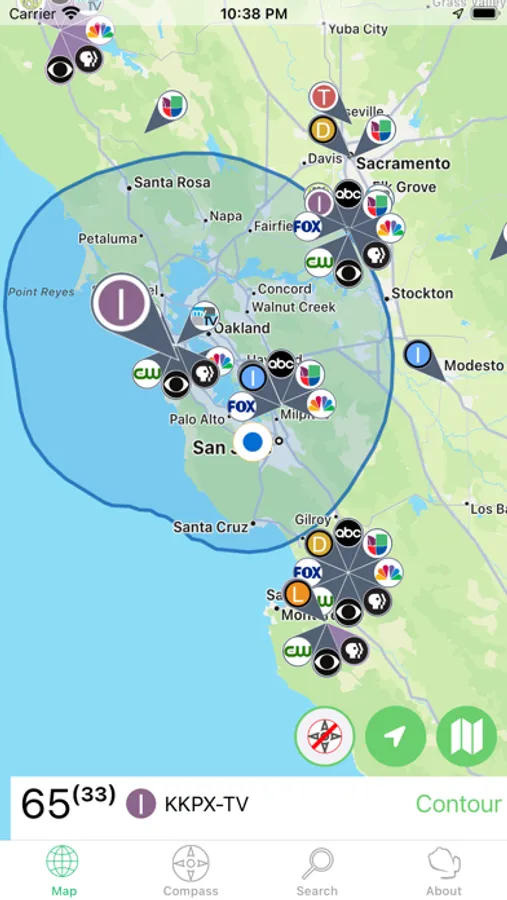
In this app, you can view a map of digital TV broadcasting towers across the United States and Canada, locate nearby stations, and access contour plot overlays for signal coverage. Includes station details, repeater information, and optional compass tools for directional antenna setup.
AppRecs review analysis
AppRecs rating 4.8. Trustworthiness 80 out of 100. Review manipulation risk 22 out of 100. Based on a review sample analyzed.
★★★★☆
4.8
AppRecs Rating
Ratings breakdown
5 star
80%
4 star
12%
3 star
3%
2 star
1%
1 star
3%
What to know
✓
Low review manipulation risk
22% review manipulation risk
✓
Credible reviews
80% trustworthiness score from analyzed reviews
✓
High user satisfaction
80% of sampled ratings are 5 stars
About TV Towers USA
Apple Watch (Series 5) users can make use of their compass with the optional in-app purchase of an embedded watch app.
There is an alternate compass tab which shows the direction of stations within a 45 mile radius—given enough screen space—just look over your phone to see which way to point your antenna.
Pinch to zoom into your locality, or hit the circular location button to concentrate on local stations. If more than 80 stations are in the area being viewed, a random assortment of 80 stations will be displayed.
There is no "phoning home" with data, personal or not. If a data connection is available, the FCC servers will be asked for contour plot data when a tower is selected. This will show up as a blue overlay showing the calculated area over which the signal will drop off by at most 35 dBu. Basically, this is the area where an antenna not too near the ground has a chance to receive the signal; your luck will vary. Once downloaded, the data is stored for the next time you select the tower.
Errors and omissions are to be expected especially for stations with low power licenses. Please e-mail the support address if you find a glaring omission or error; I'll need a call sign and a TV network.
TV Towers USA Screenshots
Tap to Rate:
Reviews for TV Towers USA
Idonthaveanickbname
Seems to be working
I plugged in my antenna and pointed it in the direction it said and I got like 40 channels. Worked great for my antenna direct
Shirley19863673
Don’t waste money on fancy signal finders. This works!
I was looking on Amazon and Walmart for a signal finder. Prices varied from $25 to $100+ with mixed reviews. I found this app again with some mixed reviews but for only $2 I thought I would give it a try. I used the compass to position my cheap indoor antenna. I went from having only 7 channels in the bedroom to almost 50. I did the same in the living room which seemed to be doing better and I went from 30ish channels to almost 50. This $2 has saved me a lot of money as I was even considering prior to this getting an outdoor antenna professionally installed. In addition to all the extra channels all the ones I already had are showing so much clearer and are not randomly scrambling.