AppRecs review analysis
AppRecs rating 4.5. Trustworthiness 65 out of 100. Review manipulation risk 27 out of 100. Based on a review sample analyzed.
★★★★☆
4.5
AppRecs Rating
Ratings breakdown
5 star
100%
4 star
0%
3 star
0%
2 star
0%
1 star
0%
What to know
✓
Low review manipulation risk
27% review manipulation risk
✓
High user satisfaction
100% of sampled ratings are 5 stars
About Cellica Database WiFi
Sync MS Access, MS SQL Server, My SQL, Oracle, MS Excel databases on iPhone.
Cellica Database for iPhone allows to synchronize any MS Access, Excel, My SQL, SQL Server database (Available on Windows) wirelessly (Local Wi-Fi network) with iPhone.
See Cellica Database in action at: http://tinyurl.com/CellicaDB (YouTube link)
Cellica Database is the powerful and easy app so you can select your windows based database Tables, Views, Queries, Stored Procedure and added feature is that you can design the forms for it and sync from iPhone.
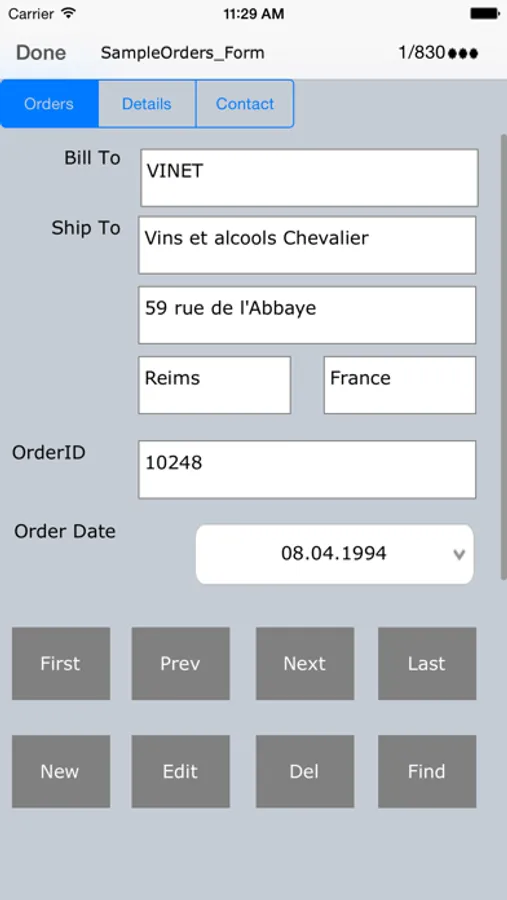
Design form on desktop with Label, Text Field, Buttons, Checkbox, Combo box, Tab control.
Changes on iPhone can synchronize wirelessly and instantly to MS Access, Excel, My SQL, SQL Server database. Also, any modifications to the desktop database can send wirelessly and instantly to iPhone, so you will always have the most current information on your iPhone.
You will just need our Desktop software. The Desktop can be connected to internet via your Wi-Fi router in another room and your iPhone is connected to your home or any other Wi-Fi router.
Desktop and iPhone must be on same network(LAN). Use IP of desktop, in iPad side Cellica Database application. Desktop does not need Wi-Fi connection, it can be wired.
Features:
•Supported Databases: Microsoft Access 97/2000/2003/2007/2010,Microsoft Excel 97/2000/2003/2007/2010, Oracle, SQL Server, DB2, MySQL, Quickbook,PostgreSQL, FoxPro, dBase, R:BASE, Sybase and any ODBC Compliant Database.
•Work Offline when network is not available and synchronize data when Wi-Fi network will be available.
•Write data on the iPhone, which will reflect to database on your PC or Server.
•Data is secured as 128 bit AES used for encryption.
•Unicode support for the database to synchronize data in Japanese, Chinese, Korean, German, Russian etc.
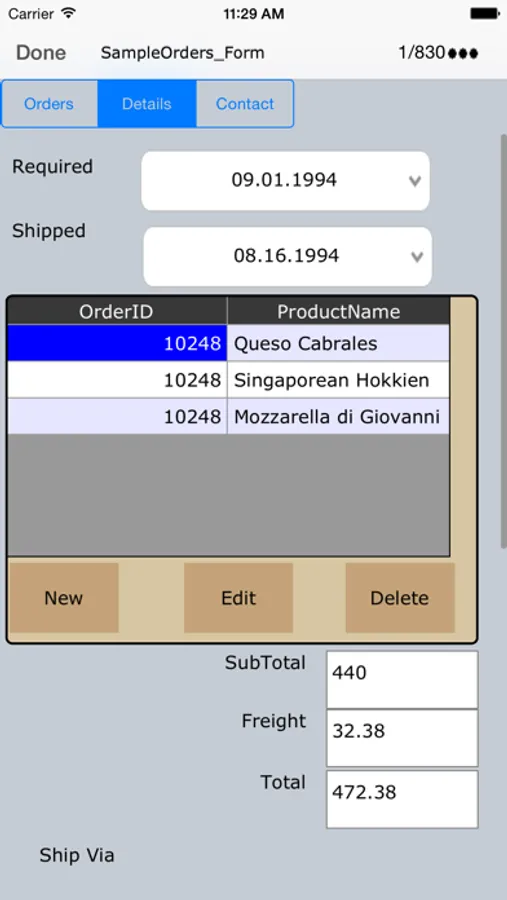
•Supported Forms on iPhone.
•Design form on desktop with Label, Text Field, Buttons, Checkbox, Combo box, Page, control.
•Supports Sub forms, Design a master/detail form, or a parent/child form using sub form.
•Send single record data on form as a .PDF by Email.
• Support Image control on form, Allows to synchronize .bmp, .jpg and .png format.
•Create form in Portrait/ Landscape mode.
•Import/Export form design.
•Use Ready made forms provided in desktop application for various purposes such Business, Personal, Education.
To transfer your desktop side database to iPhone, you need to install Desktop software on your Windows PC.
Download and install Desktop component on your Windows based PC from the product page.
Quick steps for initial synchronization setting between desktop and device
http://www.cellica.com/CellicaDatabase_Desktop_iPhone_SyncSettings.pdf
If you have any problem with the software, please contact us on support@cellica.com.
Note: Desktop component of this software needs Internet on computer. Software needs it for authorizing your copy.
Cellica Database WiFi Screenshots

Tap to Rate:
Reviews for Cellica Database WiFi
Joewylie
Great RAD Mobile database
I have been looking for a mobile solution for IOS to connect to a MySQL database. Many tools for this and security features. Great support. There is a cost but it is worth It. Having control of your own data is priceless!
Clarew55
CellicaDB-WiFi
This program lets me review information from my Access databases readily. I can check on my phone whether or not I have a particular item in my collection.