
With this IP camera app, you can stream live video and audio from your device using a web browser or compatible applications. Includes support for adjustable video quality, pan and tilt controls, and user authentication.
AppRecs review analysis
AppRecs rating 4.3. Trustworthiness 84 out of 100. Review manipulation risk 25 out of 100. Based on a review sample analyzed.
★★★★☆
4.3
AppRecs Rating
Ratings breakdown
5 star
75%
4 star
12%
3 star
1%
2 star
4%
1 star
7%
What to know
✓
Low review manipulation risk
25% review manipulation risk
✓
Credible reviews
84% trustworthiness score from analyzed reviews
✓
High user satisfaction
88% of sampled ratings are 4+ stars (4.5★ average)
About ipCam - Mobile IP Camera
ipCam turns your iPhone, iPod touch, or iPad into a Wi-Fi network IP camera.
Features
- Stream images, video & audio to compatible applications including most web browsers and our iCamSource and iCamSource Pro apps.
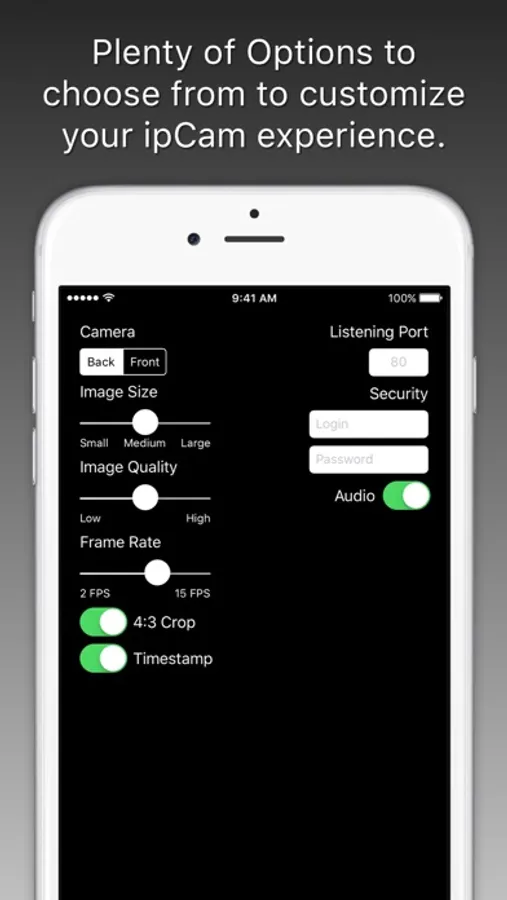
- Select either the front or back camera.
- Turn the Flash on and off via the Web Interface.
- Adjust the image size, quality, and frame rate.
- Auto-rotate the image based on device orientation.
- Optional Date / Time image overlay.
- Optional 4:3 aspect ratio image crop.
- Digital Pan / Tilt the 4:3 cropped image.
- Optional Login & Password for additional security.
- Tapping the video preview toggles darkening the screen.
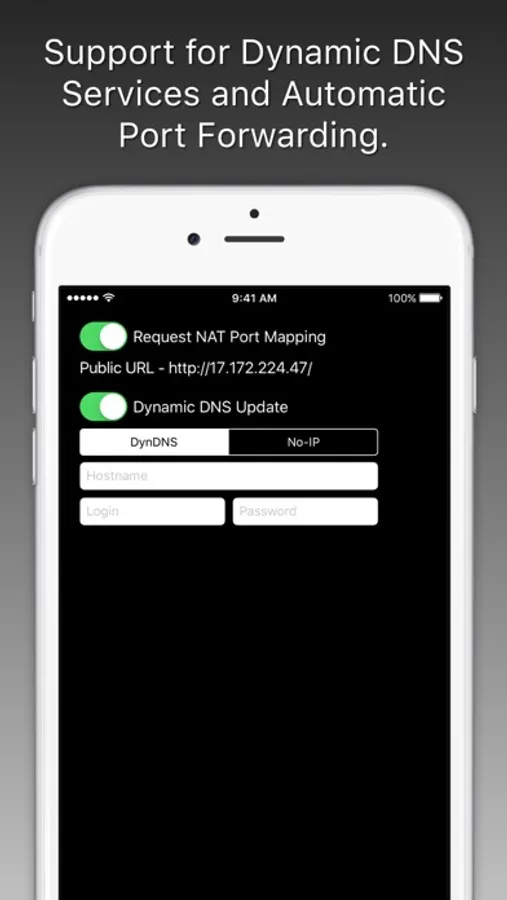
- Dynamic DNS support for DynDNS and No-IP users.
- Automatic Port Forwarding for routers that support UPnP or NAT-PMP.
Once ipCam is running you can connect to its Web Interface from most any modern web browser that is also connected to your local network by entering the http://xxx.xxx.xxx.xxx/ URL located at the bottom of the screen.
The Web Interface gives you access to various image, video, and audio links in addition to the links that control the Flash and Pan / Tilt functionalities, when available.
Please visit http://skjm.com/ipcam/ for more information.
Features
- Stream images, video & audio to compatible applications including most web browsers and our iCamSource and iCamSource Pro apps.
- Select either the front or back camera.
- Turn the Flash on and off via the Web Interface.
- Adjust the image size, quality, and frame rate.
- Auto-rotate the image based on device orientation.
- Optional Date / Time image overlay.
- Optional 4:3 aspect ratio image crop.
- Digital Pan / Tilt the 4:3 cropped image.
- Optional Login & Password for additional security.
- Tapping the video preview toggles darkening the screen.
- Dynamic DNS support for DynDNS and No-IP users.
- Automatic Port Forwarding for routers that support UPnP or NAT-PMP.
Once ipCam is running you can connect to its Web Interface from most any modern web browser that is also connected to your local network by entering the http://xxx.xxx.xxx.xxx/ URL located at the bottom of the screen.
The Web Interface gives you access to various image, video, and audio links in addition to the links that control the Flash and Pan / Tilt functionalities, when available.
Please visit http://skjm.com/ipcam/ for more information.
ipCam - Mobile IP Camera Screenshots


Tap to Rate:
Reviews for ipCam - Mobile IP Camera
Homerll
Avoid
No user support anywhere to be found. App requires you to download another app for forum support that does not exist. Apple how can you all thisPOS?
sjamesmm
Only 15 FPS!
It only goes up to 15 FPS!