In this measurement app, you reset the distance counter at point A and walk toward point B while monitoring the increasing distance. Includes GPS accuracy, multi-unit options, and background measurement capabilities.
AppRecs review analysis
AppRecs rating 3.6. Trustworthiness 68 out of 100. Review manipulation risk 28 out of 100. Based on a review sample analyzed.
★★★☆☆
3.6
AppRecs Rating
Ratings breakdown
5 star
66%
4 star
10%
3 star
4%
2 star
2%
1 star
18%
What to know
✓
Low review manipulation risk
28% review manipulation risk
✓
High user satisfaction
76% of sampled ratings are 4+ stars (4.1★ average)
✓
Authentic reviews
Natural distribution, no red flags
About Measuring Tape
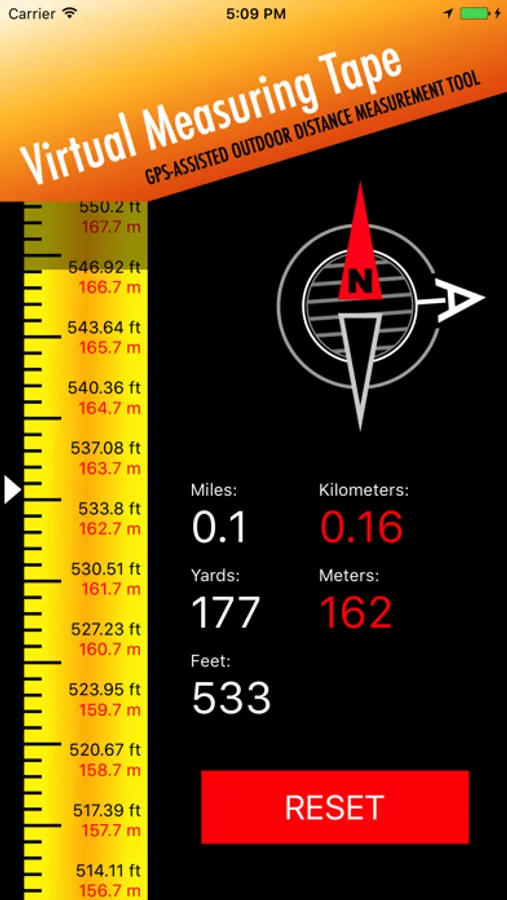
This application measures the shortest (air) distance between point A and point B using GPS, with the maximum available accuracy. Distances are displayed in yards, meters, kilometers, and miles.
Simply reset the ruler at point A and watch the distance counters increase as you move toward point B—just like using a real tape measure or ruler.
Primary uses for approximate sizing and measuring include:
Land, grounds, and properties
Real estate
Golf course yardage
Sports facilities and tracks
Air distance
Other outdoor measurements
The application is intended for outdoor use only and requires location services to be enabled.
How to use:
Go to the starting point (A) and press the RESET button to initialize the distance counters.
Walk to the target point (B) while watching the distance counters increase.
The point A arrow continuously shows the direction back to the starting point.
You can close the application at any time during a measurement. When reopened, the application will continue the current measurement.
Simply reset the ruler at point A and watch the distance counters increase as you move toward point B—just like using a real tape measure or ruler.
Primary uses for approximate sizing and measuring include:
Land, grounds, and properties
Real estate
Golf course yardage
Sports facilities and tracks
Air distance
Other outdoor measurements
The application is intended for outdoor use only and requires location services to be enabled.
How to use:
Go to the starting point (A) and press the RESET button to initialize the distance counters.
Walk to the target point (B) while watching the distance counters increase.
The point A arrow continuously shows the direction back to the starting point.
You can close the application at any time during a measurement. When reopened, the application will continue the current measurement.
Measuring Tape Screenshots
Tap to Rate:
Reviews for Measuring Tape
Hueydoyle
iPhone 16 pro
Worked really well with iPhone 11 but can’t get the reset button on the 16
Pendc966
Won’t work
I can’t get the app to measure with my new iphone 16.