In this time management app, users can calculate, track, and convert time-related data with various built-in tools. Includes multiple calculators for work hours, date differences, and time zone comparisons.
AppRecs review analysis
AppRecs rating 4.4. Trustworthiness 70 out of 100. Review manipulation risk 24 out of 100. Based on a review sample analyzed.
★★★★☆
4.4
AppRecs Rating
Ratings breakdown
5 star
85%
4 star
7%
3 star
3%
2 star
1%
1 star
4%
What to know
✓
Low review manipulation risk
24% review manipulation risk
✓
Credible reviews
70% trustworthiness score from analyzed reviews
✓
High user satisfaction
85% of sampled ratings are 5 stars
About Time Calculator - Work Hours
Time Calculator is the ultimate all-in-one toolkit for managing time, dates, schedules, and more. Whether you’re tracking work hours, planning shifts, or converting time formats, this app has a calculator for every time-related need. Designed for professionals, freelancers, travellers, and everyday users alike.
Included calculators:
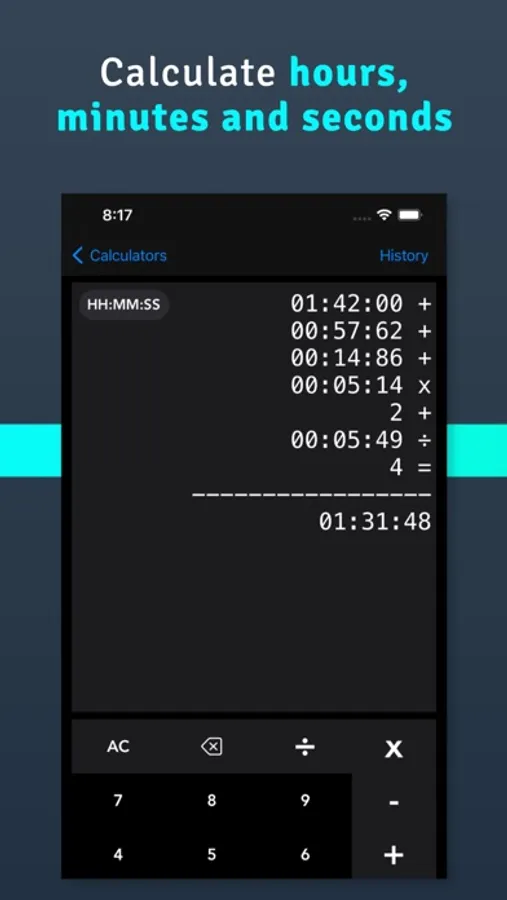
- Time Calculator
Add or subtract hours, minutes, seconds, and days. Optionally apply an hourly rate for cost calculations.
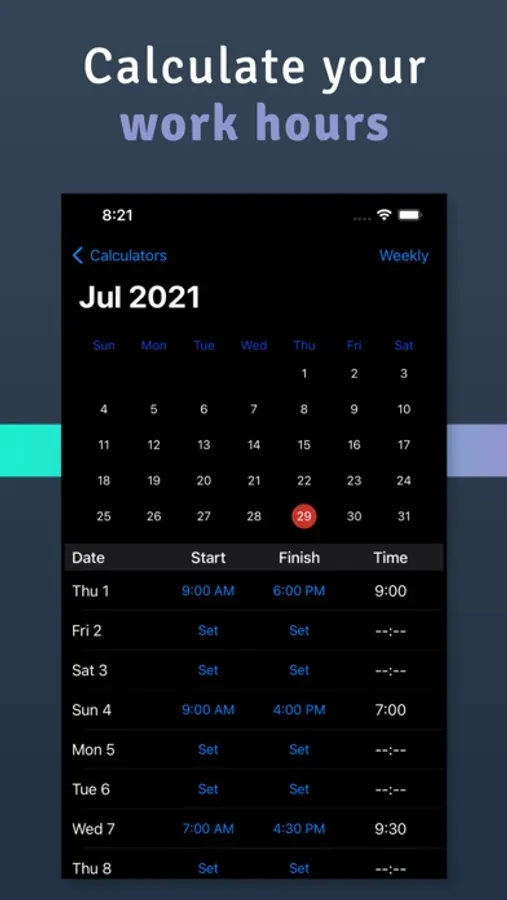
- Work Time Calculator
Track working hours, salaries, and multiple jobs. Supports custom shifts and detailed breakdowns.
- Shift Calculator
Create and calculate rotating shift schedules with ease.
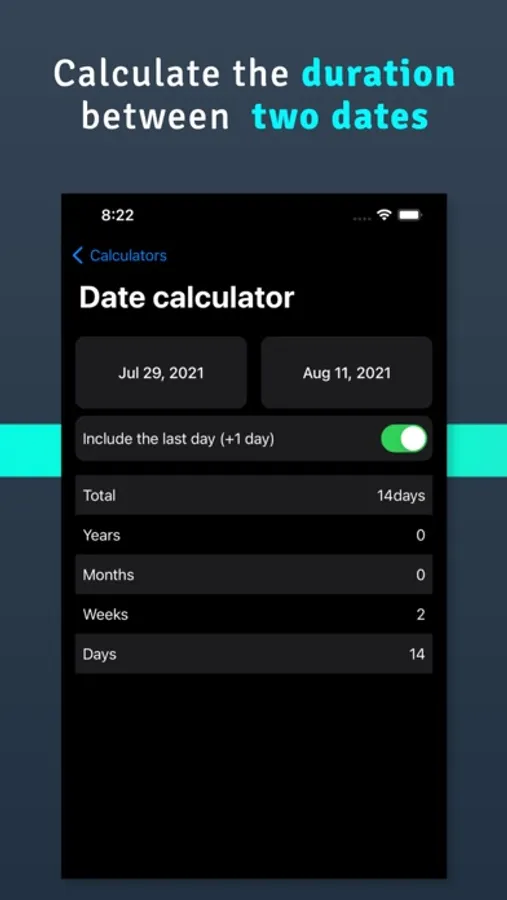
- Date Calculator
Find the difference between two dates in days, weeks, months, and years.
- Time Difference
Calculate the time between two clock times.
- Countdown
Set up countdown timers for upcoming events or deadlines.
- Weekday Calculator
Calculate how many weekdays and weekends are between two dates.
- Add to Date Calculator
Add days, weeks, months, or years to a starting date to see the resulting date.
- Count Days
Tap days on a calendar to count them - perfect for tracking Schengen or visa limits.
- Days To/From
Save countdown timers for any event and see how many days remain.
- Add to Time Calculator
Add hours and minutes to a specific time of day.
- Age Calculator
Add birthdays of friends and family to track their exact age.
- Time Converter
Convert between seconds, minutes, hours, and days.
- Time Zone Calculator
Add multiple time zones and compare times across regions.
- Military Time Calculator
Easily convert between 12-hour and 24-hour (military) formats.
- Time to Decimal
Convert standard time (like 2h 30m) to decimal format and back.
---------------------------
Subscription terms:
- The subscription auto-renews at the end of each term.
- Payment will be charged to iTunes Account at confirmation of purchase.
- The subscription automatically renews unless auto-renew is turned off at least 24-hours before the end of the current period.
- Account will be charged for renewal within 24-hours prior to the end of the current period.
- You may manage your subscription and turn off auto-renewal by going to your Account Settings after purchase.
Privacy policy and Terms of Use: https://oval.fi/privacy-policy-time-calculator
Included calculators:
- Time Calculator
Add or subtract hours, minutes, seconds, and days. Optionally apply an hourly rate for cost calculations.
- Work Time Calculator
Track working hours, salaries, and multiple jobs. Supports custom shifts and detailed breakdowns.
- Shift Calculator
Create and calculate rotating shift schedules with ease.
- Date Calculator
Find the difference between two dates in days, weeks, months, and years.
- Time Difference
Calculate the time between two clock times.
- Countdown
Set up countdown timers for upcoming events or deadlines.
- Weekday Calculator
Calculate how many weekdays and weekends are between two dates.
- Add to Date Calculator
Add days, weeks, months, or years to a starting date to see the resulting date.
- Count Days
Tap days on a calendar to count them - perfect for tracking Schengen or visa limits.
- Days To/From
Save countdown timers for any event and see how many days remain.
- Add to Time Calculator
Add hours and minutes to a specific time of day.
- Age Calculator
Add birthdays of friends and family to track their exact age.
- Time Converter
Convert between seconds, minutes, hours, and days.
- Time Zone Calculator
Add multiple time zones and compare times across regions.
- Military Time Calculator
Easily convert between 12-hour and 24-hour (military) formats.
- Time to Decimal
Convert standard time (like 2h 30m) to decimal format and back.
---------------------------
Subscription terms:
- The subscription auto-renews at the end of each term.
- Payment will be charged to iTunes Account at confirmation of purchase.
- The subscription automatically renews unless auto-renew is turned off at least 24-hours before the end of the current period.
- Account will be charged for renewal within 24-hours prior to the end of the current period.
- You may manage your subscription and turn off auto-renewal by going to your Account Settings after purchase.
Privacy policy and Terms of Use: https://oval.fi/privacy-policy-time-calculator
Time Calculator - Work Hours Screenshots
Tap to Rate:
Reviews for Time Calculator - Work Hours
mohammadhb63
Great Time calculator App
Very handy and easy to use.
Daemon S.
Editing
Need to be able to edit or pick the days on the calendar you want to add info to.