
About μMATE Link
Function
・You can search μMATE+ devices and connect to any individual device.
・Measured value display can be selected from current value, maximum value, minimum value, peak-to-peak value.
・Reset and preset operations are possible.
・You can check the connected μMATE+ with a buzzer sound.
Usage
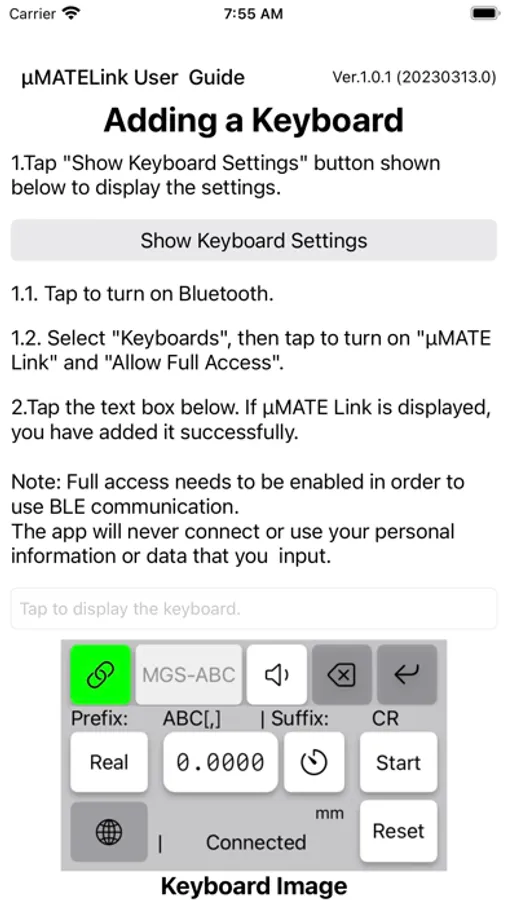
After downloading the app, tap the “μMATE Link” icon, tap the keyboard, and turn on “μMATE Link” and “Allow full access”.
Open the app you use, such as “Memo”, “Message”, “Mail”, and press the globe key on the keyboard,
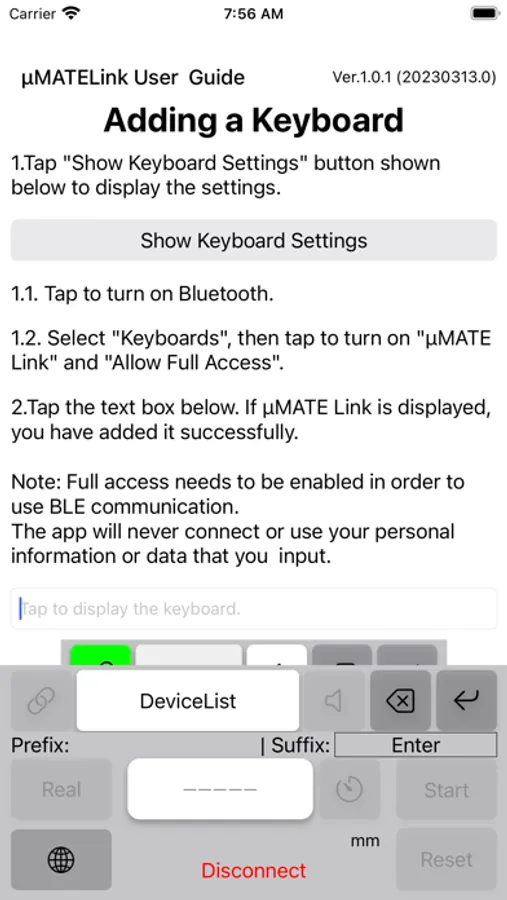
Select "μMATE Link" from the keyboard list and press the button labeled "Device List" to scan for measurable devices.
Select a connectable device, press the link button, and connect to update the value.
If you press the numeric display, it will be entered as text.
Compatible OS
iOS 16.3 or later
Note
When using, "μMATE+" manufactured by Magnescale is required.
When using μMATE Link, “Bluetooth” and “keyboard full access” must be turned on. .
For details, please refer to the instruction manual on our website.
・You can search μMATE+ devices and connect to any individual device.
・Measured value display can be selected from current value, maximum value, minimum value, peak-to-peak value.
・Reset and preset operations are possible.
・You can check the connected μMATE+ with a buzzer sound.
Usage
After downloading the app, tap the “μMATE Link” icon, tap the keyboard, and turn on “μMATE Link” and “Allow full access”.
Open the app you use, such as “Memo”, “Message”, “Mail”, and press the globe key on the keyboard,
Select "μMATE Link" from the keyboard list and press the button labeled "Device List" to scan for measurable devices.
Select a connectable device, press the link button, and connect to update the value.
If you press the numeric display, it will be entered as text.
Compatible OS
iOS 16.3 or later
Note
When using, "μMATE+" manufactured by Magnescale is required.
When using μMATE Link, “Bluetooth” and “keyboard full access” must be turned on. .
For details, please refer to the instruction manual on our website.
μMATE Link Screenshots
Tap to Rate: