
AppRecs review analysis
AppRecs rating 1.0. Trustworthiness 78 out of 100. Review manipulation risk 16 out of 100. Based on a review sample analyzed.
★☆☆☆☆
1.0
AppRecs Rating
Ratings breakdown
5 star
0%
4 star
0%
3 star
50%
2 star
0%
1 star
50%
What to know
✓
Low review manipulation risk
16% review manipulation risk
✓
Credible reviews
78% trustworthiness score from analyzed reviews
⚠
Mixed user feedback
Average 1.0★ rating suggests room for improvement
About Map Notes
"Map Notes" is your ultimate companion for personalized mapping and travel planning. With its intuitive interface and powerful features, Map Notes allows you to effortlessly mark your favorite spots, plan your adventures, and customize your maps like never before.
Draw Directly on the Map:
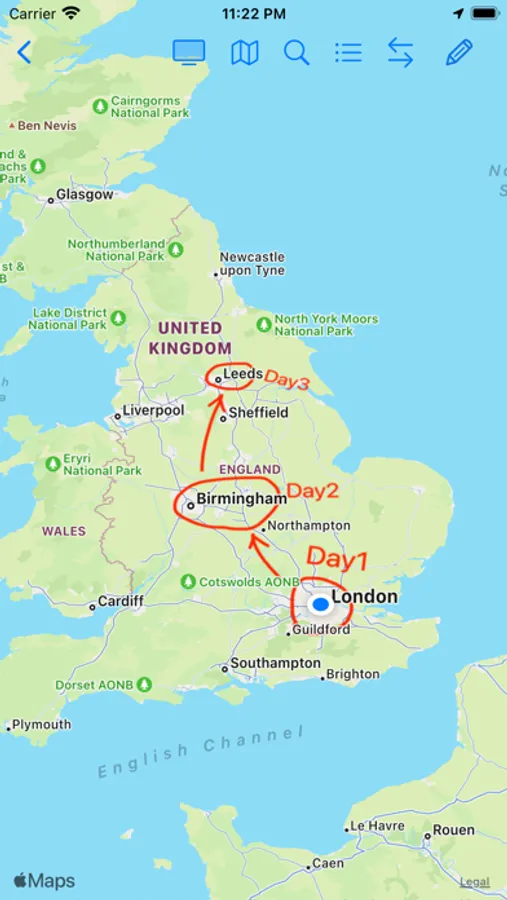
Let your creativity flow as you draw directly onto the map. Whether it's highlighting a hiking trail, sketching out a scenic route, or simply doodling landmarks, Map Notes gives you the freedom to express yourself visually. Your drawing will stick to the map and become part of it, moving, rotating, and scaling along with the map itself.
Create Pins with Custom Icons:
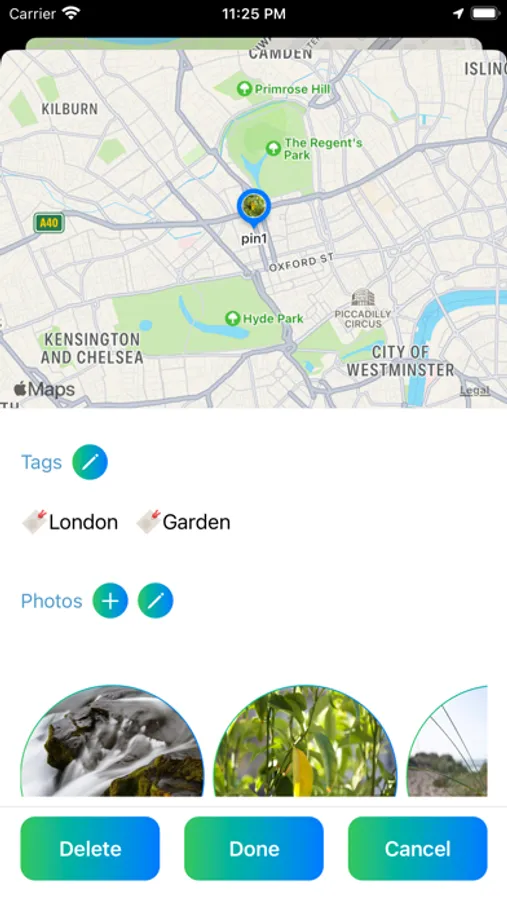
Make your map truly your own by creating pins with custom icons. Whether it's a favorite restaurant, a hidden gem, or a must-see attraction, personalize your pins to reflect your unique interests and preferences.
Calculate Directions and Customise Colours:
Seamlessly plan your journeys with Map Notes' direction calculation feature. Simply pick your starting and ending locations, and let the app generate the optimal route for you. Plus, you can customize the color of your directions to enhance visibility.
Convert Drawings to Navigable Paths:
Bridge the gap between creativity and utility. Draw a rough path on the map, and Map Notes can automatically convert your sketch into a formal, snap-to-road direction path. Once converted, save it directly to your map to keep your custom routes ready for your next adventure.
Save Annotations as Part of the Map:
Your annotations aren't just temporary markings – they become integral parts of your map. Watch as your drawings, pins, and directions seamlessly rotate, scale, and move along with the map, ensuring that your personalized annotations are always in sync with your location.
Attach Tags, Information, and Photos:
Add depth and context to your annotations by attaching tags, information, and photos. Whether it's adding notes about opening hours, descriptions of landmarks, or snapshots of memorable moments, Map Notes lets you enrich your map with meaningful details.
Sync Across Devices with iCloud:
Your work is automatically saved to your iCloud account, ensuring seamless syncing across all your devices. Whether you're using your iPhone or iPad, access your maps and annotations anytime, anywhere, with the convenience of iCloud syncing.
Map Notes Screenshots
Tap to Rate:
Reviews for Map Notes
Spongebob uhiha
Great idea but needs improvements.
Uh when I first started it crashed. Only once… I would recommend more font variations & when your in the drawing mode I would love to move around instead of being in a still screen. Overall the app is Alright.
Jtolivertree
Actually just not useful
This is just a bad app, like nothing in it works and if it somehow does work it’s exactly how you would never imagine anything working. Either that or it crashes. Genuinely just wouldn’t recommend because there is nothing to do on it.