In this notes calculator app, you can perform inline calculations, convert units, and organize notes with folders. Includes iCloud sync, trash folder, and custom keyboard features.
AppRecs review analysis
AppRecs rating 4.5. Trustworthiness 64 out of 100. Review manipulation risk 18 out of 100. Based on a review sample analyzed.
★★★★☆
4.5
AppRecs Rating
Ratings breakdown
5 star
92%
4 star
5%
3 star
4%
2 star
0%
1 star
0%
What to know
✓
Low review manipulation risk
18% review manipulation risk
✓
High user satisfaction
92% of sampled ratings are 5 stars
✓
Authentic reviews
No red flags detected
About CalcMate - notes calculator
Discover CalcMate, the smart notepad and built-in calculator app. It effortlessly solves math within your text, providing instant answers to your calculations. Say goodbye to traditional calculators and heavy spreadsheets—CalcMate offers a better way to work things out with its lightweight and efficient approach. Experience the convenience of CalcMate for quick calculations on the go. Upgrade your math game with this all-in-one tool.
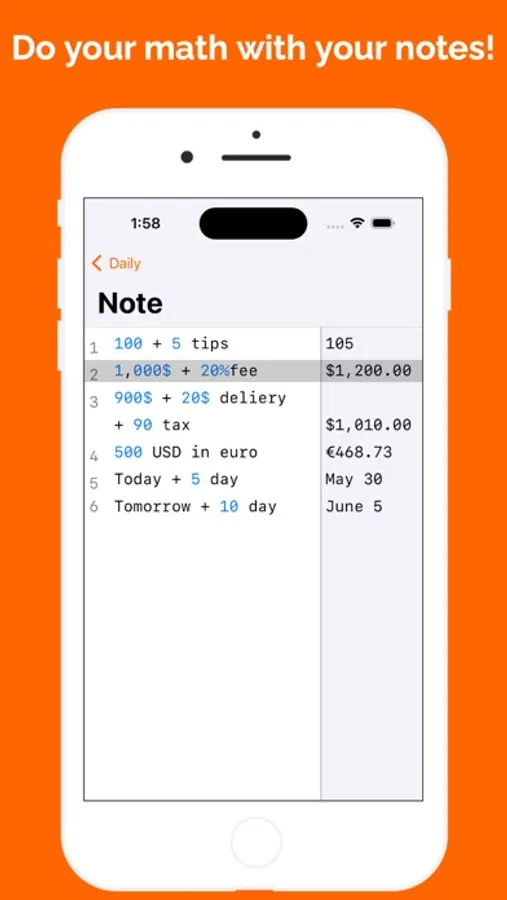
CalcMate can help you calculate your invoices, bills, etc., regardless of words and symbols. You can also use it for currency and unit conversions, as well as calculating dates. It combines the features of a note-taking app with a simple Excel.
Examples you can try:
- 100 + 5 tips
- 1000$ + 20% fee
- 900$ + 20$ delivery + 1.5%
- 500 USD in EUR
- 10 BTC in USD
- Today + 5 days
- Tomorrow + 10 days
- 1kg in lb
- subtotal – calculates the total of all previous lines
- line5 – fetches the value from line 5
- # this is a comment
…and much more — play around and see what it can do!
CalcMate features:
- Folders to organize notes.
- Trash folder, so you can restore deleted notes and folders or delete them permanently.
- iCloud syncing, so you can sync your folders and notes between your iOS devices.
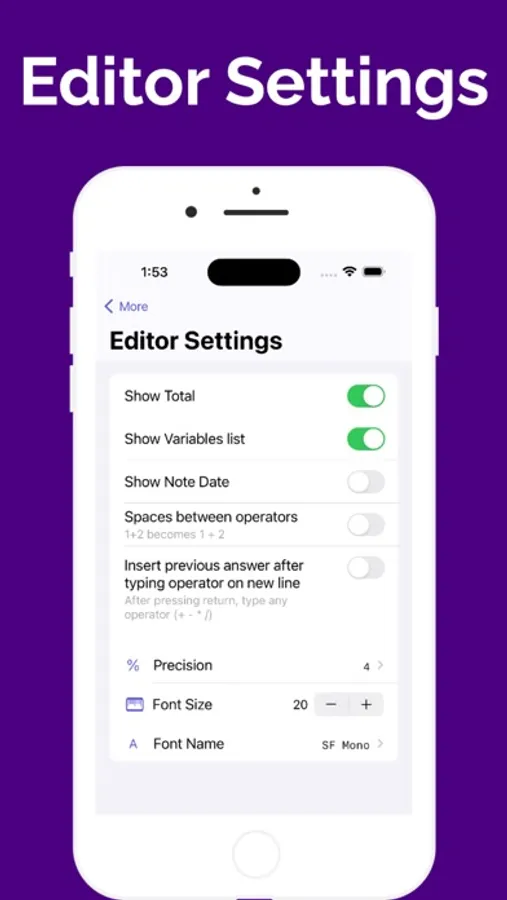
- Custom numbers keyboard, to enable it got to More → Editor Settings → 'Show Numbers Keyboard'.
- Show total on top of keyboard, , to enable it got to More → Editor Settings → 'Total on top of keyboard'.
If you have any questions, please contact us at lazyboardap+calcmate@gmail.com.
For more information:
Terms of Use - https://sites.google.com/view/calcmateapp/terms-and-conditions
Privacy Policy - https://sites.google.com/view/calcmateapp/privacy-policy
Payment Policy - https://sites.google.com/view/calcmateapp/payment-policy
CalcMate can help you calculate your invoices, bills, etc., regardless of words and symbols. You can also use it for currency and unit conversions, as well as calculating dates. It combines the features of a note-taking app with a simple Excel.
Examples you can try:
- 100 + 5 tips
- 1000$ + 20% fee
- 900$ + 20$ delivery + 1.5%
- 500 USD in EUR
- 10 BTC in USD
- Today + 5 days
- Tomorrow + 10 days
- 1kg in lb
- subtotal – calculates the total of all previous lines
- line5 – fetches the value from line 5
- # this is a comment
…and much more — play around and see what it can do!
CalcMate features:
- Folders to organize notes.
- Trash folder, so you can restore deleted notes and folders or delete them permanently.
- iCloud syncing, so you can sync your folders and notes between your iOS devices.
- Custom numbers keyboard, to enable it got to More → Editor Settings → 'Show Numbers Keyboard'.
- Show total on top of keyboard, , to enable it got to More → Editor Settings → 'Total on top of keyboard'.
If you have any questions, please contact us at lazyboardap+calcmate@gmail.com.
For more information:
Terms of Use - https://sites.google.com/view/calcmateapp/terms-and-conditions
Privacy Policy - https://sites.google.com/view/calcmateapp/privacy-policy
Payment Policy - https://sites.google.com/view/calcmateapp/payment-policy
CalcMate - notes calculator Screenshots


Tap to Rate:
Reviews for CalcMate - notes calculator
Leeveng
Paid or Unpaid
Paid and unpaid does not make any difference between the two versions. And it keeps demanding for more support if you click on it. It is very foolish.
elilevyisme
So useful and easy to use perfect!
I wish I knew about this app before. I had to use ChatGPT to find it! 😂