AppRecs review analysis
AppRecs rating 4.7. Trustworthiness 61 out of 100. Review manipulation risk 27 out of 100. Based on a review sample analyzed.
★★★★☆
4.7
AppRecs Rating
Ratings breakdown
5 star
78%
4 star
11%
3 star
11%
2 star
0%
1 star
0%
What to know
✓
Low review manipulation risk
27% review manipulation risk
✓
High user satisfaction
78% of sampled ratings are 5 stars
About Reframe It - Video Cropping
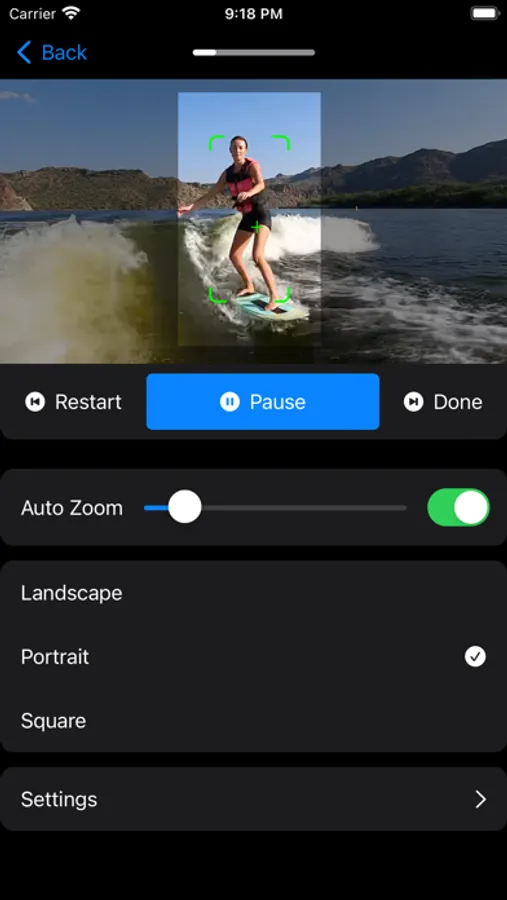
Reframe It automatically crops and reframes your videos, so the subject stays perfectly centered, every time.
Manually cropping video is slow, frustrating, and easy to mess up. Subjects drift out of frame, vertical exports look awkward, and re-editing takes forever.
Reframe It fixes that.
Using intelligent subject tracking, Reframe It automatically:
- Keeps people and objects centered
- Converts horizontal videos to vertical formats
- Adjusts framing smoothly over time
- Exports clean, ready-to-share videos
- No keyframes. No guesswork. No endless trial and error.
Designed for real workflows. Whether you’re posting to social media, exporting clips, or cleaning up home videos, Reframe It does the tedious work for you.
Perfect for:
- Turning landscape videos into vertical clips
- Keeping faces centered during movement
- Fast, repeatable crops without manual tweaking
- Creators who want results, not editing overhead
Terms of use: https://www.apple.com/legal/internet-services/itunes/dev/stdeula/
Manually cropping video is slow, frustrating, and easy to mess up. Subjects drift out of frame, vertical exports look awkward, and re-editing takes forever.
Reframe It fixes that.
Using intelligent subject tracking, Reframe It automatically:
- Keeps people and objects centered
- Converts horizontal videos to vertical formats
- Adjusts framing smoothly over time
- Exports clean, ready-to-share videos
- No keyframes. No guesswork. No endless trial and error.
Designed for real workflows. Whether you’re posting to social media, exporting clips, or cleaning up home videos, Reframe It does the tedious work for you.
Perfect for:
- Turning landscape videos into vertical clips
- Keeping faces centered during movement
- Fast, repeatable crops without manual tweaking
- Creators who want results, not editing overhead
Terms of use: https://www.apple.com/legal/internet-services/itunes/dev/stdeula/
Reframe It - Video Cropping Screenshots
Tap to Rate:
Reviews for Reframe It - Video Cropping
Xavier Antonio Gonzalez
The app dosent even work for me
When I open the app and click on a video to track. I just end up getting a black screen
DeeDee146
A must have app!
There have been more than a few times when I needed a portrait video in a landscape format. This app does that seamlessly. Well done!