
About Arial Caregiver
OVERVIEW
Arial® Caregiver is designed to work seamlessly with Securitas Healthcare’s Arial Emergency and Nurse Call solution to provide senior living caregivers with a tool for responding to resident alarms and communicating with their coworkers. Clarity and collaboration in the palm of every caregiver means all have visibility to relevant alarms, their status and who is responding.
HOW ARIAL CAREGIVER WORKS FOR YOU
ALARM MESSAGE HANDLING
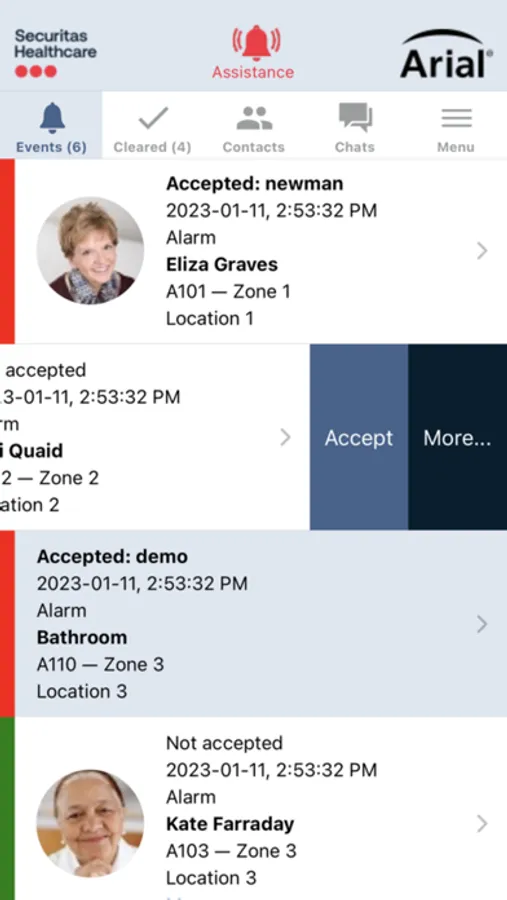
- Receive Alarms – receive call station, pendant, door, Arial Resident, and other alarms from anywhere in the community, based on the caregiver's assigned zone
- Alarm Information – critical alarm information is provided including date, time, alarm description, type and alarm location
- Rich Alarm Messages – alarm messages are colored coded by priority level and sorted by duration of alarm. Resident images can optionally be included to help caregivers recognize the residents that have initiated the alarms so they can provide care
- Alarm Accepted Status – provides notification to coworkers of who is responding to alarms
- Pause Notifications - Alarm Notifications can be temporarily suspended once a caregiver accepts an alarm. This allows the accepting caregiver to respond to the room and other caregivers to focus on additional active alarms, helping to prevent duplicate responses to individual alarms
- Alarm Response Calls – with Arial Resident, caregivers can respond to an alarm by calling into the resident room for context and to provide reassurance, then taking action to respond in the least needed trips to the room
CAREGIVER/RESIDENT ENCOUNTERS
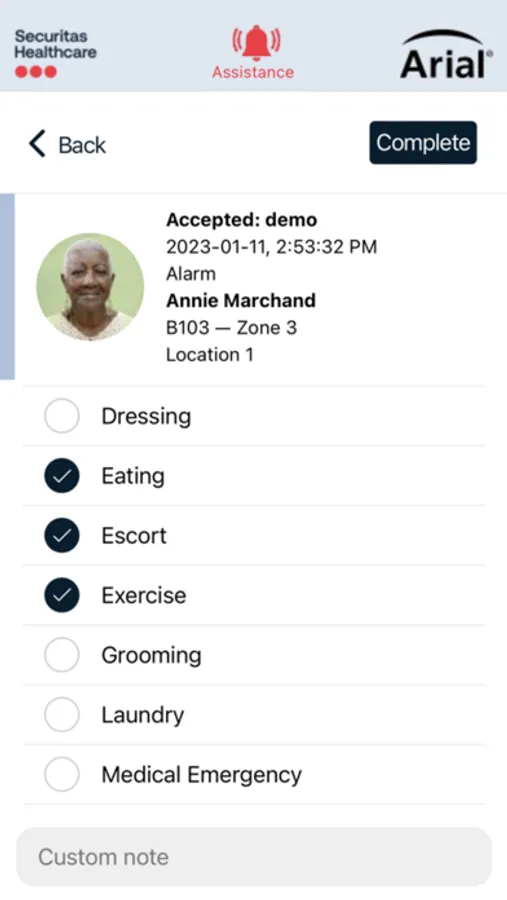
- Alarm Notes – selectable, pre-configured or custom alarm notes allow caregivers to document what was done during their encounter
- Respond through Arial Resident – use the two-way voice connection to auto-connect to the resident room, providing the caregiver with context and the resident with reassurance
- Offline Mode –Arial Caregiver works to allow caregivers to document the response to an alarm from their mobile device, even if they are not in an area covered by Wi-Fi. Alarm Notes from the encounter are synced with Arial automatically once the caregiver carries their device back into range of the community’s Wi-Fi.
CAREGIVER MESSAGING AND COLLABORATION
- Live Directory –displays all caregivers and indicates those that are currently logged in and actively using Arial Caregiver
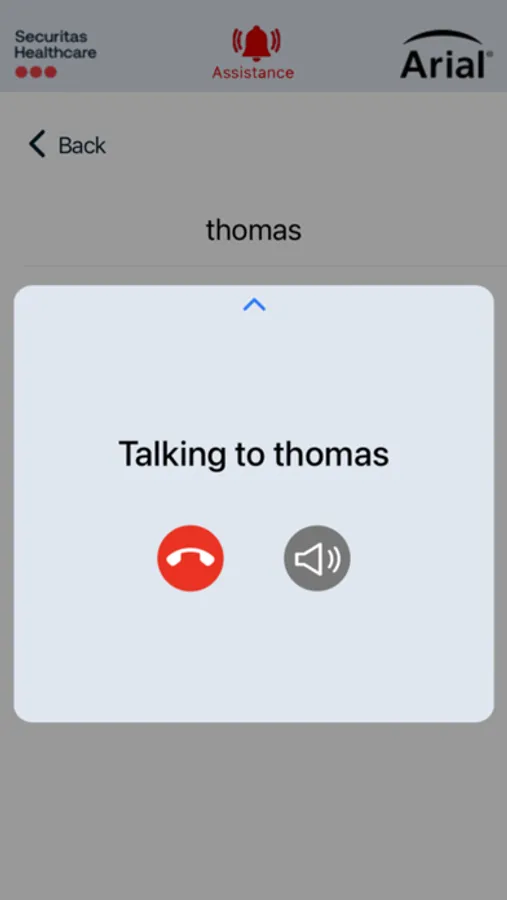
- App-to-App Voice Calls – lets caregivers talk to other staff and caregivers to coordinate resident care and request assistance from wherever they are within the community
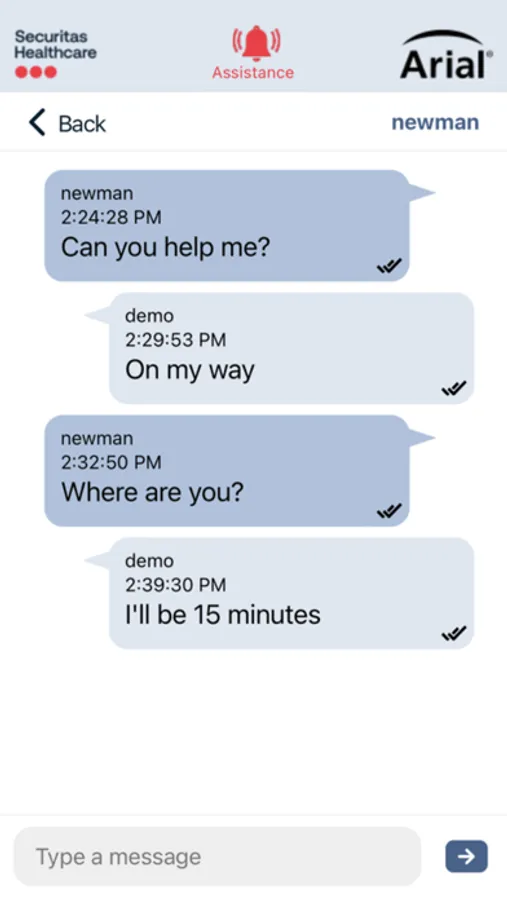
- Text Messaging –send and receive secure text messages within the app between individuals or groups to help coordinate care
- Text Messages are preserved for 24 hours
ENHANCED ALARM INSIGHTS
- Encounter Times – Arial Caregiver facilitates measuring encounter time which can be used to help understand how much time caregivers are spending with each of the residents
- Alarm Response Activities – care and services provided by caregivers during encounters can be quickly captured using Arial caregiver from anywhere in the community. This information can later be referenced using the Resident Call System Usage report locally in Arial, the Arial Insights service, or optionally forwarded to PointClickCare® or ALIS electronic health record systems to aid with care planning.
- Staff Response Time Report - this report is local in Arial and shows the average amount of time it takes each caregiver to respond to alarms and how much time is spent helping residents. A completion score is also provided to help show how often each caregiver completes the calls they respond to.
- Non-Completed Alarm Report – this report is local in Arial and lists the alarms that were not completed by caregivers during a selected time frame. This report can help managers understand the conditions when calls are not being completed using Arial Caregiver and the reasons why.
Arial® Caregiver is designed to work seamlessly with Securitas Healthcare’s Arial Emergency and Nurse Call solution to provide senior living caregivers with a tool for responding to resident alarms and communicating with their coworkers. Clarity and collaboration in the palm of every caregiver means all have visibility to relevant alarms, their status and who is responding.
HOW ARIAL CAREGIVER WORKS FOR YOU
ALARM MESSAGE HANDLING
- Receive Alarms – receive call station, pendant, door, Arial Resident, and other alarms from anywhere in the community, based on the caregiver's assigned zone
- Alarm Information – critical alarm information is provided including date, time, alarm description, type and alarm location
- Rich Alarm Messages – alarm messages are colored coded by priority level and sorted by duration of alarm. Resident images can optionally be included to help caregivers recognize the residents that have initiated the alarms so they can provide care
- Alarm Accepted Status – provides notification to coworkers of who is responding to alarms
- Pause Notifications - Alarm Notifications can be temporarily suspended once a caregiver accepts an alarm. This allows the accepting caregiver to respond to the room and other caregivers to focus on additional active alarms, helping to prevent duplicate responses to individual alarms
- Alarm Response Calls – with Arial Resident, caregivers can respond to an alarm by calling into the resident room for context and to provide reassurance, then taking action to respond in the least needed trips to the room
CAREGIVER/RESIDENT ENCOUNTERS
- Alarm Notes – selectable, pre-configured or custom alarm notes allow caregivers to document what was done during their encounter
- Respond through Arial Resident – use the two-way voice connection to auto-connect to the resident room, providing the caregiver with context and the resident with reassurance
- Offline Mode –Arial Caregiver works to allow caregivers to document the response to an alarm from their mobile device, even if they are not in an area covered by Wi-Fi. Alarm Notes from the encounter are synced with Arial automatically once the caregiver carries their device back into range of the community’s Wi-Fi.
CAREGIVER MESSAGING AND COLLABORATION
- Live Directory –displays all caregivers and indicates those that are currently logged in and actively using Arial Caregiver
- App-to-App Voice Calls – lets caregivers talk to other staff and caregivers to coordinate resident care and request assistance from wherever they are within the community
- Text Messaging –send and receive secure text messages within the app between individuals or groups to help coordinate care
- Text Messages are preserved for 24 hours
ENHANCED ALARM INSIGHTS
- Encounter Times – Arial Caregiver facilitates measuring encounter time which can be used to help understand how much time caregivers are spending with each of the residents
- Alarm Response Activities – care and services provided by caregivers during encounters can be quickly captured using Arial caregiver from anywhere in the community. This information can later be referenced using the Resident Call System Usage report locally in Arial, the Arial Insights service, or optionally forwarded to PointClickCare® or ALIS electronic health record systems to aid with care planning.
- Staff Response Time Report - this report is local in Arial and shows the average amount of time it takes each caregiver to respond to alarms and how much time is spent helping residents. A completion score is also provided to help show how often each caregiver completes the calls they respond to.
- Non-Completed Alarm Report – this report is local in Arial and lists the alarms that were not completed by caregivers during a selected time frame. This report can help managers understand the conditions when calls are not being completed using Arial Caregiver and the reasons why.
Arial Caregiver Screenshots
Tap to Rate: