Handwriting to Text - OCR
Aculix Technologies LLP
4.9 ★
10 ratings
Free
AppRecs review analysis
AppRecs rating 4.5. Trustworthiness 54 out of 100. Review manipulation risk 27 out of 100. Based on a review sample analyzed.
★★★★☆
4.5
AppRecs Rating
Ratings breakdown
5 star
90%
4 star
10%
3 star
0%
2 star
0%
1 star
0%
What to know
✓
High user satisfaction
90% of sampled ratings are 5 stars
About Handwriting to Text - OCR
Need to turn messy handwritten class notes, recipes, or meeting scribbles into clean, shareable text—instantly? handwritingOCR uses AI OCR models to scan, recognize, and convert handwriting & printed text from any image in over 140 languages.
Whether you shoot a photo right inside the app or import from Photos, you’ll get crystal-clear, editable text in seconds.
Features:
One-Tap Camera & Import
• Capture documents, whiteboards, or notebook pages in high resolution
• Import existing photos or screenshots for lightning-fast OCR
140+ Language Recognition
• English, Hindi, Gujarati, Spanish, Japanese, Arabic & more—perfect for students, travellers, researchers, and multilingual teams.
Edit, Copy & Refine
• Tap to copy plain text, and edit directly in-app before sharing.
Flexible Export
• Save results as TXT or high-fidelity PDF, share via Mail, Messages, AirDrop, or any cloud drive.
Ultra-Fast & Accurate
• Cutting-edge AI models trained on diverse handwriting samples deliver industry-leading accuracy.
How It Works
• Open handwritingOCR and tap on the New button.
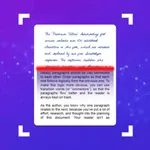
• Tap Scan — our AI sharpens, crops, and recognizes handwriting automatically.
• Edit or copy the extracted text, then export or share in your preferred format.
• That’s it—paper to digital in under 10 seconds.
We would love to hear from you. Feel free to reach out to us at support@aculix.com for feedback or any queries.
Your usage of this app is governed by the following policies:
Privacy Policy: https://legal.ocrx.app/privacy-policy
Terms of Service: https://legal.ocrx.app/terms-of-service
Everything else is governed by the terms presented under Apple's End User License Agreement.
Apple's EULA: https://www.apple.com/legal/internet-services/itunes/dev/stdeula/
Cheers! :)
Whether you shoot a photo right inside the app or import from Photos, you’ll get crystal-clear, editable text in seconds.
Features:
One-Tap Camera & Import
• Capture documents, whiteboards, or notebook pages in high resolution
• Import existing photos or screenshots for lightning-fast OCR
140+ Language Recognition
• English, Hindi, Gujarati, Spanish, Japanese, Arabic & more—perfect for students, travellers, researchers, and multilingual teams.
Edit, Copy & Refine
• Tap to copy plain text, and edit directly in-app before sharing.
Flexible Export
• Save results as TXT or high-fidelity PDF, share via Mail, Messages, AirDrop, or any cloud drive.
Ultra-Fast & Accurate
• Cutting-edge AI models trained on diverse handwriting samples deliver industry-leading accuracy.
How It Works
• Open handwritingOCR and tap on the New button.
• Tap Scan — our AI sharpens, crops, and recognizes handwriting automatically.
• Edit or copy the extracted text, then export or share in your preferred format.
• That’s it—paper to digital in under 10 seconds.
We would love to hear from you. Feel free to reach out to us at support@aculix.com for feedback or any queries.
Your usage of this app is governed by the following policies:
Privacy Policy: https://legal.ocrx.app/privacy-policy
Terms of Service: https://legal.ocrx.app/terms-of-service
Everything else is governed by the terms presented under Apple's End User License Agreement.
Apple's EULA: https://www.apple.com/legal/internet-services/itunes/dev/stdeula/
Cheers! :)
Tap to Rate:
Reviews for Handwriting to Text - OCR
Suliyafunmi
Text
Using this app is the best for me because it’s too different among other
Janooni17
Highly recommended.
This app so useful. When you want to write something from paper to your phone this plays the key roles. Just scan and done. Easy and time saving. Truly useful best app.