About Party AI : Venue Designer AI
party.ai — AI Party Decoration Studio
Turn any blank venue into a show-stopping party—instantly.
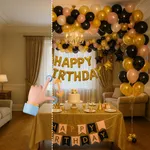
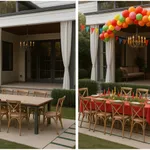
Tomorrow’s the big night. The room? Bare walls, harsh lights, zero vibe.
Open AI Party Decoration: pick a style (Neon Glow, Pastel Pop, Tropical Fiesta, Minimal Chic, Rainbow Confetti) or go fully Custom Mix. In seconds, your photo blossoms into balloon garlands, fairy lights, neon accents, streamers, styled tables—no guesswork, just wow.
What You Can Do
Party-First Style Presets
Neon Glow • Pastel Pop • Tropical Fiesta • Minimal Chic • Rainbow Confetti • Custom Mix
Theme Composer (Custom Mix)
Define your vibe:
Layout focus (open floor, runway, photo-booth corner)
Color theme (pastel, neon, monochrome, rainbow)
Hero material (balloons, sequins, tulle, LED acrylic)
Special accents (fairy lights, welcome sign, dessert cart, ceiling streamers)
Save and reuse your setup anytime.
Color & Accessories
Pick Primary and Accent colors
Tap to add suggested decorations or your own custom items (e.g., “disco ball cloud,” “70s vinyl wall”)
Budget Planner (Qty × Unit Cost)
Add items in one tap from your selection or create custom lines
Set Quantity and Unit Cost; see live Subtotals and Grand Total
Stays in sync with your chosen decorations
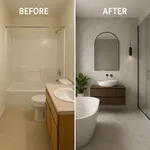
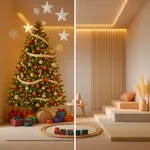
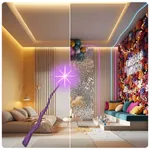
Gorgeous Before/After
Compare Slider with a glassy handle and smooth feathering
Fullscreen Preview with pinch-to-zoom
History with Budget & Totals
Every render is saved with theme, selected elements, and full budget breakdown
See Total Price at a glance; open details for itemized costs
Filter by theme and sort by date or element count
Smooth Generate Flow
Clear progress overlay while rendering
Controls auto-disable to prevent accidental taps
One-tap Share/Save (JPG or PNG)
History & Prompts
Your design prompt is editable—copy it in one tap for pro tweaking.
Free lets you explore presets, compose prompts, and preview.
Go Premium to unlock generation.
Go Premium to Unlock
AI Render Generation — Photorealistic before/after from your own venue photos
High-Resolution Output (No Watermark) — Ready for clients, planners, or the group chat
Unlimited Re-Generations — Iterate until it’s perfect
Richer Decoration Mixing — Combine more props, remix from saved history
Priority Processing — Faster results when time is tight
Pricing
Subscriptions (auto-renew, cancel anytime)
Weekly: $4.99
Monthly: $14.99
Yearly: $34.99
Payment is charged to your App Store account at confirmation. Subscriptions auto-renew unless turned off at least 24 hours before the current period ends. Manage or cancel in App Store settings. If a free trial is offered, unused portions are forfeited upon purchase.
Token Packs (Consumable)
$2.00 • 5 Tokens
Each render = 1 token. Tokens work for both Free and Premium users with no daily cap.
Daily Limits (Premium)
Up to 10 premium renders/day. Tokens are uncapped and can be used beyond the daily limit.
Privacy Policy: https://ultrazoom.site/privacy.html
Terms of Use: https://ultrazoom.site/terms.html
Turn any blank venue into a show-stopping party—instantly.
Tomorrow’s the big night. The room? Bare walls, harsh lights, zero vibe.
Open AI Party Decoration: pick a style (Neon Glow, Pastel Pop, Tropical Fiesta, Minimal Chic, Rainbow Confetti) or go fully Custom Mix. In seconds, your photo blossoms into balloon garlands, fairy lights, neon accents, streamers, styled tables—no guesswork, just wow.
What You Can Do
Party-First Style Presets
Neon Glow • Pastel Pop • Tropical Fiesta • Minimal Chic • Rainbow Confetti • Custom Mix
Theme Composer (Custom Mix)
Define your vibe:
Layout focus (open floor, runway, photo-booth corner)
Color theme (pastel, neon, monochrome, rainbow)
Hero material (balloons, sequins, tulle, LED acrylic)
Special accents (fairy lights, welcome sign, dessert cart, ceiling streamers)
Save and reuse your setup anytime.
Color & Accessories
Pick Primary and Accent colors
Tap to add suggested decorations or your own custom items (e.g., “disco ball cloud,” “70s vinyl wall”)
Budget Planner (Qty × Unit Cost)
Add items in one tap from your selection or create custom lines
Set Quantity and Unit Cost; see live Subtotals and Grand Total
Stays in sync with your chosen decorations
Gorgeous Before/After
Compare Slider with a glassy handle and smooth feathering
Fullscreen Preview with pinch-to-zoom
History with Budget & Totals
Every render is saved with theme, selected elements, and full budget breakdown
See Total Price at a glance; open details for itemized costs
Filter by theme and sort by date or element count
Smooth Generate Flow
Clear progress overlay while rendering
Controls auto-disable to prevent accidental taps
One-tap Share/Save (JPG or PNG)
History & Prompts
Your design prompt is editable—copy it in one tap for pro tweaking.
Free lets you explore presets, compose prompts, and preview.
Go Premium to unlock generation.
Go Premium to Unlock
AI Render Generation — Photorealistic before/after from your own venue photos
High-Resolution Output (No Watermark) — Ready for clients, planners, or the group chat
Unlimited Re-Generations — Iterate until it’s perfect
Richer Decoration Mixing — Combine more props, remix from saved history
Priority Processing — Faster results when time is tight
Pricing
Subscriptions (auto-renew, cancel anytime)
Weekly: $4.99
Monthly: $14.99
Yearly: $34.99
Payment is charged to your App Store account at confirmation. Subscriptions auto-renew unless turned off at least 24 hours before the current period ends. Manage or cancel in App Store settings. If a free trial is offered, unused portions are forfeited upon purchase.
Token Packs (Consumable)
$2.00 • 5 Tokens
Each render = 1 token. Tokens work for both Free and Premium users with no daily cap.
Daily Limits (Premium)
Up to 10 premium renders/day. Tokens are uncapped and can be used beyond the daily limit.
Privacy Policy: https://ultrazoom.site/privacy.html
Terms of Use: https://ultrazoom.site/terms.html
Tap to Rate: