In this app, you can open and view Pyware 3D drill files with detailed animations and multiple viewing options. Includes cloud access, file refreshing, and performer spotlight features.
AppRecs review analysis
AppRecs rating 2.7. Trustworthiness 76 out of 100. Review manipulation risk 21 out of 100. Based on a review sample analyzed.
★★☆☆☆
2.7
AppRecs Rating
Ratings breakdown
5 star
36%
4 star
10%
3 star
2%
2 star
8%
1 star
44%
What to know
✓
Low review manipulation risk
21% review manipulation risk
⚠
Mixed user feedback
Average 2.9★ rating suggests room for improvement
⚠
High negative review ratio
52% of sampled ratings are 1–2 stars
About Pyware 3D Viewer
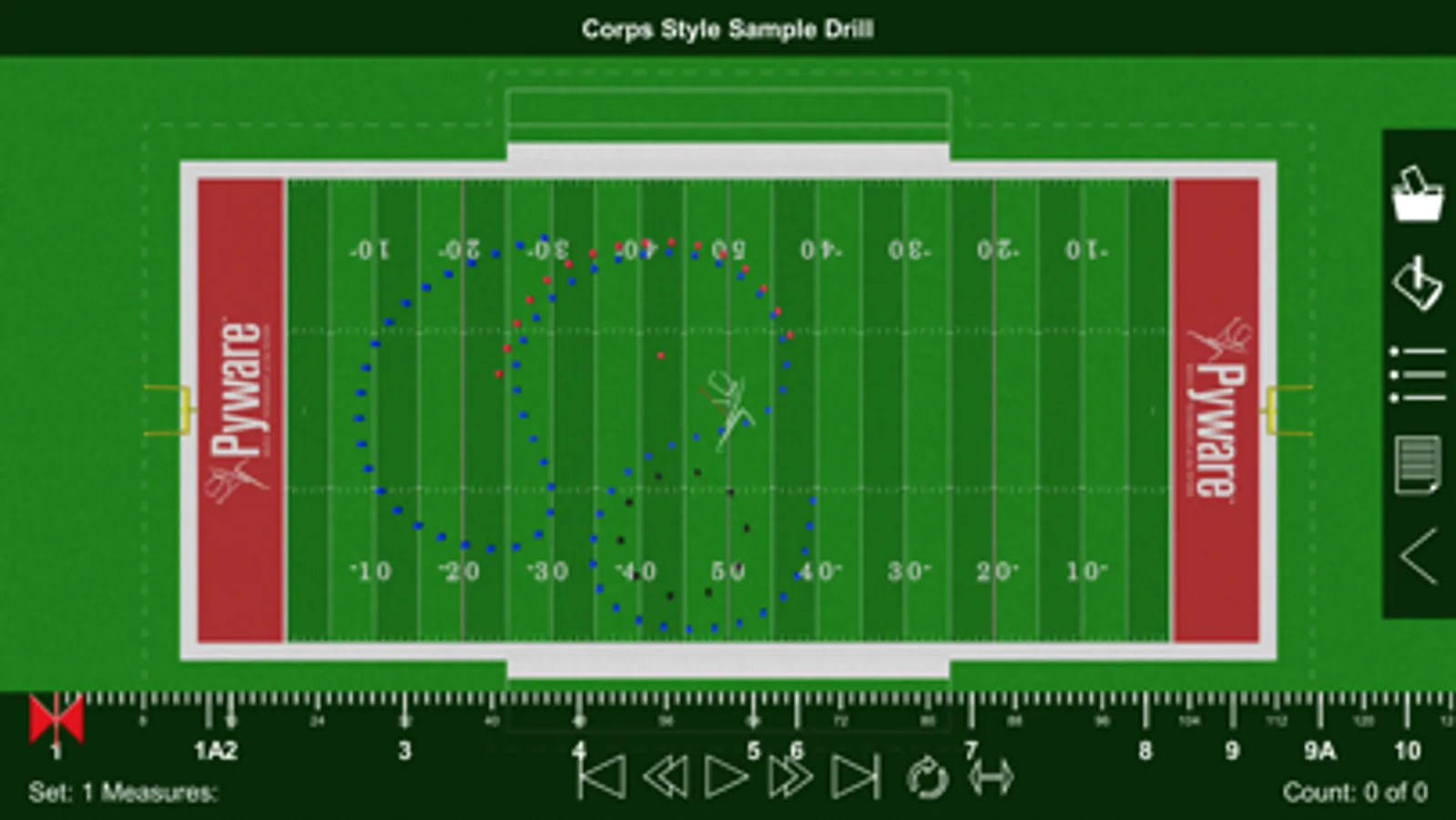
Pyware 3D Viewer allows you to take your Pyware 3D® drills anywhere! Designed for both instructors and performers, our Pyware 3D Viewer app eliminates the need to print anything.
You’ll see your drills animate the way they were intended, because Pyware 3D Viewer actually opens Pyware 3D® files! Floats, Follow-The-Leaders, and curved pathways all animate flawlessly whether you’re watching the playback animation in fluid or step-time.
Seamlessly retrieve file updates with the press of a button. View both Production Sheet and Text Box instruction information. Open drill files for any venue: football fields, gymnasiums, parade routes; if you can design it in Pyware 3D®, you can open it in Pyware 3D Viewer!
Feature List
-Open Pyware 3D® mobile drill files (.3da)
-Files can be accessed from cloud storage services by entering a download link or scanning a QR code from within the app
-Pinch zoom, rotate, tilt and shift to view the drill from any angle
-Animation shows true pathways for all performers
-Fluid or step-time animation
-Up to 8x animation speed
-Repeat and Play All animation controls
-Count Track that allows you to stop and view any count of drill
-View entire Production Sheet and Text Box instructions
-Search for performers in the drill’s Cast List
-Switch between ensemble view and performer view
-See detailed performer coordinate instructions on any count of the drill
-Spotlight an individual performer
-Switch between 3D’s surfaces, flat color, and high contrast for the performance area
-Loads grids for any performance area (fields, gyms, streets, stages, etc.)
-Toggle step grid on/off
-Easily refresh drill files to download the latest changes
Compatible with Pyware 3D version 8 or greater.
You’ll see your drills animate the way they were intended, because Pyware 3D Viewer actually opens Pyware 3D® files! Floats, Follow-The-Leaders, and curved pathways all animate flawlessly whether you’re watching the playback animation in fluid or step-time.
Seamlessly retrieve file updates with the press of a button. View both Production Sheet and Text Box instruction information. Open drill files for any venue: football fields, gymnasiums, parade routes; if you can design it in Pyware 3D®, you can open it in Pyware 3D Viewer!
Feature List
-Open Pyware 3D® mobile drill files (.3da)
-Files can be accessed from cloud storage services by entering a download link or scanning a QR code from within the app
-Pinch zoom, rotate, tilt and shift to view the drill from any angle
-Animation shows true pathways for all performers
-Fluid or step-time animation
-Up to 8x animation speed
-Repeat and Play All animation controls
-Count Track that allows you to stop and view any count of drill
-View entire Production Sheet and Text Box instructions
-Search for performers in the drill’s Cast List
-Switch between ensemble view and performer view
-See detailed performer coordinate instructions on any count of the drill
-Spotlight an individual performer
-Switch between 3D’s surfaces, flat color, and high contrast for the performance area
-Loads grids for any performance area (fields, gyms, streets, stages, etc.)
-Toggle step grid on/off
-Easily refresh drill files to download the latest changes
Compatible with Pyware 3D version 8 or greater.
Pyware 3D Viewer Screenshots
Tap to Rate:
Reviews for Pyware 3D Viewer
Jamey2966
College Use
I am my students have been using Pyware for the last 4 years and had great success learning our drills. Has save use many hours and minutes.
givememy$7
I WANT MY MONEY BACK!!!
I bought this app when it was $10 and now it’s only $3😑 Give me my money back please. I barely even used it. Waste of money.