In this text editor app, you can customize fonts, use external hardware keyboards, and run external commands. Includes font management, language support, sharing options, and plugin management.
AppRecs review analysis
AppRecs rating 4.9. Trustworthiness 75 out of 100. Review manipulation risk 22 out of 100. Based on a review sample analyzed.
★★★★☆
4.9
AppRecs Rating
Ratings breakdown
5 star
84%
4 star
5%
3 star
5%
2 star
1%
1 star
6%
What to know
✓
Low review manipulation risk
22% review manipulation risk
✓
Credible reviews
75% trustworthiness score from analyzed reviews
✓
High user satisfaction
84% of sampled ratings are 5 stars
About iVim
It is open source, please visit the App Support URL.
Font management
Besides some system and embedded monospace fonts, iVim allows users to import and use their own custom fonts. Moreover, iVim supports to render ligatures if your font provides beautiful ones.
Extended keyboard
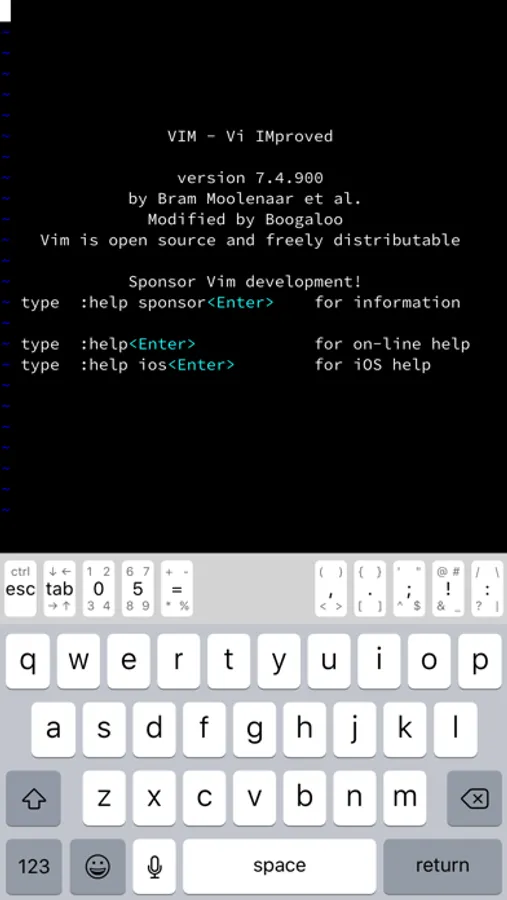
By introducing compact buttons, iVim covers as many keys as possible in its extended keyboard, so that you can input symbols without switching among key groups. Moreover, you can customize it to meet your own special needs.
Multistage language input
iVim adds support to multistage input languages such as Chinese or Japanese.
Sharing
Through sharing, iVim makes its editing power available to more apps. Via the share extension, iVim can import text or text files from, or export to other apps. Via the document picker, you can also import or edit files or directories in iCloud Drive or documents providers, without leaving iVim.
External hardware keyboard
iVim supports external hardware keyboards well, just connect your favorite one to the device and start typing. With the native modifier keys mapping option from the system, you can even make the "caps lock" key act both as "ctrl" and "esc" in iOS 13.4 and above.
External commands
iVim includes some useful external commands that you are familiar with and integrates powerful scripting languages such as Python and Lua. With +terminal feature enabled and a simple shell named "ivish" included, you can run the commands in terminal windows like on a computer.
Plugins management (In App Purchase required)
iVim provides a plugins manager, "iplug", for you to install and manage plugins easily.
Version control (iVim Pro required)
iVim has native version control system integrated into its UI and workflow, you get better idea of what is happening to your files, make changes with more confidence, and collaborate in editing more conveniently than ever.
iVim Pro
iVim provides a monthly subscription (with an introductory 1 week free trial), named "iVim Pro", enabling extra great features:
- native version control
Subscriptions will be charged to your Apple ID account. Your subscription will automatically renew unless it is cancelled at least 24 hours before the end of the current period. You can manage or cancel your subscriptions in Account Settings on App Store after purchase. Any unused portion of a free trial period, if any, will be forfeited when the user purchase a subscription.
Terms of Use: https://github.com/terrychou/docs/blob/master/ivim-terms-of-use.md
Privacy Policy: https://github.com/terrychou/docs/blob/master/ivim-privacy-policy.md
Type ":help ios" in iVim for more detailed information.
iVim Screenshots
Tap to Rate:
Reviews for iVim
flowfo
wish I knew about this app sooner
this app is a really good port of Vim to ios, im not a vim pro but most of the keybindings and features i use on Vim are in this app. I also really like the keyboard, makes coding so much faster. something i wish it had was .vimrc functionality, as i tried to make one but it didn't seem to work (idk if i did something wrong), but i guess that would be hard to implement. i also wish that it was easier to access the documents instead of having to click twice (the menu button and show me the documents). however the app is so good that im still gonna give it 5 stars despite these slight shortcomings. It's free, revolutionizes coding and note taking on phone, and i can't believe the app is not more popular.
_awesome1_
Good
If you actually want to get work done, don’t use iVim, and don’t program on iOS. Just by a laptop to actually program. I use iVim for practice with vim, and it’s pretty good. I also use iVim for note taking. VERY good for that, you can easily write down stuff, and it feels very natural.