
AppRecs review analysis
AppRecs rating 4.6. Trustworthiness 66 out of 100. Review manipulation risk 22 out of 100. Based on a review sample analyzed.
★★★★☆
4.6
AppRecs Rating
Ratings breakdown
5 star
80%
4 star
11%
3 star
7%
2 star
0%
1 star
2%
What to know
✓
Low review manipulation risk
22% review manipulation risk
✓
High user satisfaction
80% of sampled ratings are 5 stars
About Omniscient - Blender CGI Lidar
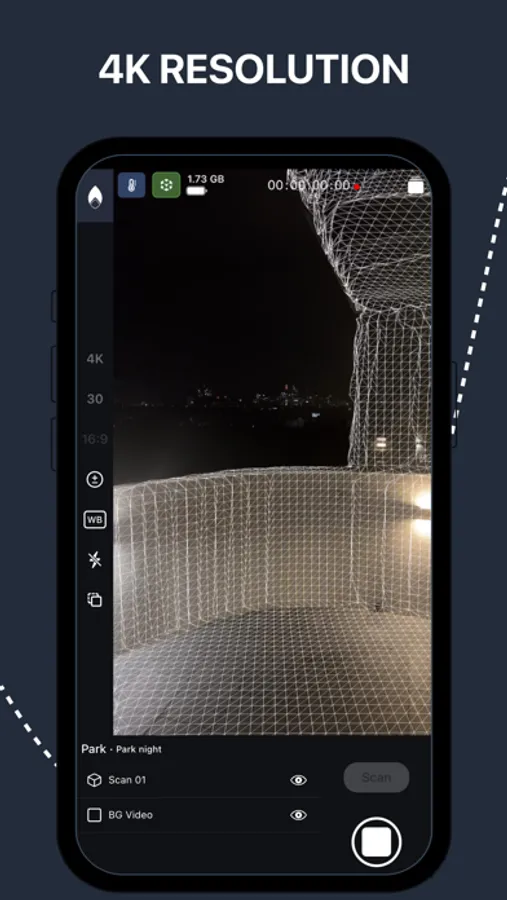
Capture 4K HDR videos with seamless 3D camera tracking inside a scan of your environment, all at a real-world scale of 1 meter per unit. Manage your shots by project or sequence and export them effortlessly in industry-standard formats compatible with leading animation and VFX software.
Easily import your shots into Blender, Cinema4D, Unreal Engine and Unity with the Omniscient add-ons, or export them to After Effects or Apple Motion Thanks to our industry-standard format output, Omniscient is fully compatible with most 3D software, including Maya, Houdini, Nuke, and more.
For users with LiDAR-equipped devices, capture even more precise 3D scans and depth data for enhanced scene understanding.
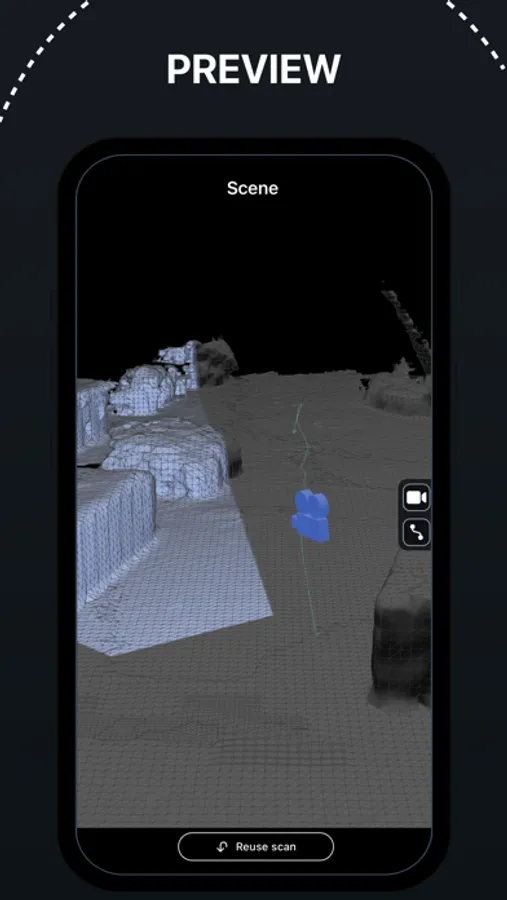
With our integrated advanced 3D player, you can preview the 3D scene and camera tracking directly in the app, including a real-time preview of the camera projection onto the scan. The player also includes trimming functionality, allowing you to edit your shots before exporting.
Export includes:
• Video Files (.mov)
• Camera Data (.abc, .usda, .fbx)
• 3D Scans (.obj)
Key Features:
• Video Quality: 4K or HD
• Video Encoding: HDR or SDR
• Frame Rate: 24, 25, 30, 48, 50, and 60fps (4K recording up to 30fps)
• Real-time Control: Adjust exposure, white balance, and focus on the fly
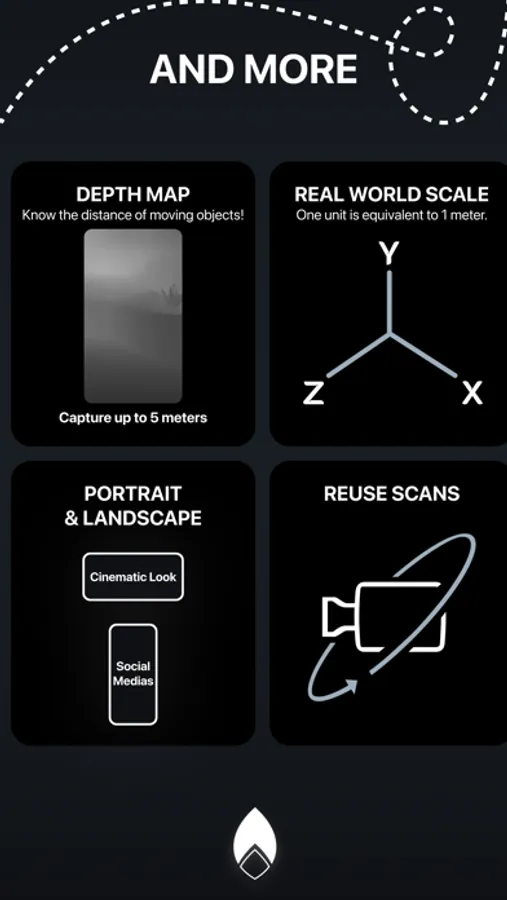
• Depth Recording: Capture depth maps up to 5 meters (on LiDAR-equipped devices)
• Shot Editing: Trim and stabilize your video before exporting
• Fast Import: Seamlessly import into Blender, Cinema4D from Maxon, Unreal Engine from Epic Games and Unity using the Omniscient add-ons
• Third-Party Export: Export directly to After Effects from Adobe (.jsx) or Apple Motion (.motn)
• Other Compatibility: Maya, Houdini, Nuke, DaVinci Resolve, 3ds Max and more
Additional Options:
• Portrait or Landscape Modes: Create content for social media in Portrait, or cinematic videos in Landscape
• Advanced Codecs: Choose from H264, HEVC, or ProRes (ProRes on compatible devices)
• GPS Metadata: Add GPS location data to your shots
• Audio Recording: Capture sound along with your video
• LTC: Output Linear Timecode during recording
Terms of Use: https://docs.omniscient-app.com/policy/ios/omniscient-terms-and-conditions
Easily import your shots into Blender, Cinema4D, Unreal Engine and Unity with the Omniscient add-ons, or export them to After Effects or Apple Motion Thanks to our industry-standard format output, Omniscient is fully compatible with most 3D software, including Maya, Houdini, Nuke, and more.
For users with LiDAR-equipped devices, capture even more precise 3D scans and depth data for enhanced scene understanding.
With our integrated advanced 3D player, you can preview the 3D scene and camera tracking directly in the app, including a real-time preview of the camera projection onto the scan. The player also includes trimming functionality, allowing you to edit your shots before exporting.
Export includes:
• Video Files (.mov)
• Camera Data (.abc, .usda, .fbx)
• 3D Scans (.obj)
Key Features:
• Video Quality: 4K or HD
• Video Encoding: HDR or SDR
• Frame Rate: 24, 25, 30, 48, 50, and 60fps (4K recording up to 30fps)
• Real-time Control: Adjust exposure, white balance, and focus on the fly
• Depth Recording: Capture depth maps up to 5 meters (on LiDAR-equipped devices)
• Shot Editing: Trim and stabilize your video before exporting
• Fast Import: Seamlessly import into Blender, Cinema4D from Maxon, Unreal Engine from Epic Games and Unity using the Omniscient add-ons
• Third-Party Export: Export directly to After Effects from Adobe (.jsx) or Apple Motion (.motn)
• Other Compatibility: Maya, Houdini, Nuke, DaVinci Resolve, 3ds Max and more
Additional Options:
• Portrait or Landscape Modes: Create content for social media in Portrait, or cinematic videos in Landscape
• Advanced Codecs: Choose from H264, HEVC, or ProRes (ProRes on compatible devices)
• GPS Metadata: Add GPS location data to your shots
• Audio Recording: Capture sound along with your video
• LTC: Output Linear Timecode during recording
Terms of Use: https://docs.omniscient-app.com/policy/ios/omniscient-terms-and-conditions
Omniscient - Blender CGI Lidar Screenshots


Tap to Rate:
Reviews for Omniscient - Blender CGI Lidar
Preqell
LOVE IT
Love the app, if i could récord on apple log would be just perfect
TheSpendog
It’s amazing
… but, I don’t know if I will use it a lot. Missing lots of features like being able to sync it to audio, and since there’s a yearly payment price ;( Would like to see the blender app take native iPhone video files someday.