Remote Control For Sound Byte Cart Machine Program
Black Cat Systems
2.7 ★
store rating
Free
AppRecs review analysis
AppRecs rating 2.7. Trustworthiness 83 out of 100. Review manipulation risk 21 out of 100. Based on a review sample analyzed.
★★☆☆☆
2.7
AppRecs Rating
Ratings breakdown
5 star
44%
4 star
11%
3 star
11%
2 star
0%
1 star
33%
What to know
✓
Low review manipulation risk
21% review manipulation risk
✓
Credible reviews
83% trustworthiness score from analyzed reviews
⚠
Mixed user feedback
Average 2.7★ rating suggests room for improvement
About Remote Control For Sound Byte Cart Machine Program
Sound Byte Control lets you control a copy of Sound Byte running on a remote computer from your iPad. Now you can run Sound Byte for all your sound clip playback needs, without being tied down to your desktop or laptop computer. Note that this is a remote control app, it does not run by itself.
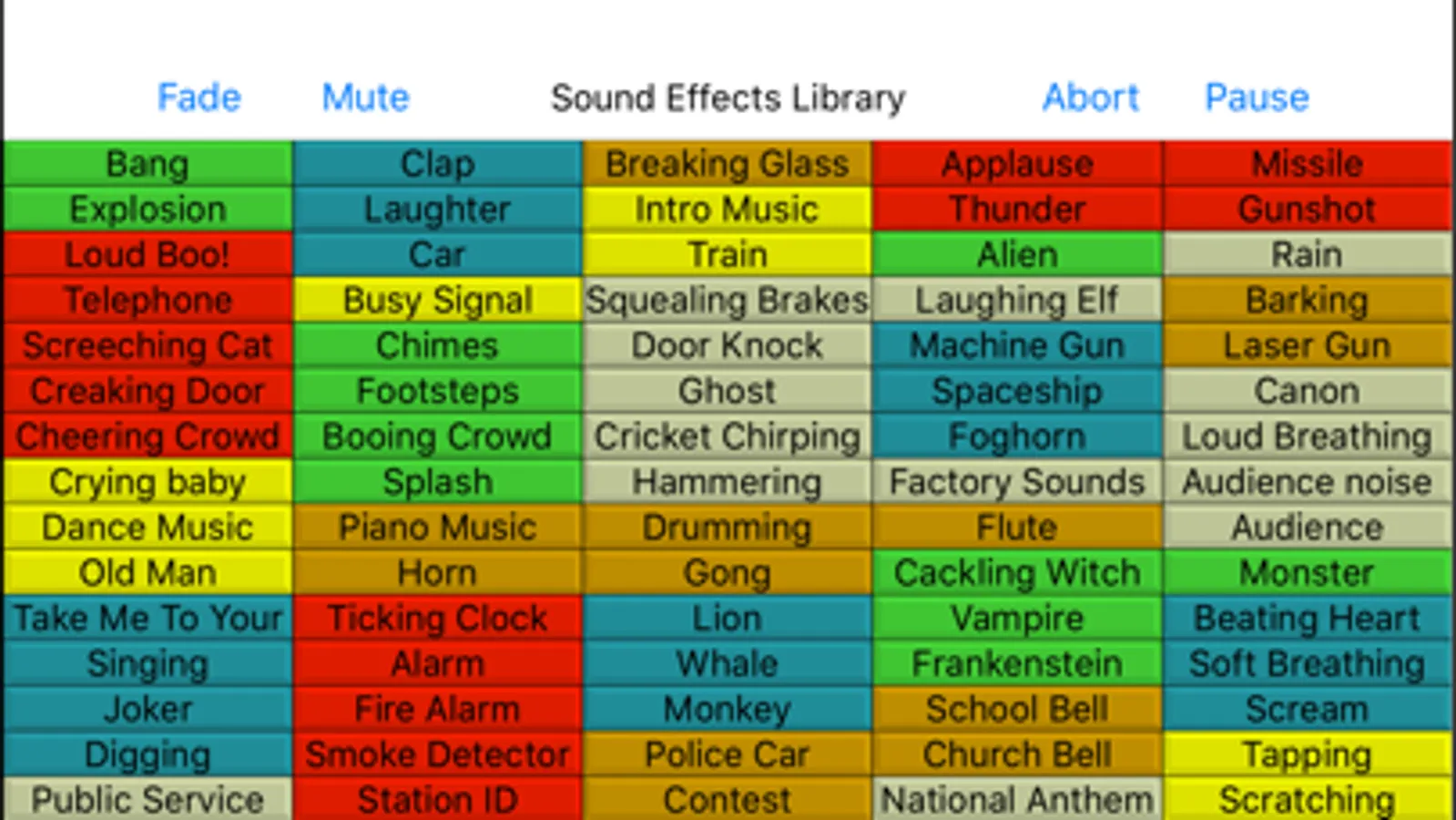
All 75 carts (sound recordings) on the active Sound Byte rack are displayed. Just tap an entry, and playback starts. You can tap it again to immediately stop playback, or let it naturally end. You can also fade out all playing carts, as well as mute or abort them.
It's triggering playback of sound clips for sporting events, radio, theater, presentations, and other events.
Sound Byte Control requires you to be running a copy of Sound Byte on your computer, which may be downloaded from here: http://www.blackcatsystems.com/download/soundbyte.html
Sound Byte is perfect for:
Radio, podcast and TV productions - have ads, announcements, songs and sound effects
at your fingertips.
Theater Productions - play any sound effect on cue.
Sports Events - jazz up the commentary for your home team with sound effects each time they score.
All 75 carts (sound recordings) on the active Sound Byte rack are displayed. Just tap an entry, and playback starts. You can tap it again to immediately stop playback, or let it naturally end. You can also fade out all playing carts, as well as mute or abort them.
It's triggering playback of sound clips for sporting events, radio, theater, presentations, and other events.
Sound Byte Control requires you to be running a copy of Sound Byte on your computer, which may be downloaded from here: http://www.blackcatsystems.com/download/soundbyte.html
Sound Byte is perfect for:
Radio, podcast and TV productions - have ads, announcements, songs and sound effects
at your fingertips.
Theater Productions - play any sound effect on cue.
Sports Events - jazz up the commentary for your home team with sound effects each time they score.