
AppRecs review analysis
AppRecs rating 3.0. Trustworthiness 81 out of 100. Review manipulation risk 21 out of 100. Based on a review sample analyzed.
★★★☆☆
3.0
AppRecs Rating
Ratings breakdown
5 star
43%
4 star
10%
3 star
7%
2 star
14%
1 star
26%
What to know
✓
Low review manipulation risk
21% review manipulation risk
✓
Credible reviews
81% trustworthiness score from analyzed reviews
⚠
Pricing complaints
Many low ratings mention paywalls or pricing
About Clicks Keyboard
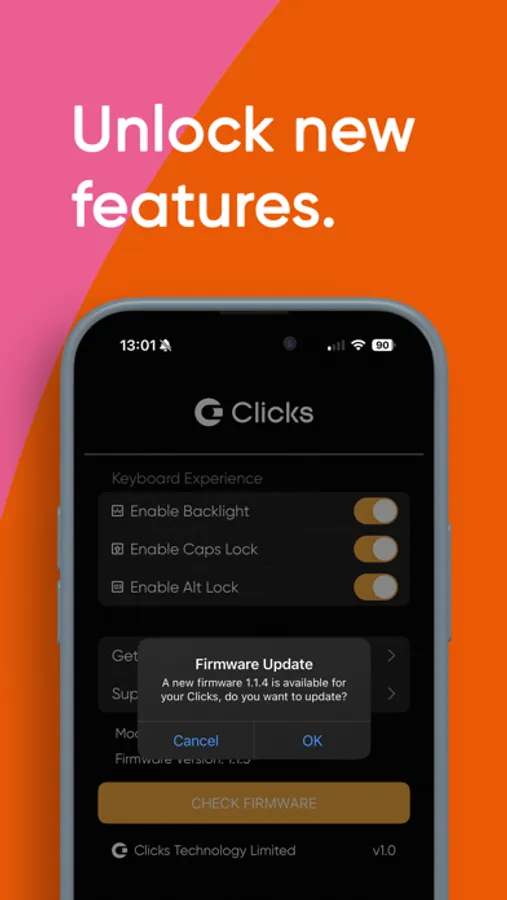
The Clicks app unlocks new features for your keyboard.
Toggle your keyboard backlight between 'automatic' and off. Use this feature to check the status of your backlight and reset it to automatic mode if it's been accidentally disabled through the keyboard shortcut.
Caps lock - Control the behaviour of the shift key. When turned on, pressing the shift key once makes the next charater a capital letter. Double clicking the shift key enables shift lock. When disabled, you must press and hold shift to get a captial letter.
Alt lock - Control the behaviour of the '123' key. When turned on, pressing the '123' key once makes the next typed character a number of symbol. Double clicking the shift key enables number lock - (great for typing phone numbers of long number strings!). When disabled, you must press and hold '123' to get numbers and symbols.
Soft return - Choose between using the return to add a carriage return (soft return) or send a message (hard return).
Clicks key customization - Decide whether you want the Clicks key to function as Tab or Control
Cursor mode - Enable cursor mode to use WASD and IJKL as directional cursor keys
Currency symbol - Customize your currency symbol
Create or log in to your Clicks Keyboard account to get updated about the latest features coming to your Clicks Keyboard
Update your keyboard firmware over the air to optimize the typing experience.
Learn and explore your Clicks keyboard with access to tips and how-to's.
* Certain features and functionality are dependant on your Clicks model.
Toggle your keyboard backlight between 'automatic' and off. Use this feature to check the status of your backlight and reset it to automatic mode if it's been accidentally disabled through the keyboard shortcut.
Caps lock - Control the behaviour of the shift key. When turned on, pressing the shift key once makes the next charater a capital letter. Double clicking the shift key enables shift lock. When disabled, you must press and hold shift to get a captial letter.
Alt lock - Control the behaviour of the '123' key. When turned on, pressing the '123' key once makes the next typed character a number of symbol. Double clicking the shift key enables number lock - (great for typing phone numbers of long number strings!). When disabled, you must press and hold '123' to get numbers and symbols.
Soft return - Choose between using the return to add a carriage return (soft return) or send a message (hard return).
Clicks key customization - Decide whether you want the Clicks key to function as Tab or Control
Cursor mode - Enable cursor mode to use WASD and IJKL as directional cursor keys
Currency symbol - Customize your currency symbol
Create or log in to your Clicks Keyboard account to get updated about the latest features coming to your Clicks Keyboard
Update your keyboard firmware over the air to optimize the typing experience.
Learn and explore your Clicks keyboard with access to tips and how-to's.
* Certain features and functionality are dependant on your Clicks model.
Clicks Keyboard Screenshots



Tap to Rate:
Reviews for Clicks Keyboard
BroncoNovillo
Clicks
Exelente, es el segundo quechua
Not user friendly apphdhshhsh
Login to my keyboard app wtf
Why am I needed to login to my keyboard app Why doesn’t the keyboard light up when I use it The product is not worth the cost